


For freelance designers who often work with clients on a fixed budget, speed and efficiency is key to additional projects and better profit margin. This guide by SGEN covers five specific changes to a website building workflow that actually helps speed up the web design projects.
Key takeaways
- A workflow makes projects predictable. Making them faster takes a second decision, about what carries from one client project to the next.
- Freelancers and agencies have different bottlenecks. For a solo designer it is bandwidth rather than coordination, and the fixes differ.
- Setup, plugin management and maintenance consume project hours before design work begins. Reducing the stack reduces all three.
What Is a Web Design Workflow?
The shape of a client website project is settled and has been for years. Discovery and scoping, information architecture, design, content production, development, QA and client review, then launch and post-launch. Most published frameworks run seven phases or a variation of them, and there is nothing wrong with any of it.
That said, the phases describe the work. They do not explain why the same five-page site takes one designer two days and another two weeks.
Where the hours actually go
Three places, none of which appear as a phase.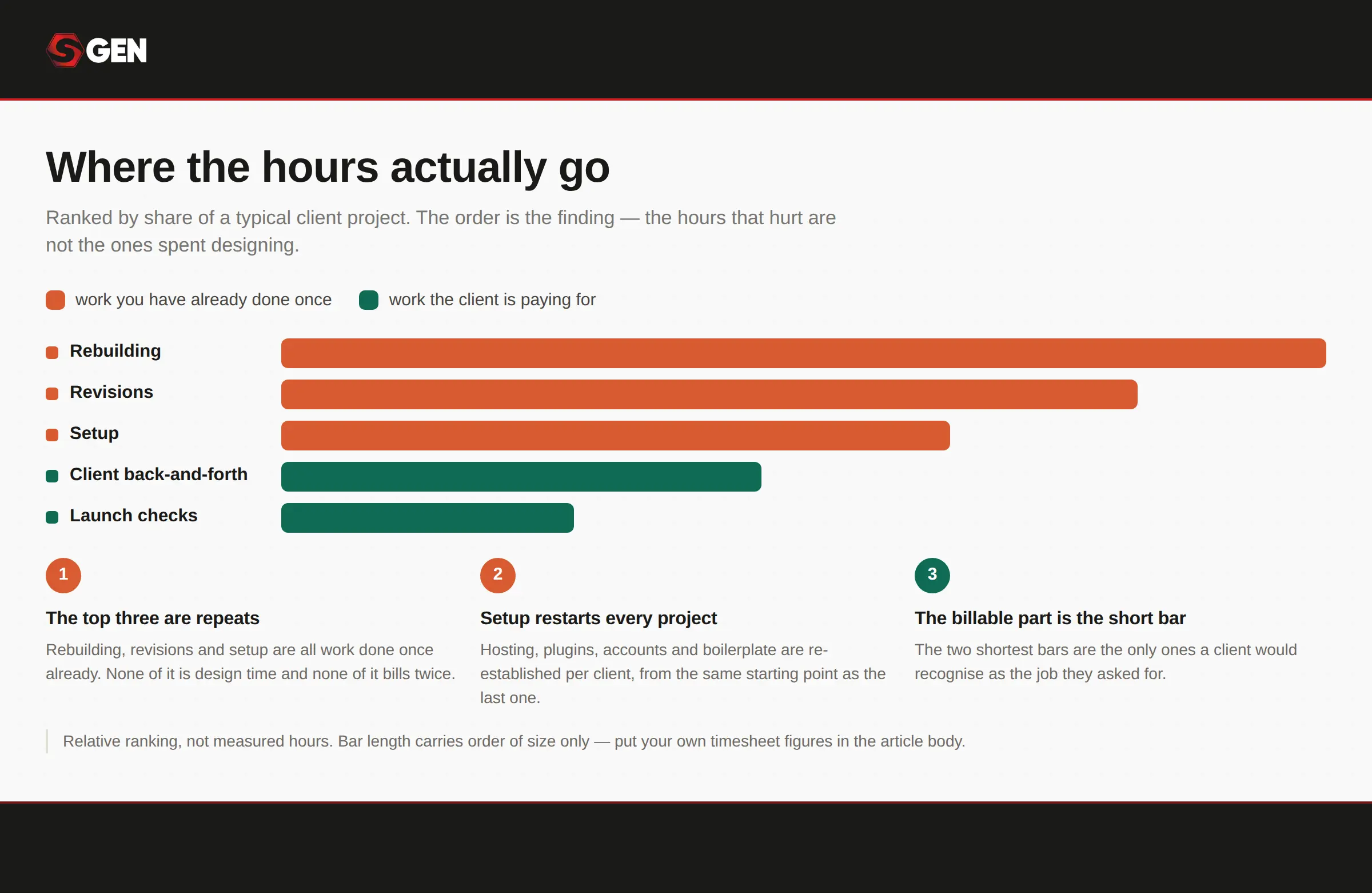
Setup, rebuilding and revisions describe where the time goes, and none of them is a phase.
- Setup, meaning the hours between opening a new project and being able to design anything.
- Rebuilding, meaning the header, the contact form and the footer you also built last month.
- Revisions, meaning the round trips that happen because nobody agreed what done looked like.
None of those are design work, and all of them are billable time that produces nothing the client can see.
It’s worth mentioning that freelancers and agencies have different bottlenecks
Ybug draws this distinction well in its 2026 guide to web design workflow. An agency bottleneck is coordination: handoffs, approvals, who is waiting on whom. Meanwhile, a freelancer bottleneck is bandwidth. There is no coordination problem when there is one of you, only a limit on hours.
Unfortunately most workflow advice is written for the coordination problem. Project management tooling, approval routing and feedback consolidation all solve something a solo designer does not have.
How To Speed Up Your Client Website Workflow
Each of these targets one of the three places the hours went, and most freelance web design workflow already include two or three by accident. The gain comes from doing all five deliberately, which is how you build client websites faster without working any harder.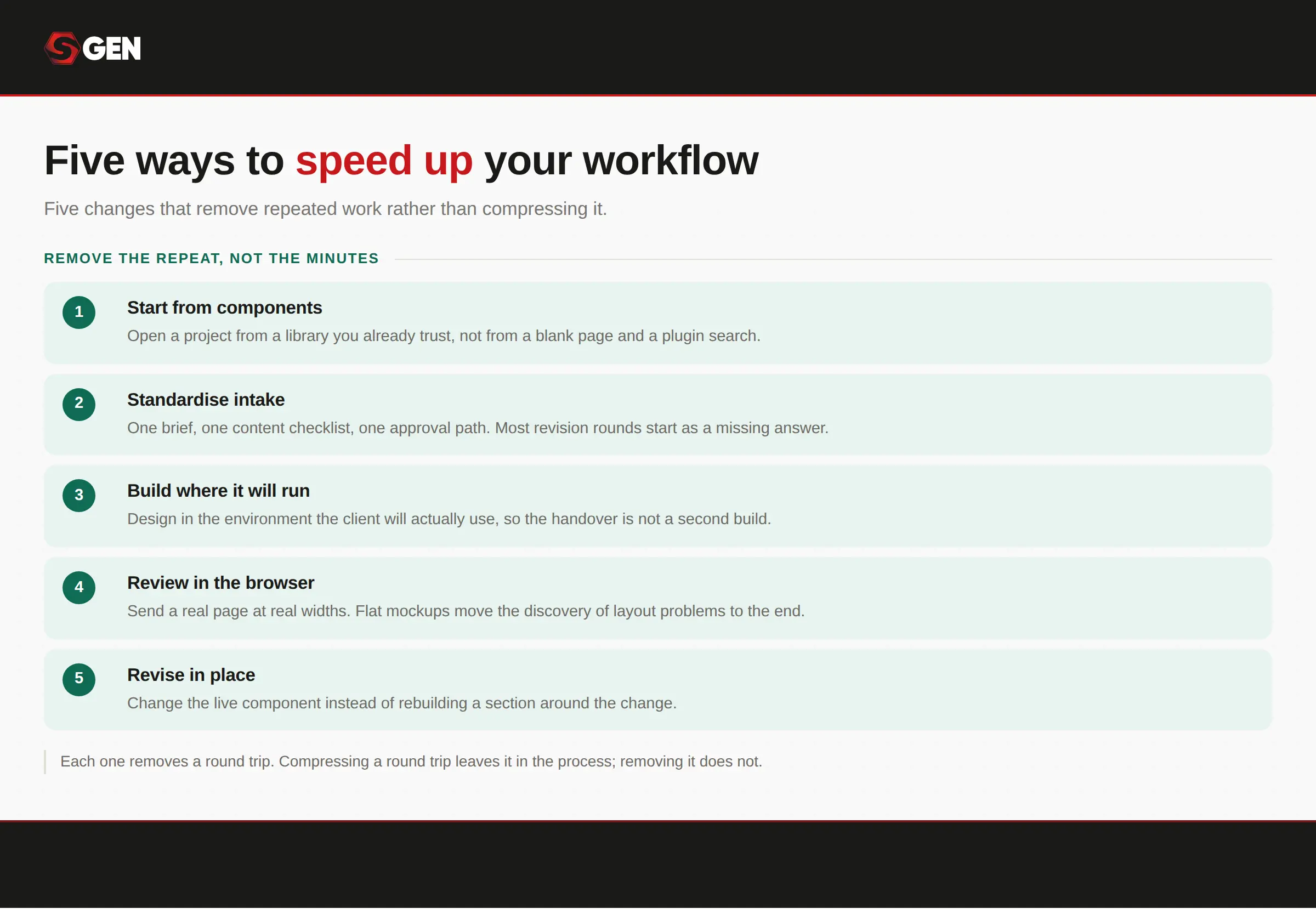
Fixes one to four each remove a single kind of waste.
1. Standardize your design process
The least glamorous fix and the highest leverage. What you can produce is proportional to the quality of what arrives at the start, so a fixed intake removes a whole category of mid-project rework before it happens.Start with a short workable intake list.
- Business type and primary service.
- Target audience in one sentence.
- The page list, agreed before design starts.
- Brand assets, or a decision that there are none.
- A named content owner for each page.
- A deadline per content item, not one deadline for all content.
That last item is where most schedules quietly fail. Content arrives late, in pieces, and the project stretches around it.
2. Reuse templates and components
Web design workflow becomes more efficient with the right set of reusable templates and components. HappyAddOns estimate Savings compound at 45 to 60 minutes per page from templates alone, which is roughly four hours on a five-page site. When developing yours, be sure to include:- A starter structure, meaning a skeleton site with your standard pages already in place.
- A saved section library, meaning the hero, the testimonial block and the pricing table you keep rebuilding. And,
- A shared design vocabulary, meaning type scale, spacing and colour defined once rather than per project.
Every serious platform now has a version of this. Duda has reusable sections, Webflow has a template marketplace, and Squarespace designers commonly maintain a starter site they duplicate for each client. SGEN handles it with design tokens and a saved component library that sits at account level, so a new site inherits the vocabulary without anyone rebuilding it.
3. Cut down on plugins
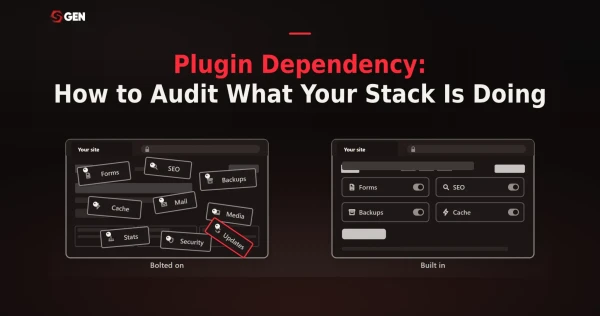
Every additional tool in a stack carries its own update schedule, its own failure mode and its own renewal date. The average WordPress install runs 20 to 30 plugins, which is 20 to 30 independent things that can change without warning.Regardless if you intend to cut down or build websites entirely without plugins, start with an audit. Sort every plugin into four categories. Native replacement, where the platform already does it. Workflow redesign, where a change in process removes the need. Genuinely niche, where nothing else does the job. And retire, where nobody has used it in a year.
SGEN puts the typical outcome at 60 to 80 per cent native replacement, 10 to 20 per cent workflow redesign, with the remainder retired or genuinely niche.
4. Build with integrated tools instead of assembling multiple products
Consolidating five add-ons into one is a real improvement, and vendors who make that argument are right that it saves hours. Follow the logic one step further, though. If one tool beats five, capability that ships with the platform beats one tool, because there is nothing left to update, license or reconcile.Elementor makes the sharpest version of this point in its own workflow guide, and it is worth quoting because it comes from a WordPress vendor. If you design outside the environment the site is built in, someone has to spend a development phase recreating the design. If you prototype inside it, that phase mostly disappears.
5. Create a repeatable delivery workflow for every project
This is what turns them into a system: a written definition of done for each phase, and a handover document you produce the same way every time. Frame handover as protecting your own time rather than as client service. A client who knows how to change their own phone number does not email you about it in eighteen months.Do that and the compounding claim stops being a promise. Project one is slower because you are building the library. By project five, most of the structure already exists and the work is the part clients actually pay for.
How WordPress Slows Down Client Projects
If you are one of the many freelance web designers that use WordPress, you’re likely familiar with these.
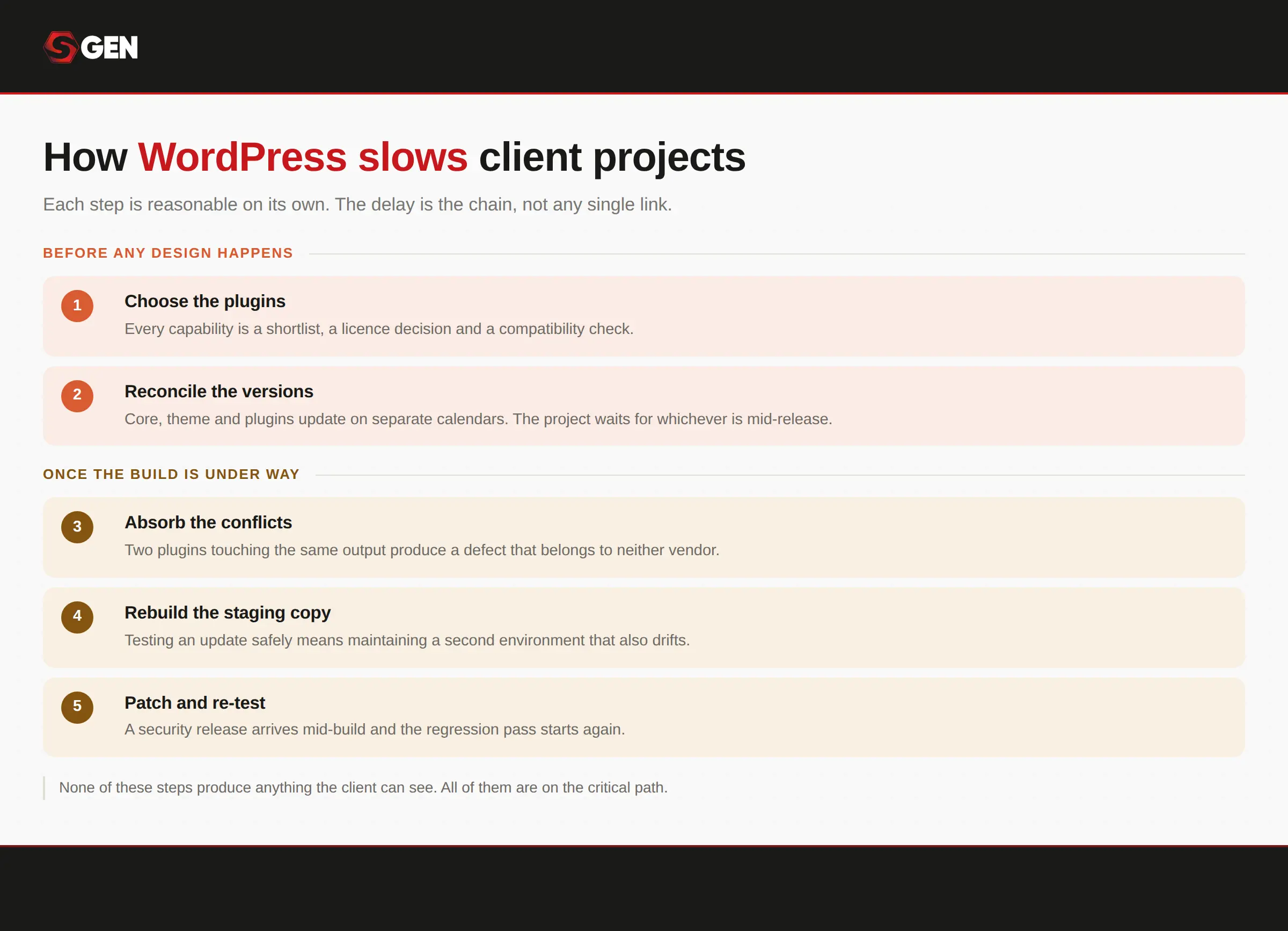
Setup is billable time producing nothing visible; the security gap is core's problem to solve and it already has.
Repetitive setup
Install, configure, choose a theme, install the plugins, rebuild the header. HappyAddons even estimates three to four hours before content work begins on a typical project. Multiply that by the number of sites you build in a year and it stops being a rounding error.Plugin dependency and conflicts
Separate vendors, separate release schedules, separate failure modes, and no single party responsible when two of them disagree. The security picture is the sharpest version of this. Patchstack found that plugins accounted for 91% of the 11,334 WordPress vulnerabilities disclosed in 2025, while core accounted for six.Nothing carries forward
A WordPress project starts from a theme, and the work you did last month lives inside a different site. Reuse is possible but it is something you build and maintain yourself, on top of everything else.Maintenance, which is the cost nobody prices
A working WordPress stack for a single client site runs roughly 60 dollars a month, or about 727 dollars a year, once managed hosting, an SEO plugin, a security plugin and a forms plugin are all on renewal pricing.Compare that to what the alternatives publish. Wix runs 17, 29, 39 and 159 dollars a month on annual billing. Canva's free tier caps publishing at five sites, supports no e-commerce, and exposes three SEO fields.
Unfortunately, most freelancers quote a client a monthly figure without pricing the stack, and then absorb the difference at renewal or have an awkward conversation twelve months later. Pagesmith estimates that maintaining existing client sites consumes 30 to 50% of agency time.
How Do Modern Website Platforms Help Freelancers Deliver Faster?
The short answer: What changes is what ships in the box.In modern website design platforms, forms, SEO fields and schema, redirects, analytics, custom fields, backups, media optimization and consent tracking all exist as native modules rather than as separate products. Caching, CDN and security all sit at the platform layer, which means nobody configures them per site.
The field here is genuinely competitive. Webflow, Duda, Framer, Squarespace and Wix Studio all serve professional client work, and each is better than the others at something. On SGEN, freelancers pay for sites not features so it ships 23 native modules on every plan with hosting, SSL, CDN and security included as standard.
What about using AI for site generation?
Most of the current answer to "build faster" is AI generation, and it solves a different problem. An AI builder compresses the blank-page stage, which is real and useful. An integrated platform removes the assembly and maintenance stage, which is a different bottleneck.Let's compare the approaches for website building:
| Approach | Setup Per Project | What Carries Forward | Maintenance Load | Biggest Trade-Off |
|---|---|---|---|---|
| WordPress + page builder + plugins | Highest | Little, unless you build it yourself | Highest, multiple update cadences | Maximum flexibility and upkeep |
| WordPress + consolidated add-ons | Reduced | Saved sections and templates | Reduced but still stacked | Fixes the add-on layer only |
| AI site generation | Lowest at first draft | Prompts and briefs | Depends on the platform underneath | Strong at scaffolding, weak at brand |
| Integrated platform | Low | Design tokens and component library | Handled at platform layer | No plugin marketplace |
| Hosted site builder | Low | Templates | Handled at platform layer | Caps on sites, commerce, and SEO control |
So Why Do Many Freelancers Still Default to WordPress?
WordPress does things no hosted platform does: arbitrary custom code, a plugin for genuinely obscure requirements, and an ecosystem deep enough that somebody has usually solved your problem before you had it. For a site that depends on any of that, moving is not the right call."Every client expects WordPress"
This belief is worth taking seriously rather than dismissing, because it is often true and the reasons behind it are real. Clients have heard of WordPress. They assume it means portability. And they assume a future developer will be able to pick the site up without difficulty. But It is also rarely tested.Most clients want three things: to be able to edit their own content, to not be locked in, and for the site to work. The general assumption is that only WordPress can deliver all three.
But is it, really?
- Ask yourself when you last actually moved a WordPress site somewhere else. Portability that has never been exercised is a belief rather than a feature, and a site carrying thirty plugins and a page builder is among the harder things to move anywhere.
- A new developer can pick up WordPress. Whether they can pick up this site, with its particular theme, builder and plugin set, is a different question, and the answer gets worse the longer the site has been running.
- Check how often the client has edited their own content in the past year. If the answer is never, because they email you instead, the capability you are protecting is one nobody is using.
- Ask the client what being locked in would actually mean to them. Most people mean they want to keep their content and their domain, which nearly every modern platform allows, rather than anything specific to WordPress.
Explore your options. We tested over a dozen platforms to find the best website builders for freelancers so you don't have to.
How to Introduce a New Website Platform to Existing Clients
Clients approach freelance web designers with a problem, and as experts, they will value your insight with the right approach. So while most clients would prefer a platform they already know, proposing a new one won’t hurt.Lead with their interest, not the tooling
Clients do not care what the site is built on. They care about how quickly it ships, what changes cost them later, and whether they are trapped. Frame the conversation in those three terms and the platform becomes an implementation detail, which is what it is to them.Answer the three objections that actually come up:
- Will I be locked in? Ask what portability looks like on the platform you are proposing, and give them the honest answer, including whether they can export and take the site elsewhere.
- What happens if you disappear? A fair question, and the answer is a documented handover plus a platform their next developer can learn in an afternoon rather than one that requires your specific knowledge.
- Can my team still edit it? Usually yes, and usually more easily. This is the objection that dissolves fastest in a five-minute screen share.
Be straight about what a move involves
Content is not retyped. On most modern platforms, pages and posts export to CSV or JSON and import with a field-mapping step, and structured data maps across: custom post types become custom object types, and custom fields map to their equivalent.The design is what gets rebuilt. Themes do not transfer as themes, and the equivalent is design tokens plus templates. That is worth framing as the point rather than the cost, because a rebuild is what leaves years of theme and plugin debt behind.
Say this plainly. Every competitor implying a clean automated port is setting the reader up for a bad afternoon.
Start with one site, not the portfolio
Nobody has to migrate anything on day one. The lowest-risk starting point is the next new client, which is a site you were going to build anyway and which costs nothing to lose. Phased moves are the documented norm, and teams that move everything at once face heavier coordination and usually finish slower.If it goes well, a website builder built for freelance client work becomes the default for new projects and the existing book moves only when a client is paying for a redesign anyway.
Find out how SGEN compares against other website builders:
Conclusion: What makes for a faster web design workflow?
A fast web design workflow is not a faster version of the same work. It is a workflow where less of the work happens twice. Standardized intake, reusable structure and a smaller plugin stack let freelancers build client websites faster without cutting corners on any of the phases. Meanwhile, the platform underneath decides how much of that you have to build yourself.While most clients prefer WordPress because they are familiar with the system, there’s an argument to be made for modern alternatives. Efficiency can come in the form of capabilities shipped natively rather than assembled plugins, without any stack to reconcile or renew separately. And when maintenance is handled at the platform layer, the hours that used to disappear into updates go back into the work clients actually pay for.