

Nearly every customer checks you online before they buy, which is why businesses require online presence to stay competitive, regardless of their size or business model. That said, a slow or dated site quietly sends them to a competitor. And without any update, a site goes stale within a quarter and stops ranking. Choosing the right website builder makes all the difference.
The category is wider than it looks so we tried the most popular platforms in the market. We found that the best website builder for small businesses should come with native tools for managing customers, growing visibility, maintaining financials, and handling inventory from a single platform. Consider who maintains the site after launch and what it costs in year two.
These are the 7 best website builder options for small business in 2026:
- Squarespace: Best no-code, visual website builder
- Wix: Best for restaurants and online ordering
- SGEN: Best for low maintenance and value-for-money site management
- Shopify: Best for ecommerce and multi-channel sales
- Duda: Best for businesses managing multiple websites
- WordPress: Best for customization and flexibility
- Ghost: Best for online publications and subscription-based models
Best Website Builder for Small Business: Quick Comparison
| Product Name | Our Score Out of 5 | Pricing Starts At | Business Management Tools | Payment Processor Partner |
|---|---|---|---|---|
| Squarespace | 4.61 | $16/mo billed annually | Some, native | Squarespace Payments |
| Wix | 4.48 | $0 free plan, paid from $17/mo billed annually | Mostly, native | Wix Payments |
| SGEN | 4.43 | $0 Sandbox, paid from $39/mo billed annually | Mostly, native | Stripe |
| Shopify | 4.33 | $29/mo billed yearly | Mostly, native | Shopify Payments |
| Duda | 4.24 | $19/mo billed annually | Some, native plus integration | Stripe |
| WordPress | 4.18 | Free software, WordPress.com paid from $4/mo billed annually | Mostly, via plugins | Stripe and PayPal |
| Ghost | 4.13 | Free self-hosted, Ghost(Pro) from $18/mo billed yearly | Some, native | Stripe |
Methodology: How we evaluated the best website builder for small business
To provide a fair, reasonable recommendation, we tested over a dozen website builders in the market. The rubric scored every platform against four criteria: pricing and features at 20%, project management and ease of use at 30% each.
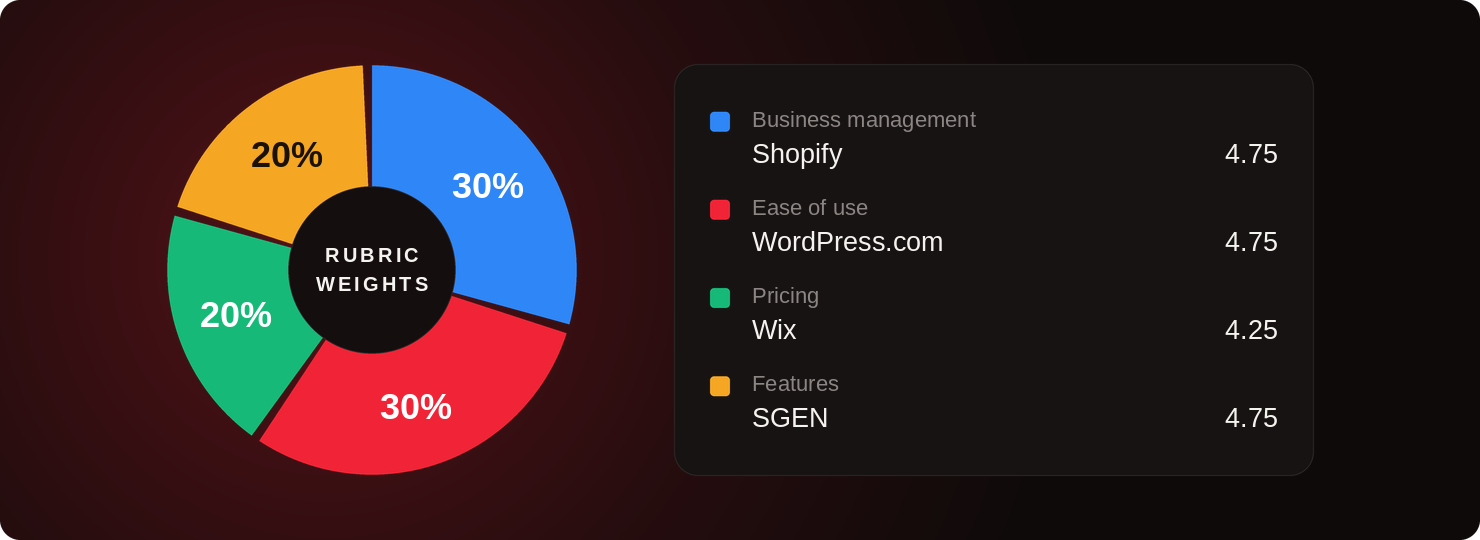
Business management and ease of use determined the overall best website builder for small business.
Shopify scores full marks on six of the seven business management factors, while WordPress leads ease of use. Wix wins pricing on its free plan and tier flexibility and SGEN leads features on unlimited bandwidth, storage, and native SEO.
Squarespace takes the overall win at 4.61 because its strengths sit in ease of use and features, the categories small business owners touch daily, while its pricing lands mid-pack.
Decision Guide: How To Choose The Right Website Builder For Your Business
Before you compare features, settle three questions that eliminate most of the list for you.Should you DIY or hire a developer?
Every platform here markets itself as something you can do yourself, and for a five-page brochure site most of them are. The decision turns on what happens after launch rather than on the build. If the site will need a custom content type, a members area, or an integration nobody has written yet, you are hiring someone whether you plan to or not.| Build it yourself when | Hire a developer when |
|---|---|
| The site is under ten pages and mostly explains what you do | The brief includes custom post types, a members area, or a booking flow the platform does not ship |
| Someone on staff will keep it current and needs to do that without help | You want a design that does not look like the template it came from |
| You are validating an idea and want it live this month | You are migrating an existing site with rankings to protect |
| The platform ships the business tools you need natively, so nothing has to be wired together | The build is on WordPress, where the theme, plugin stack and hosting are all decisions |
| Your budget is the subscription and nothing else | The site is the main sales channel and downtime costs real money |
Site migration: If you are currently running a business website on a different platform, rankings are your biggest concern though not a reason to stop you from leaving. Plugin fatigue, rising maintenance cost, security concerns, and plugin vendor management are real issues that can cost your business more if you delay. What is less talked about is that migrating your website does not always mean you need to hire someone else for the task.
Read our website migration SEO guide and learn how to get started.
What Are Your Compliance Requirements?
Compliance decides the shortlist faster than price does. A healthcare practice collecting patient details needs a platform that publishes HIPAA compliance, and SGEN does while stating plainly that SOC 2 and ISO are still in progress rather than showing a badge it has not earned. If you take cards, Shopify is certified Level 1 PCI DSS with stores PCI compliant by default.If you sell age-restricted goods or operate under consent rules, check that age verification and a logged consent banner are native rather than a plugin.
Website Builder vs CMS?
These get used interchangeably in vendor marketing and they describe genuinely different products. The distinction decides what you can change later and what leaves with you if you move.| Attribute | Website Builder | CMS |
|---|---|---|
| What it is | Builds, hosts and secures the site in one product | Software that manages content, installed on hosting you choose |
| Who owns the site | The vendor hosts it, you hold the account | You do, fully, including files and database |
| Examples | Squarespace, Wix, Duda | WordPress, Ghost self-hosted |
A website platform is a combination of CMS plus hosting plus native modules found in a website builder all in one system. SGEN is an example, Shopify is another platform with a storefront for commerce.
Squarespace: Best No-Code, Visual Website Builder
- Our evaluation
- 4.61 / 5
- Pricing scheme
- Per site, billed annually or monthly. Lower tiers pay higher transaction fees rather than losing features
- Best feature
- Templates built by designers that keep their proportions no matter who is editing them
- Native business tools
- Invoicing, Squarespace Payments, contacts panel, forms, memberships and courses. Scheduling and email marketing are separate subscriptions
- Hosting
- Bundled in on every plan, with no self-hosting path
Squarespace launched in 2004 as a one-person blog host and grew into a design-led all-in-one platform sold on the strength of its templates. It runs only on its own managed cloud, bundles hosting, SSL and updates into every subscription, and positions itself as designer-grade to build and client-grade to maintain. Small businesses reach for it when the site has to look professional and nobody on staff writes code.
Why we chose Squarespace
What you are really buying is the template engine. It holds spacing, type and hierarchy in proportion no matter what you drop into it, so the site reads as designed before anyone has consciously designed anything. Blogging, memberships, invoicing and Squarespace Payments are native, and every paid plan can sell products or services, which covers most service-business briefs without an add-on.This is where Squarespace proves it beginner friendliness over Wix. Because Wix will let you drop any element anywhere, reviewers describe non-designers producing sites with three navigation menus and stretches of empty page, purely because nothing intervened. Squarespace fences the canvas in, and a fence is precisely what you want when the person maintaining the site is the owner and not a designer.
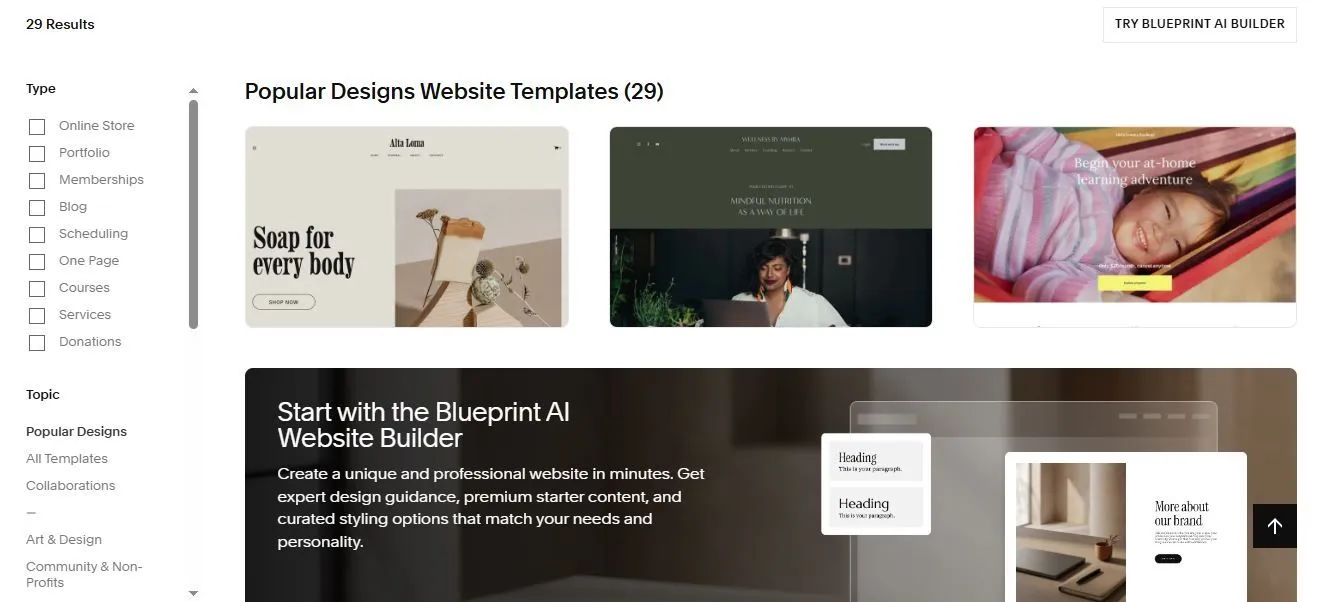
Squarespace opens with a filtered template library rather than a blank canvas, which is why it scores 4.50 on ease of use. (Source image: Squarespace)
Pricing
- Basic: $16 per month billed annually. 2 contributors, 2% online store transaction fee, 7% on digital content and memberships, 30 minutes of video storage
- Core: $23 per month billed annually. No online store transaction fee, 5% on memberships, unlimited contributors, 5 hours of video
- Plus: $39 per month billed annually. 1% on memberships, 50 hours of video. Offered only where Squarespace Payments operates
- Advanced: $99 per month billed annually. 0% on memberships, unlimited video
Above Basic the money buys lower fees and larger quotas rather than new capability, so the upgrade case is arithmetic on transaction volume rather than a feature gap. If you sell more than roughly $350 a month through the store, Core pays for itself on the transaction fee alone.
Read the renewal before you commit. Squarespace runs promotions, and the terms state a discount applies to the first payment of a new subscription only. The free custom domain is first year only, so year two adds a domain renewal on top of the plan, and Acuity Scheduling and Email Campaigns are separate subscriptions that are easy to mistake for included features.
Top features
- Templates built by designers: responsive, curated layouts that keep type and spacing in proportion whoever is editing them, which is what stops a site drifting out of shape six months after handover.
- Fluid editor with grid: a visual canvas with snapping and alignment guides, plus the Finish Layer set for element animation and separate control of desktop and mobile breakpoints.
- Squarespace Payments and invoicing: collect payments and send invoices natively, accepting Klarna, Afterpay, Apple Pay, ACH and major cards, with Pay Links for collecting money outside a store.
- SEO and AI Visibility: SEO tools and keyword analysis on every tier, plus AI Visibility as a distinct product metered in prompt runs, 10 one-time on Basic then 20, 40 and 120 monthly.
- Ecommerce on every paid plan: unlimited products, gift cards, abandoned cart recovery, subscriptions, print on demand and carrier-calculated shipping, with only the fees varying by tier.
What to know before using Squarespace
Most owners build this themselves. Reviewers repeatedly report launching a complete, credible site in a day or less with no technical background, which is the clearest signal in the sample that you do not need to hire anyone for a standard brochure or service site. If you want a layout the template does not offer, that is where a designer earns their fee, because custom code sits behind higher tiers and reviewers describe a recognizable Squarespace look that is hard to escape.Squarespace owns maintenance entirely. Hosting, SSL, updates and security are included on every plan and there is nothing to patch. The cost of that is portability: no export path is documented, switching templates means rebuilding, and one Capterra reviewer explicitly wishes for a way to move off the platform without starting over.
Squarespace Pros & Cons
- Pros
- ✓Templates keep their proportions whoever is editing
- ✓Hosting, SSL, updates and security included on every plan
- ✓Ecommerce on every paid plan, with only fees varying
- ✓Unlimited bandwidth on all tiers
- ✓24/7 chat and email support on every tier
- Cons
- ✕Nothing free, just a 14-day trial
- ✕Basic allows only two contributors in total
- ✕Switching templates means rebuilding from scratch
- ✕Scheduling and email marketing are separate subscriptions
- ✕No documented export path, and documented domain transfer disputes
User reviews
Template and design quality is the most cited strength, and reviewers who moved from Wix name design capability as the reason. Owners switching from WordPress cite escaping plugin management, and designers report clients confidently running their own updates afterward.
Cost is the topic of most complaints, with reviewers objecting to paying in perpetuity with no one-time option and noting that adjacent services each carry a separate charge. The customization ceiling is next, followed by useful features sitting behind higher tiers with custom code named most often.
Check out our Squarespace alternative.
Wix: Best for Restaurants and Online Ordering
- Our evaluation
- 4.48 / 5
- Pricing scheme
- Per site, billed annually or monthly, with a permanent free plan
- Best feature
- Industry suites, including a restaurant stack covering online ordering, reservations and POS
- Native business tools
- CRM, scheduling and staff management, invoices and quotes, payments, POS and mobile POS, email marketing, automations, loyalty and coupons
- Hosting
- Bundled in on every plan, including the free tier
Wix launched in 2006 and is now a hosted all-in-one builder that bundles design, hosting, business operations and marketing into one subscription. It ships prompt-to-site generation through Wix Harmony feeding into a drag-and-drop editor, and every site includes multi-cloud hosting, SSL, CDN and security as Wix's responsibility rather than yours. It also carries one of the largest template libraries in the category.
Why we chose Wix
Restaurants need a specific stack, and Wix is the only builder here that sells it as a suite instead of as parts. Industry solutions cover restaurants which pair online ordering with the native CRM, payments, POS and mobile POS, invoices, automations, coupons and a loyalty program. One subscription runs the menu, the order, the payment and the follow-up email, which is the entire quote-to-cash loop for a food business.
See how the same requirements look on a native platform built for restaurants.
Wix runs a real CRM and real email marketing natively, where Squarespace offers a contacts panel and sells email campaigns as a separate subscription. It goes to-to-toe with Shopify though Wix is not as well built for a catalog nor is it priced for one, so a business whose orders are meals pays a fraction of that on Wix for the same result.
Wix is also our pick for the best free website builder for small businesses. Nothing is held back from the editor or the template catalog on the free tier, and hosting is included; what you pay instead is a wixsite.com address and Wix’s own advertising on the page. It is the least expensive way to look at a real working site although a free tier lacks payment processing features.
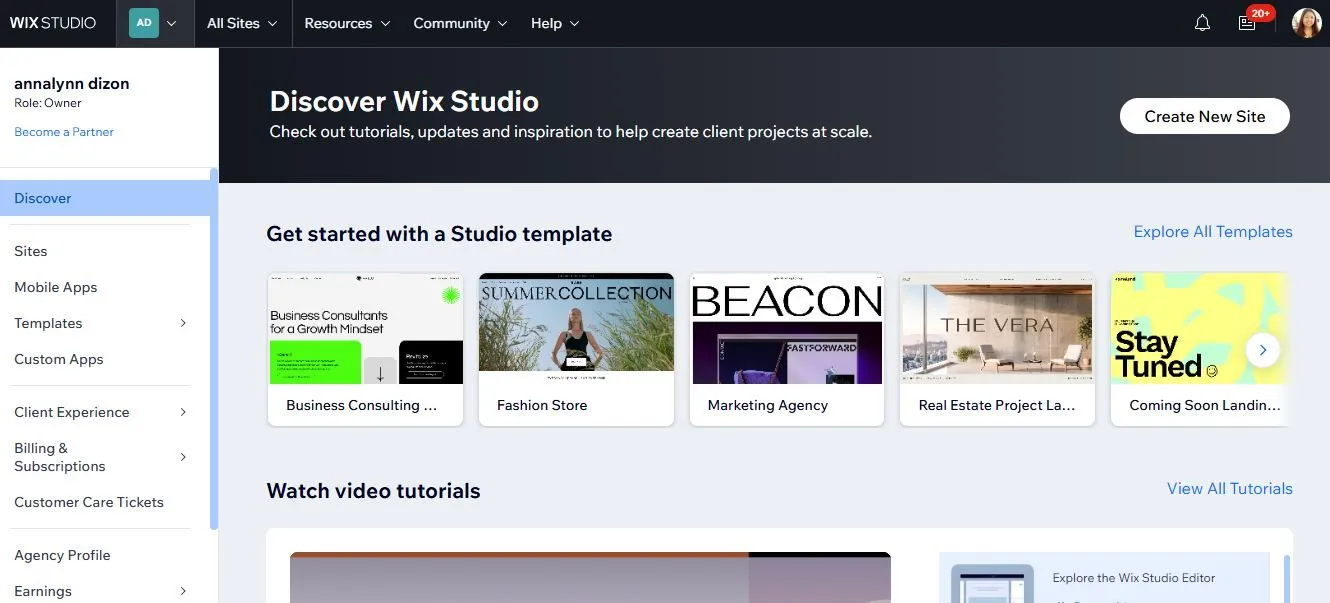
For better design control and options, Wix Studio comes with customizable templates and advanced management tools. (Source image: Wix Studio)
Pricing
- Free: $0. Full editor and templates, wixsite.com subdomain, Wix advertising, no custom domain and no payment acceptance
- Light: $17 per month billed annually. Custom domain, 2 GB storage, 2 collaborators, light marketing suite, still no payment acceptance
- Core: $29 per month billed annually. First tier that can take money, adds basic ecommerce, scheduling and services, 50 GB, 5 collaborators
- Business: $39 per month billed annually. Standard ecommerce and marketing suite, 100 GB, 10 collaborators
- Business Elite: $159 per month billed annually. Advanced ecommerce and marketing, the advanced developer platform, unlimited storage, 100 collaborators
For a restaurant the tier that matters is Core at $29, because Light cannot accept a payment. Read that before you weigh $17 against a competitor’s entry price, because the two numbers are not describing the same product.
Renewal is the weak spot. Wix publishes no renewal price for any plan anywhere on the plans page, and the free one-year domain voucher applies only to a first-time domain purchase and cannot be used on renewals or upgrades, so year two adds a domain bill. Business email is not included either. Wix sells Google Workspace separately, which is one more line most budgets miss.
Top features
- Industry suites: purpose-built sets for restaurants, hotels, fitness, events and photography, covering online ordering, reservations, staff management and bookings rather than leaving them to third-party apps.
- Native CRM and automations: built-in contacts, lead capture, live chat, a members area and automations, plus the Wix Owner mobile app for running the business away from a desk.
- SEO stack: server-side rendering, a URL redirect manager for 301s, editable canonicals, structured data, XML sitemaps with IndexNow, GSC data inside the dashboard, and an AI Visibility Overview tracking mentions in ChatGPT and Gemini.
- Photo Studio: native image editing with filters, cropping, background removal, resolution upscaling, AI image generation and generative extension, which most platforms here do not offer at all.
- Free plan and template library: one of the largest template catalogs in the category, plus the one free tier here you could put in front of a customer, backed by an App Market of hundreds of third-party apps.
What to know before using Wix
Owners build these sites themselves and reviewers consistently launch professional-looking results with no coding. Two caveats are worth planning around. The automatically generated mobile view routinely misplaces or clips elements after the desktop build and needs manual correction, so budget an hour for it.
And once a site is live the template cannot be swapped, which reviewers describe as the single most expensive limitation on the platform, because changing direction means rebuilding. Wix owns hosting, SSL, CDN, backups and security on every plan including free, so there is nothing for you to patch. The trade is that there is no full-site export, so leaving Wix means a rebuild elsewhere rather than a migration.
Wix Pros & Cons
- Pros
- ✓The one free plan here you could actually run a site on
- ✓Industry suites for restaurants, bookings and events
- ✓Native CRM, email marketing and image editing included
- ✓24/7 support on every tier including free
- ✓Large template library and an App Market
- Cons
- ✕Light at $17 cannot accept a payment
- ✕Templates cannot be switched once a site is live
- ✕No site export, so leaving means rebuilding
- ✕Renewal price is published nowhere on the plans page
- ✕Auto-generated mobile view needs manual correction
User reviews
Support is the most praised part of Wix: 24/7 care on every tier including free, with live chat, a scheduled callback and an in-product AI assistant that escalates to a human. Reviewers credit the drag-and-drop editor as genuinely usable by non-developers and value getting hosting, security, backups, SSL, bookings, payments and ecommerce in one subscription with nothing to assemble.
Billing friction is the dominant negative theme. Reviewers describe endless subscriptions, upsells and add-ons and say the value proposition degrades as the site grows, with several noting that removing Wix branding and connecting a custom domain requires moving up a tier. Template lock-in and platform lock-in follow, along with the mobile output problem.
Learn about our Wix alternative.
SGEN: Best for Low Maintenance and Value-for-Money Site Management
- Our evaluation
- 4.43 / 5
- Pricing scheme
- By number of live sites. Every plan is the whole platform, with nothing gated by tier
- Best feature
- Every one of the 23 native modules, and the Foundation Pack with them, switched on from the free Sandbox upward
- Native business tools
- Ecommerce with no SGEN transaction fee, forms, popups, events, reviews, attribution, analytics, SEO and redirects
- Hosting
- Included on every plan, along with SSL, a CDN, a WAF and security patching
SGENSGEN is a single-system CMS platform whose premise is that the assembled plugin stack should not exist: the building and management features arrive in the box instead. It is the newest name on this list, and it publishes direct comparison pages against WordPress, Elementor, WP Engine, Wix, Squarespace and GoDaddy.
Why we chose SGEN
The case is maintenance arithmetic, and SGEN publishes the sum itself. A typical small business site assembled the usual way runs managed hosting at $30, a page builder at $4, SEO at $10, forms and lead routing at $17 to $33, security and firewall at $12, backups at $8, call tracking at $50 and image optimization at $10.That is eight to ten subscriptions at $145 to $200 or more a month, each on its own update cycle. SGEN ships the same capability native from $39 per month billed annually, on one engine, one login and one release schedule. On the other hand, you will find SGEN limiting if you intend on working with AI or edit images as part of your business model.
When compared against Squarespace and Wix, the difference is what sits behind a tier. Squarespace charges separately for scheduling and email marketing. Wix cannot accept a payment until Core at $29 and caps storage at 2 GB on Light. SGEN is also the only platform here that publishes HIPAA compliance. See how that applies to regulated practices.
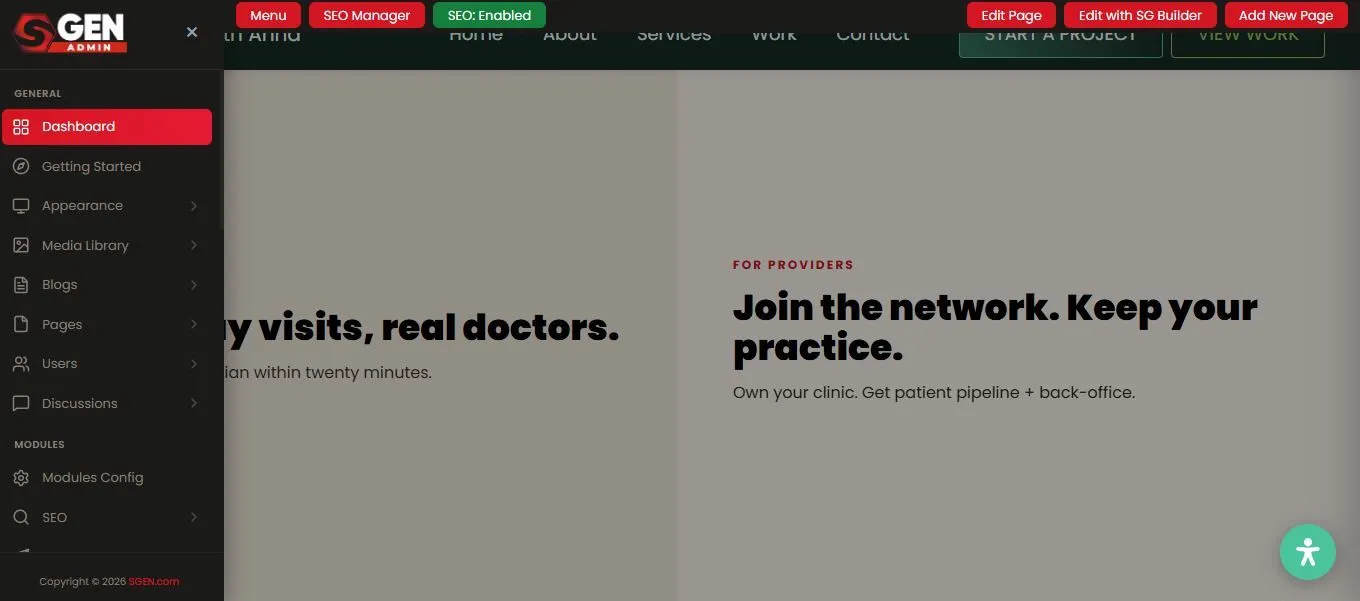
SGEN keeps SEO controls and the page builder in the same admin bar as the live site, part of the feature set that scores 4.75. (Source image: SGEN)
Pricing
- Sandbox: $0, free forever, no card and no time limit. Unlimited sandbox sites on a staging URL, with the whole platform unlocked
- Indie: $39 per month billed annually, or $47 monthly. 1 live site
- Studio: $97 per month billed annually, or $117 monthly. 3 live sites
- Scale: $297 per month billed annually, or $333 monthly. 10 live sites
- Enterprise: $497 per month billed annually, or $577 monthly. Unlimited live sites
The site can be built out completely in the sandbox, with every module available, on no deadline, and the bill only starts when it goes live. Nothing else on this list lets you finish a real site before you spend anything.
For a business running one site, Indie at $39 sits above Squarespace Basic at $16 and Wix Light at $17; a fair comparison only if you never add a form tool, a security subscription, a backup service or a page builder license.
No tier carries an introductory rate, so nothing doubles at renewal, and the ladder ends at a published Enterprise price instead of a sales call.
Top features
- 23 native modules across 7 categories: build and design, content and publishing, growth and conversion, SEO and performance, analytics and attribution, security and compliance, and operations, with no tier holding any of them back.
- Foundation Pack: hosting, SSL, a CDN, a WAF, security patching and the multi-site dashboard, present from the $0 Sandbox upward, so the security stack never becomes its own line item.
- SG Builder: a drag-and-drop canvas with 48 native components snapping to a precise grid at six breakpoints, publishing server-rendered HTML rather than a page a script has to draw.
- Stage and Live: snapshots you can clone to a site, restore from a site, or push between staging and live, all handled server-side instead of through a backup plugin.
- Redirects and SEO: native 301 and 302 rules with a Test URL dry-run and bulk load, alongside an SEO module covering titles, meta, schema, robots and Core Web Vitals in one table.
What to know before using SGEN
The SG Builder is drag-and-drop, so an owner can build on the free Sandbox without writing code. For WordPress users migrating their current website, there is no one-click WordPress importer, and the design is rebuilt which the company frames as the point rather than a limitation, because it is how the old plugin stack and theme debt get left behind.Content transfers by exporting pages and posts to CSV or JSON and using Advanced Import with a visual field-mapping step. Maintenance sits with SGEN on every plan. Hosting, SSL, CDN, WAF and security patching ship in the Foundation Pack including on the free tier. A white-glove migration is quoted per site.
SGEN Pros & Cons
- Pros
- ✓Nothing is tier-gated; every plan is the full platform, Sandbox included
- ✓Hosting, SSL, CDN, WAF and patching included, with no plugins to maintain
- ✓Free Sandbox runs unlimited staging sites with no card and no deadline
- ✓HIPAA compliant, with no transaction fee on the native store
- Cons
- ✕Carries no independent review scores at all so far
- ✕Lacks an AI assistant and image editing tools
- ✕For a single site, $39 sits above the entry price elsewhere
- ✕No one-click WordPress importer, so the design is rebuilt
User reviews
SGEN has no Capterra or G2 reviews, or BBB listing yet unlike every other platform in this guide that carries at least one third-party score. If review volume is how you de-risk a decision, this is the weakest entry here.What exists is first-party proof. SGEN publishes a showcase of 29 live sites across 5 categories and 17 industries.
The free Sandbox is the practical answer to the missing reviews, because you can test the whole platform on a real build before paying anything.
Shopify: Best for Ecommerce and Multi-Channel Sales
- Our evaluation
- 4.33 / 5
- Pricing scheme
- Per store, billed monthly or yearly, with card rates, apps and add-ons metered on top
- Best feature
- The same full-featured store and checkout on every plan, including the entry tier
- Native business tools
- Checkout, Shopify Payments, POS, multi-location inventory, shipping labels, automated tax and filing, email and SMS campaigns, Balance and Capital
- Hosting
- Included with unlimited bandwidth and no bandwidth fees, and not optional
Shopify launched in 2006 after its founders could not find software good enough to sell snowboards, and it is now a commerce platform first and a website builder second. Checkout, payments, multi-location inventory, POS, shipping, tax filing and business banking are core products rather than assembled parts, and Shopify is certified Level 1 PCI DSS compliant with stores PCI compliant by default.
Why we chose Shopify
The storefront does not change between tiers, which is unusual and worth understanding. Every plan gets a full-featured online store, unlimited products, the same checkout, themes, 200-plus real-time reports, marketing automations, abandoned checkout recovery, gift cards, Shopify Markets and the entire tax stack.
Multi-channel is the other half of the case. One dashboard sells through the online store, social channels, marketplaces, in person through POS, and now into AI shopping surfaces, since selling in AI chats is included on every plan and the $0 Agentic listing charges only card rates when a sale happens. No other ecommerce website builder here covers that spread from a single account.
Against Wix and Squarespace whose stores are a module attached to a website; Shopify's website is a themed front attached to a commerce system. One reviewer describes outgrowing Wix past six figures of revenue and moving specifically for performance, ecosystem and checkout. If selling is what the business does, that difference shows up in year two.
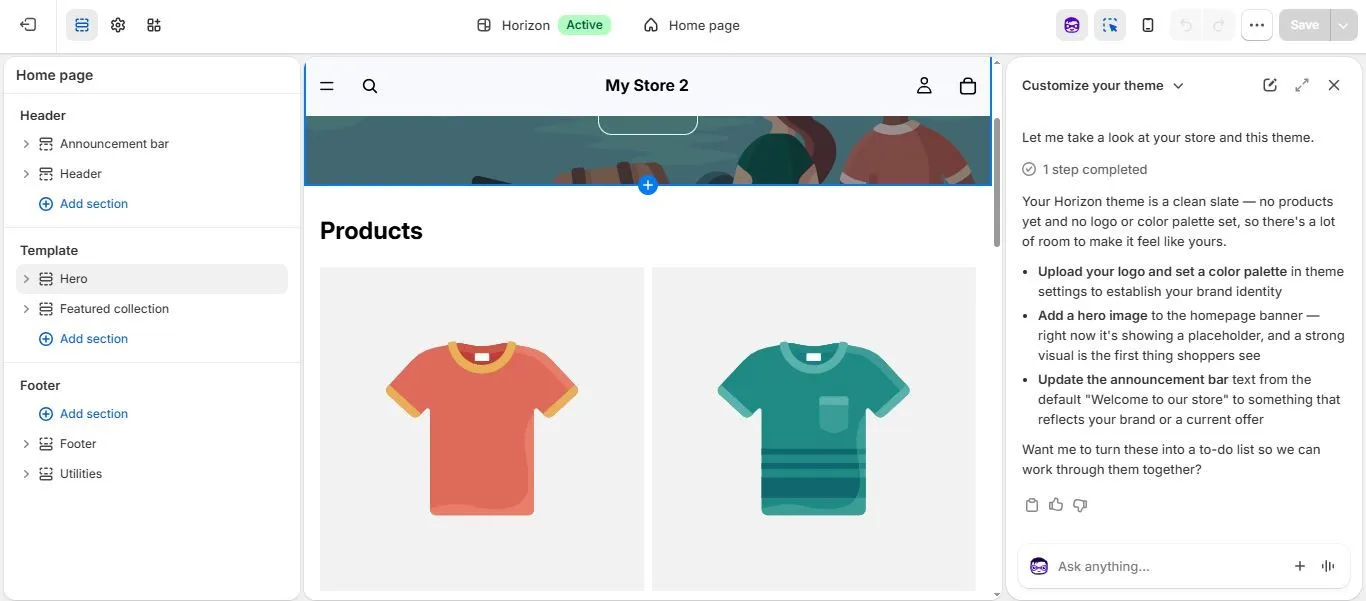
Shopify's assistant reads the store and returns specific setup steps, reinforcing the 4.75 it earns on business management. (Source image: Shopify)
Pricing
- Basic: $29 per month billed yearly, or $39 monthly. 2.9% + 30c on online cards, a 2% third-party gateway surcharge, limited API data access and zero additional staff accounts
- Grow: $79 per month billed yearly, or $105 monthly. 2.7% + 30c, 1% surcharge, 5 staff accounts, full API data access
- Advanced: $299 per month billed yearly, or $399 monthly. 2.5% + 30c, 0.6% surcharge, 15 staff accounts, enhanced live chat, live third-party shipping rates
- Plus: from $2,300 per month. Unlimited staff, fully customizable checkout, 200 inventory locations, priority 24/7 phone support
The decision above Basic is arithmetic rather than features: at what monthly card volume does a 0.2 percentage point saving beat a $50 plan increase. Work that out on your own numbers before upgrading, because the storefront you get is identical either way.
The trap is staffing. Basic includes zero additional staff accounts, so the owner login is the only login, and a two-person business is pushed from $29 to $79 for a reason that has nothing to do with selling. Cost also compounds past the plan. In a 6,703-review sample the most repeated complaint is that paid apps stack, transaction fees bite, premium themes cost extra, and features reviewers expect to be included require an app or a higher tier.
Top features
- Checkout: Shopify's most defended asset, which it claims converts 15% better on average, with fully customizable checkout reserved for Plus and fraud analysis included on every tier when using Shopify Payments.
- Shopify Payments and POS: card processing at published per-tier rates, in-person selling included on all plans, POS Pro as a per-location add-on, plus Shopify Balance, Capital, Bill Pay and a business credit card.
- Multi-location inventory and fulfillment: 10 inventory locations on the lower three tiers, shipping labels with discounts up to 87%, shipping insurance, and automated sales tax with liability tracking and filing.
- Reporting on every tier: 200-plus real-time reports plus custom analytics included from Basic, which is more generous than any website builder in this guide offers at any price.
- Developer platform and apps: thousands of apps, REST and GraphQL APIs, a CLI, Liquid theming, metafields and metaobjects, with documentation an agency reviewer calls clear, thorough and developer-friendly.
What to know before using Shopify
Getting a store live needs no technical skill, and reviewers describe launching a full catalog in one to two weeks without a dedicated tech team. Deep design change is a different job. It requires Liquid, Shopify's proprietary templating language, and that is the point where a developer becomes necessary, with checkout customization capped below Plus and a developer reviewer noting some changes are impossible without Shopify's authorization.
Shopify owns hosting, security, updates, performance and PCI compliance, and reviewers consistently credit it with handling all of that invisibly. The limits are structural rather than operational. There is no site export, so a store cannot be moved with its design intact. Blogging is thin, with no content modeling beyond products, collections and metafields, so a content-led small business site is the wrong job for this platform even though it can technically publish one.
Shopify Pros & Cons
- Pros
- ✓Full-featured store and checkout on every plan
- ✓Multi-channel selling across social, marketplaces, POS and AI chats
- ✓200-plus real-time reports included from the entry tier
- ✓Level 1 PCI DSS certified with unlimited bandwidth
- ✓Strong developer platform and documentation
- Cons
- ✕Zero additional staff accounts on Basic
- ✕App costs and transaction fees compound past the plan price
- ✕Deep customization requires Liquid, and checkout is capped below Plus
- ✕Blogging is thin, with no real content modeling
- ✕No site export, and a 3-day trial reviewers call too short
User reviews
Reviewers switching from website builders say the difference is immediate, and praise clusters on speed to a working store, the developer platform, and reliability across security, updates and performance. Cost is overwhelmingly the dominant complaint and the shape of it is consistent: the base plan is reasonable and the total is not.
One reviewer objects that Shopify is software you pay for forever and never own, and another flags that the billing cycle runs on 30 days rather than calendar months so the bill date drifts, with support confirming no alternative. Support quality is reported as good in normal conditions and slow during busy periods, particularly on payments and data issues.
Duda: Best for Business Managing Multiple Websites
- Our evaluation
- 4.24 / 5
- Pricing scheme
- Per account rather than per site. The plan buys the platform and a few included sites, with extras billed separately
- Best feature
- Dynamic pages driven by connected data, so one template fills every location page
- Native business tools
- Client billing, unlimited form submissions, personalization, multi-language, site comments and an app store. Ecommerce and bookings are separately priced
- Hosting
- Bundled in on AWS with CloudFront and a published 99.5% uptime target
Duda was founded in 2009 in Palo Alto as a mobile site product and is now a web design platform sold to agencies, SaaS platforms, hosting companies and point-of-sale providers rather than directly to end business owners. Its pricing separates platform access from the websites themselves, which is unusual here, and it is the only builder on this list whose architecture assumes from the start that you are running more than one site.
Why we chose Duda
Multi-location is a data problem before it is a design problem. Duda’s dynamic pages pull from connected sources such as Google Sheets and Airtable, so twenty branch pages come from one template and one row per location. Personalization varies content by audience, multi-language is native, and every tier allows up to 1,000 pages per site.
The per-account model matters once locations become separate sites. Agency at $52 per month billed annually includes four published sites with each additional site at $17, which is cheaper per location than four separate Squarespace or Wix subscriptions.
Storage and bandwidth are unlimited on every tier including the $19 entry plan, and Duda argues the point explicitly, that traffic restrictions are incompatible with a business model where the goal is to drive as much traffic to sites as possible.
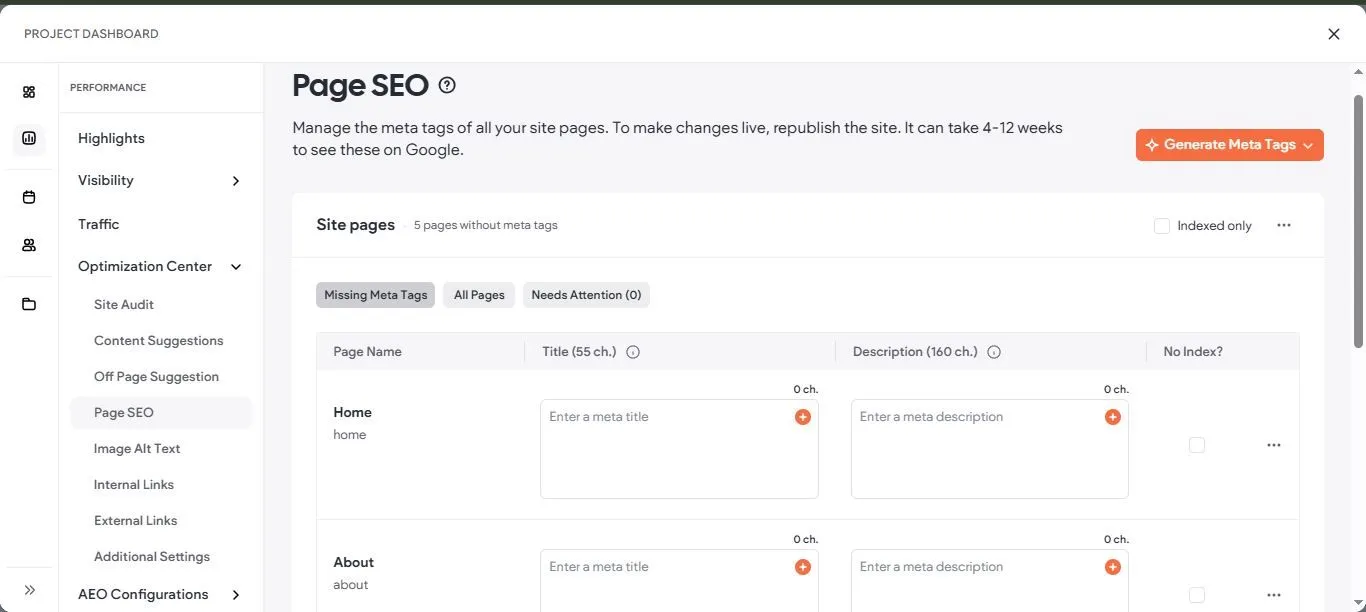
Duda surfaces meta tags, alt text, and internal links inside one optimization center, which is where its 4.00 features score comes from. (Source image: Duda)
Pricing
- Basic: $19 per month billed annually, or $25 monthly. Platform access plus 1 published site, with no team seats, no client accounts and no dynamic pages
- Team: $29 per month billed annually, or $39 monthly. 3 team seats, unlimited client accounts, limited dynamic pages, site comments, role-based permissions
- Agency: $52 per month billed annually, or $69 monthly. 6 team seats, 4 included sites, standard dynamic pages, 5 custom templates, 15 custom sections
- White Label: $149 per month billed annually, or $199 monthly. Full white labeling of the editor, dashboard, preview pages and platform emails
- Additional published sites: $19 per month on Basic, $17 per month on Team, Agency and White Label. A 14-day trial includes every White Label feature with no card, plus a 30-day money-back guarantee
Two things are easy to miss. Dynamic pages, the feature multi-location businesses come here for, are absent from Basic and only reach standard on Agency at $52, so the real entry price for this use case is not $19. And ecommerce, bookings and AI Visibility are all priced separately on top of platform plus sites, with AI Visibility running its own ladder from $19 to $195 per month.
No promotional rates appear anywhere in that list, which means there is nothing to lapse and no jump waiting in year two. What grows instead is the count. Ten location sites on the Agency plan comes to $52 plus six additional site subscriptions, roughly $154 per month, which is transparent but not cheap.
Top features
- Dynamic pages from connected data: build location, staff or product pages from Google Sheets, Airtable or another connected source, so updating a spreadsheet row updates the live page.
- Simple Editor and scoped client accounts: a stripped-back editing mode for non-technical staff, with unlimited client accounts from the Team tier restricted to the specific sites assigned to them.
- Unlimited storage and bandwidth: on every tier including the $19 entry plan, with the only published ceiling being 1,000 pages per site, which is rare in this category.
- Code export: pull the finished site down as HTML and CSS files, which only Ghost match here, though a reviewer notes blog data is not included in the export.
- Agentic SEO and AI Visibility: agentic SEO on every tier, plus a separately priced AI Visibility add-on tracking prompts across ChatGPT, Gemini and Perplexity with competitor and sentiment analysis.
What to know before using Duda
The editor is drag-and-drop with per-breakpoint editing for desktop, tablet and mobile, and reviewers describe publishing responsive sites in minutes, so an in-house marketer can run this without a developer. The recurring complaint is precision rather than capability: reviewers report spacing glitches, settings reverting after publish, and fine-tuning options missing in certain breakpoint views.
Duda owns hosting, SSL, updates and security, with free SSL on all sites and a public status page, though the published 99.5% uptime target is the lowest figure in this guide. Two limits deserve planning. Blogging is weaker than WordPress or Squarespace by reviewer account, and it is the one content type the code export does not capture. API access is available only on White Label and Custom, so an agency or business on the $52 Agency plan has no API at all.
Duda Pros & Cons
- Pros
- ✓Dynamic pages build location pages from connected data
- ✓Highest ease-of-use score in this guide at 4.6 on Capterra
- ✓Unlimited storage and bandwidth on every tier
- ✓Code export to HTML and CSS, plus a documented REST API
- ✓Simple Editor and scoped accounts for non-technical staff
- Cons
- ✕Dynamic pages are absent from Basic and standard only from Agency
- ✕Sites are billed separately from the platform plan
- ✕Ecommerce, bookings and AI Visibility are separately priced
- ✕API access is White Label or Custom only
- ✕Published uptime target of 99.5% is the lowest here, and blogging is weak
User reviews
On one hand, reviewers say unprompted that Duda understands who its customers are and solves the problems people running many sites actually have. On the other, cost accumulation is the most consistent complaint, and it is specifically about the roster rather than the headline rate, with one reviewer noting that owning multiple websites means costs add up quickly.
Editor precision issues recur, blogging is named as weaker than the alternatives, and key capabilities including API access and white-label analytics sit behind the top tier. The two harshest support reviews in the sample date from 2016 and 2019 and predate the current platform by a wide margin.
Learn how SGEN’s native multi-website setup compares to Duda.
WordPress: Best for Customization and Flexibility
- Our evaluation
- 4.18 / 5
- Pricing scheme
- Either tiered by site across four billing cycles or free, with real cost in hosting, themes and plugins.
- Best feature
- Full ownership of the site, database and content, with no vendor lock-in
- Native business tools
- Forms, newsletters, paid subscribers, payment buttons and WooCommerce. Almost everything else is a plugin decision
- Hosting
- Buy separately for WordPress.org, bundled into the plan on WordPress.com
WordPress launched in 2003 as blogging software and became the reference CMS the rest of this list is measured against. Two versions get confused constantly. WordPress.org is free open-source software you install on hosting you buy and manage, while WordPress.com is Automattic's managed service built on that software, where hosting, security, backups and updates are handled for you. WordPress.com states 160 million websites trust it.
Why we chose WordPress
No other platform on this list answers as many requirements without custom work. Whatever the business needs next, whether that is appointment booking, a members-only area, a storefront, a second language or a content type nobody else supports, something in the library already does it. The decision becomes which one to install rather than whether to pay someone to build it.Set against Squarespace and Wix, the distinction is what happens at the boundary. A hosted builder handles the requirements its vendor anticipated and stops cleanly beyond them. WordPress has no such boundary, so a request that would end in “the platform cannot do that” somewhere else usually ends instead with a search, a plugin and a working feature the same week.
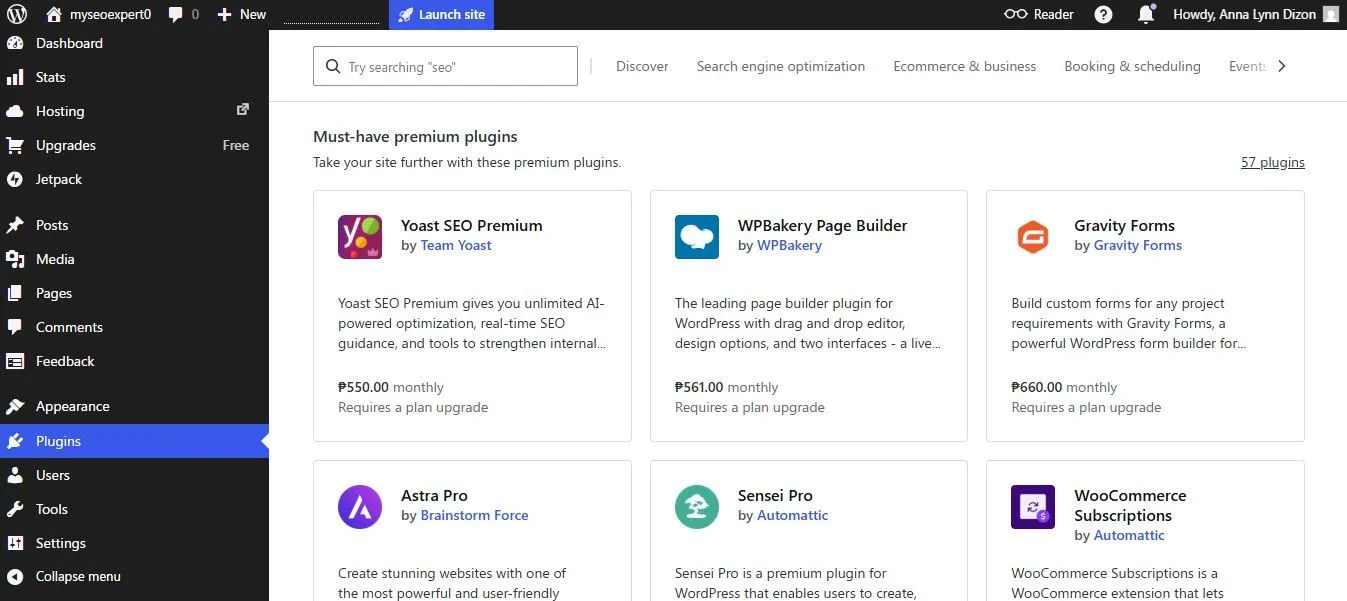
WordPress.com reaches full functionality through paid plugins that each carry their own monthly cost on top of the plan, which is the one place its 4.75 ease of use score slips. (Source image: WordPress)
Pricing
- WordPress.org software: free and GPL licensed. Hosting, a premium theme and the plugin stack are separate costs
- WordPress.com Free: $0. 1 GB storage, a wordpress.com subdomain, no plugins, and a 10% transaction fee on payments
- Personal: $4 per month billed annually. Custom domain free for a year, 6 GB, plugin access, 8% transaction fee
- Premium: $8 per month billed annually. All premium themes, full analytics with UTM and device insights, payment buttons, 4% fee
- Business: $25 per month billed annually. 50 GB, free staging site, real-time backups, SFTP, SSH, WP-CLI and GitHub Deployments, 2% fee
- Commerce: $45 per month billed annually. WooCommerce bundled, unlimited products, inventory management, selling in 60-plus countries, 0% fee
A free licence does not produce a free website, and the number most people overlook is the transaction fee ladder. That 10% on Free, 8% on Personal, 4% on Premium, 2% on Business and 0% on Commerce are charged on top of standard card processing. A shop sitting on Personal spends more on payments alone than a shop on Commerce spends on everything.
Business at $25 is the point where WordPress.com starts behaving like a development platform, and it is the only tier we would put a business site on. Two-year and three-year terms cut the headline rates further, with stated savings reaching 69% on Personal and Premium, but monthly billing forfeits the free first-year domain, which is a real cost the advertised price does not show.
Top features
- Plugin ecosystem: the deepest library anywhere, spanning SEO, forms, caching, bookings, memberships, ecommerce and security, which means most requirements are already solved and priced as a download instead of a build.
- Block editor and site editor: saved blocks, patterns and templates take the repetition out of assembling pages, and WordPress.com now ships a guided AI site builder, metered on the lower tiers.
- Full data ownership: GPL-licensed open source with a standard export format and a documented database schema, so a site moves between hosts without vendor permission.
- WooCommerce: native ecommerce scaling from a handful of products to a large catalog, bundled with its premium extensions on the Commerce tier and installable on Business.
- Unlimited users and granular roles: every plan including free supports unlimited users with role-based permissions, the most generous collaboration position of any platform here.
What to know before using WordPress
This is the hardest platform on the list to run yourself with reviewers stating directly that WordPress takes far longer than Wix or Squarespace to reach a desired design and that the block editor still feels clunky compared with proprietary builders. Most small businesses hire someone for the build even when they intend to maintain it afterward.Maintenance depends entirely on which version you buy. On WordPress.com a web application firewall, DDoS mitigation, brute-force protection, malware detection and removal, Akismet and automated core updates are included from the free tier upward. On WordPress.org every one of those becomes your responsibility, along with hosting choice, backups and plugin conflicts.
Migration is strong in both directions, with a built-in importer covering Wix, Squarespace, GoDaddy, Medium and Blogger.
WordPress Pros & Cons
- Pros
- ✓The deepest plugin and theme library of any platform here
- ✓Full ownership with a clean export path to any host
- ✓Free software, and plugins on every paid plan from $4/mo
- ✓Unlimited users with role-based permissions on every plan
- ✓Security stack included from the free tier on WordPress.com
- Cons
- ✕You own maintenance, updates and security on the self-hosted route
- ✕A core release can take a live page down through the plugins beneath it
- ✕Ease of use at 4.2, the lowest score in this guide
- ✕Transaction fees run 10% to 2% below the Commerce tier
- ✕No vendor support at all on WordPress.org
User reviews
Real-life users praise WordPress for the absence of lock-in directly, alongside an ecosystem that answers nearly any requirement and a community reviewers call the best tech support in the world. That said, the negatives land almost entirely on the plugin layer. Sixty-seven reviewers claim plugins slow the site down and 36 report plugins colliding after an update. Others describe a steep climb around updates and are uneasy about securing the site themselves.
One reviewer describes swapping out abandoned plugins, paying for replacements, and being permanently concerned about security.
Get our list of WordPress alternative recommendations.
Ghost: Best for Online Publications and Subscription-Based Models
- Our evaluation
- 4.13 / 5
- Pricing scheme
- By site and by audience size. Quoted prices are the floor for the smallest member band
- Best feature
- Memberships, paid tiers and newsletters as core product, with 0% of subscription revenue taken by Ghost
- Native business tools
- Newsletters, memberships, paid tiers, tips and donations, special offers, referrals and comments. No ecommerce and no bookings
- Hosting
- Ghost(Pro) managed hosting, or self-host the open-source software anywhere
Ghost began in 2013 as a Kickstarter-funded reaction to WordPress bloat and is now open-source Node.js software published by a non-profit foundation. Ghost(Pro) is the official managed hosting from the same team, and the software itself is free to self-host under an MIT license. Publishing, newsletters, memberships and paid subscriptions are core products here rather than plugins bolted on afterward.
Why we chose Ghost
Monetization is built into the core and Ghost takes 0% of subscription revenue from Publisher upward. Paid tiers, tips, donations, time-limited offers, member segmentation, unlimited email sends and signup attribution all ship together, so a paid newsletter or a membership site works out of the box. The editor is the most cited strength in the reviews by a wide margin, described as minimal and distraction-free.Against WordPress, the difference is what you have to assemble. A WordPress publisher licenses a membership plugin, an email plugin and a payments plugin separately and patches all three, and reviewers moving to Ghost consistently report traffic gains they attribute to page speed and clean output. White label branding is a named feature on every tier including the $18 entry plan, which no other platform in this guide offers at that price.
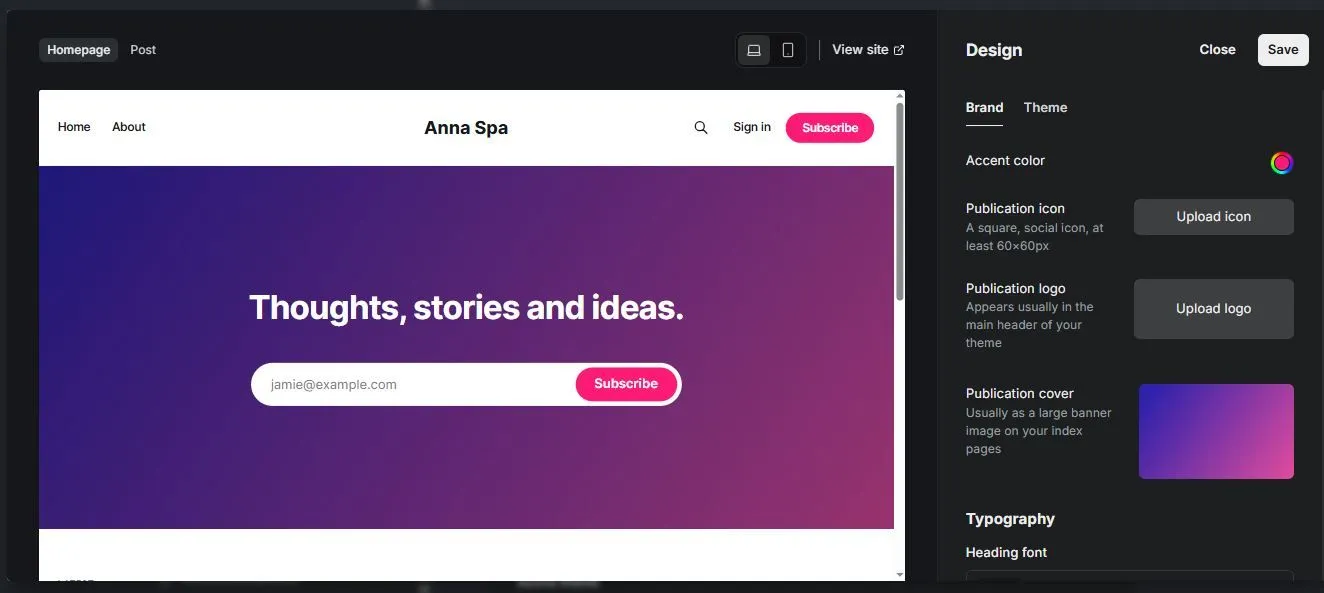
Ghost limits design control to brand and theme settings, so setup is fast but the layout options stop where a page builder would start.(Source image: Ghost)
Pricing
- Starter: $18 per month billed yearly. 1 staff user, 1,000 members, 1 newsletter, 5 MB file uploads, no paid subscriptions or premium tiers
- Publisher: $29 per month billed yearly. 3 staff, 1,000 members, 3 newsletters, 3 premium tiers, 100 MB uploads, 0% transaction fee
- Business: $199 per month billed yearly. 15 staff, 10,000 members, 10 newsletters, 250 MB uploads, priority support
- Custom: quoted. Unlimited everything, dedicated IP, SSO, invoice billing and the only published 99.9% uptime SLA
- Self-hosted: the software is free under MIT, and you pay only for infrastructure
The Starter to Publisher jump is larger than $11 suggests, because Starter cannot earn. No paid subscriptions, no tips, no premium tiers, no marketplace themes and a 5 MB per-file cap. If the business model is subscriptions, your real entry price is $29.
Two other things shape the bill. Prices rise with audience size through a member slider that runs to 100,000 plus, so every figure above assumes the smallest band, and any budget should state the member count it assumes. Self-hosting removes the subscription entirely and moves SSL, backups, updates, CDN, security and uptime back to you, which Ghost states plainly rather than glossing over.
Top features
- Professional editor: dynamic cards for galleries, video, audio, products, toggles and files, with markdown support, and it is the single most praised element of the product across both review sites.
- Newsletters with unlimited sends: no send limits on any plan, managed deliverability with bounce handling and reputation monitoring, custom templates, and the ability to edit links after sending.
- Memberships and paid tiers: free and paid tiers, time-limited special offers, tips and donations, member tagging and segmentation, all Stripe-backed with 0% taken by Ghost from Publisher up.
- Open-source portability: the software is MIT licensed with source on GitHub, so a Ghost(Pro) site can move to self-hosting or another host without a rebuild, and the Content API ships on every tier.
- Advanced SEO and ActivityPub: meta tags, structured data, sitemaps and canonical URLs on every tier, plus native distribution to the fediverse including WordPress, Bluesky, Threads, Flipboard and Mastodon.
What to know before using Ghost
There is no drag-and-drop builder in Ghost so coding knowledge is required if you want to build a website on your own. Starter gives you design settings on a built-in default theme, Publisher and above install marketplace themes, and anything past the presets means a hand-written Handlebars theme. If your site needs a bespoke look, budget for a developer. Paid subscriptions require Stripe with no alternative, which reviewers name as a real constraint.Who owns maintenance depends on which Ghost you buy. On Ghost(Pro) the team handles automatic weekly updates, automated backups, free SSL, a worldwide CDN and Fastly-backed security including DDoS mitigation and a web application firewall. Self-hosted, every one of those is yours, and one long-term self-hosting reviewer describes major-version upgrades as too difficult.
Ghost Pros & Cons
- Pros
- ✓0% taken on subscription revenue from Publisher upward
- ✓Open source and self-hostable, so the site can genuinely leave
- ✓Whitelabel branding on every tier, including the $18 plan
- ✓Unlimited email sends on every plan with managed deliverability
- ✓Strong security stack with WAF, DDoS mitigation and automated backups
- Cons
- ✕Starter cannot take paid subscriptions at all
- ✕No drag-and-drop builder, and design beyond presets needs code
- ✕No ecommerce, bookings or CRM
- ✕Prices rise with audience size, so quoted figures are a floor
- ✕Email-only support, and no phone or chat at any tier
User reviews
Real life users compliments the editor on the publishing economics of getting blogging, newsletters, memberships and subscriptions in one product with no revenue cut, and on speed and SEO gains after moving from WordPress. The dominant complaint is the absence of plugins, with reviewers naming fewer themes and design options and calling the platform bare bones outside publishing.
Customization requiring code and the hard Stripe dependency follow, along with two long-standing gaps: no built-in site search and no like mechanism.
What to Look For in the Best Website Builder for Small Business
Work through these six before you compare a single price.Sustainable cost
Cheapest and best value part company quickly here. Wix Light at $17 reads as better value than SGEN Indie at $39 right up to the point you notice that Light cannot take a payment at all, and the first Wix tier that can is Core at $29. WordPress.com’s free tier skims 10% off payments and Personal at $4 skims 8%, which at any real sales volume costs more than every plan on this list.
Free is a test tier rather than a business tier, and each one is limited differently. Wix free carries ads and a wixsite.com subdomain, SGEN’s Sandbox unlocks everything but publishes only to a staging URL, and WordPress.com free cannot install plugins.
Then model renewal: Squarespace promotions apply to the first payment only, Wix does not publish a renewal price at all, and the free first-year domain on Wix, Squarespace and WordPress.com annual plans becomes a bill in year two.
Compliance support
A healthcare practice, a regulated retailer and a shop taking cards are three different requirements, and retrofitting compliance is far more expensive than choosing for it. Shopify is certified Level 1 PCI DSS with stores PCI compliant by default. SGEN publishes HIPAA compliance and states that SOC 2 and ISO are in progress.Check whether age verification and a logged consent banner are native or a plugin, and note that single sign-on is a top-tier feature on both Ghost and Duda.
Ease of use
How easily you can drive the editor during a comparison is not what matters. What matters is whether the person who runs the business can swap a phone number or add a page half a year from now without picking up the phone to anyone, because that phone call becomes a recurring line in the budget.Constrained platforms win here for the same reason they frustrate designers. Squarespace’s grid and Duda’s Simple Editor make a layout hard for a non-designer to wreck, while Wix reviewers, given a free hand, describe exactly the results a free hand produces.
Maintenance
On self-hosted WordPress the answer is you: core updates, plugin patches, backups, and the conflicts that follow a release. Sixty-seven reviewers name plugins slowing the site or expose it and 36 reporting them colliding after an update. If nobody on staff is going to do that work, you are buying a retainer whether or not you have priced one.
Every hosted platform here takes that work back. SGEN ships hosting, SSL, CDN, WAF and security patching in the Foundation Pack on every plan including the free Sandbox, and there is no plugin layer underneath to conflict in the first place
Hosting requirements
Hosting that arrives with the plan takes a decision and an invoice off your hands. WordPress is the one entry here that keeps the two apart, and that split is simultaneously its biggest advantage and the root of most of its complaints, because performance and uptime become yours to choose and yours to fix.
Where hosting is bundled, read the specifics rather than the word. Duda publishes a 99.5% uptime target, the lowest figure here. Ghost’s 99.9% SLA exists only on the quoted Custom tier. Bandwidth is unlimited on Squarespace, Shopify, Duda and WordPress.com, unpublished on Wix, and the security stack varies from an SSL certificate to a full WAF with DDoS mitigation.
After sales support
Support is irrelevant until the morning something stops working, and that morning is exactly when waiting costs the most. Wix runs 24/7 care on every plan including free, with live chat, a scheduled callback and an AI assistant that escalates, and reviewers name it the strongest part of the product. Squarespace offers 24/7 chat and email with a stated 12-hour window but no phone line.
Shopify scales chat by tier with 24/7 phone reserved for Plus. Ghost is email only with no phone or chat at any tier. WordPress.org has no vendor support at all, and one reviewer notes plainly that there is no phone number and that expecting white-glove service will be a shock.
Conclusion: What is the Best Website Builder for Small Business?
Business models vary which is why there is no one-size-fits-all website software. The best website builder for small business is Squarespace for non-technical website owners. Wix offers the best value for restaurants while we recommend Shopify for ecommerce. Ghost is perfect for online publications, WordPress for customization, and Duda fits for managing multiple locations on one platform.
A unified CMS platform like SGEN offers the most value, and is the easiest to maintain among the best website builders for small business. A small business website builder that ships native tools, hosting, SSL, CDN, WAF, SEO, forms and analytics itself eliminates the plugin risks. Build the whole thing free on the Sandbox and put the two bills side by side.
Frequently Asked Questions
What is the best free website builder for small business owners?
Wix is the best free website builder for small business owners because the free plan gives you the full editor, the template library and hosting. The cost is a wixsite.com subdomain, Wix advertising and no payment acceptance. WordPress.com's free tier cannot install plugins and charges 10% on payments, and SGEN's Sandbox unlocks everything but publishes only to a staging URL.
What is the best CMS for a small business website?
WordPress is the best CMS for small business website projects that need custom content types, an unusual integration or full ownership, since the plugin library answers almost any requirement. It costs you maintenance, updates and security.
How much should a small business website builder cost?
Budget $16 to $40 a month for a hosted small business website builder on an annual plan, then add a domain renewal from year two. Add transaction fees if you sell, extra seats if more than one person logs in, and any add-on the entry tier leaves out, such as scheduling or email marketing. Year two normally costs more than year one.
Which ecommerce website builder is best for a small business?
Shopify is the strongest ecommerce website builder here, because checkout, payments, POS, inventory, shipping and automated tax are identical on every plan including the $29 entry tier. Wix Core or Squarespace Core is cheaper and sufficient for a short catalog. Compare card rates and transaction fees rather than plan prices, since fees usually decide the total.
What is the best website builder for companies with more than one location?
Duda is the best website builder for companies running several locations, because dynamic pages build location pages from connected data instead of by hand and the plan buys the platform rather than a single site. Wix and Squarespace need a separate subscription for every location, which gets expensive and drifts out of date faster.