



Website migration SEO is the work of carrying your search rankings across when your site moves to a new platform. When businesses hesitate replacing a costly website platform it’s more often because they worry about losing their place in search results. That said, rankings survive a move when URLs, redirects and metadata are handled deliberately. They suffer when those three are treated as cleanup at the end.
Businesses shouldn’t be stuck on a website platform that costs too much just to keep their rankings, and this SGEN guide explains why staying put stops making sense. It provides a closer look at what actually happens to a site's rankings during a move and how to safely replace your website platform with your rankings intact.
Key takeaways
- Rankings move with URLs, not with pages. If old addresses redirect to their new homes, most of your search equity travels with them.
- Monthly platform fees compounded by overstacked plugins are less than transparent and can quickly get out of hand.
- Recovery from a badly handled migration has been measured in months rather than weeks.
What Actually Happens to Your Rankings When You Move
The short answer: A short dip is normal and expected.A website migration typically causes short-term SEO dips because search engines need time to discover new URLs, re-crawl pages, and update their index, straining crawl budgets and triggering ranking volatility. During this transition, sites often see temporary traffic drops as indexing delays cause keywords to bounce up and down while links re-map.
However, these short-term setbacks give way to meaningful long-term gains, including faster load times, cleaner and more logical site structures, and easier indexing for search bots. Over time, this stronger technical foundation builds greater site authority and user trust, driving higher organic traffic than before the migration.
For a small business weighing whether to touch a site that currently ranks, the number that should drive your decision is how long recovery takes. A Search Engine Journal study found that sites took around 17 months to regain their traffic. Permanent losses are almost always caused by preventable things and not by the act of moving: missing redirects, pages nobody inventoried, a staging site left visible to search engines.
Meanwhile, the absence of an SEO migration plan can be costly. Marcel Digital, for example, documented a 44% drop in organic traffic after a launch carried out with no migration strategy, affecting roughly 500,000 users.
The Three Things That Protect Your Rankings
Your URLs are what rank, not your pages
Changing a URL effectively creates a new page with no ranking history of its own. Whatever authority the old address had built up over time does not automatically transfer to the new one. This is a critical point to understand before any migration begins, since it shapes nearly every decision that follows. Treating URL changes as a fresh start, rather than a simple relocation, is the mindset that protects existing rankings.
The practical takeaway is also the cheapest protection available during a migration. Wherever the old address can be preserved, it should be. If a page lived at /about-us before the move, it should live at /about-us after it as well. Matching slugs exactly is widely regarded as the single most important step for maintaining search continuity, and it costs nothing extra at build time.
Redirects carry the value across when a URL has to change
When an address genuinely has to change, a 301 redirect map tells search engines the move is permanent and the accumulated value should follow. Create a record of old address to new address, one row per kept page, so every old link forwards to its new home.
One common mistake is worth avoiding specifically: Do not redirect removed content to your homepage. It confuses visitors who expected a specific page and it confuses search engines about what the homepage is. Content that is genuinely gone should say so with a 410, which tells search engines to stop looking.
Importing content is not the same as preserving rankings
This is a distinction almost nobody draws, yet it matters most when comparing platforms on their migration tooling. Content transfer moves your words from one place to another, while redirect mapping moves your rankings, and these are fundamentally separate jobs. No automated tool in this space actually handles the second task.
Even providers that market AI-powered migration tools acknowledge that redirects for individual blog posts still require manual work, which is an honest admission that applies to the entire category rather than any single provider.
So when a platform advertises a content importer, it's worth reading that claim as a statement about your content rather than your search visibility. Both aspects matter for a successful migration, but only one of them addresses the concern that likely keeps you up at night.
Importing content solves half the problem while leaving the harder, higher-stakes half untouched. Understanding this gap early helps you evaluate migration tools for what they actually do, not just what they promise.
A Practical Step-By-Step Guide To Small Business Website Migration
If you are running a small business, you’ll need to understand the scope of a website migration SEO in order to protect your revenue. This means playing an active role for better oversight of technical teams in preventing costly downtime and avoiding permanent search engine ranking drops.
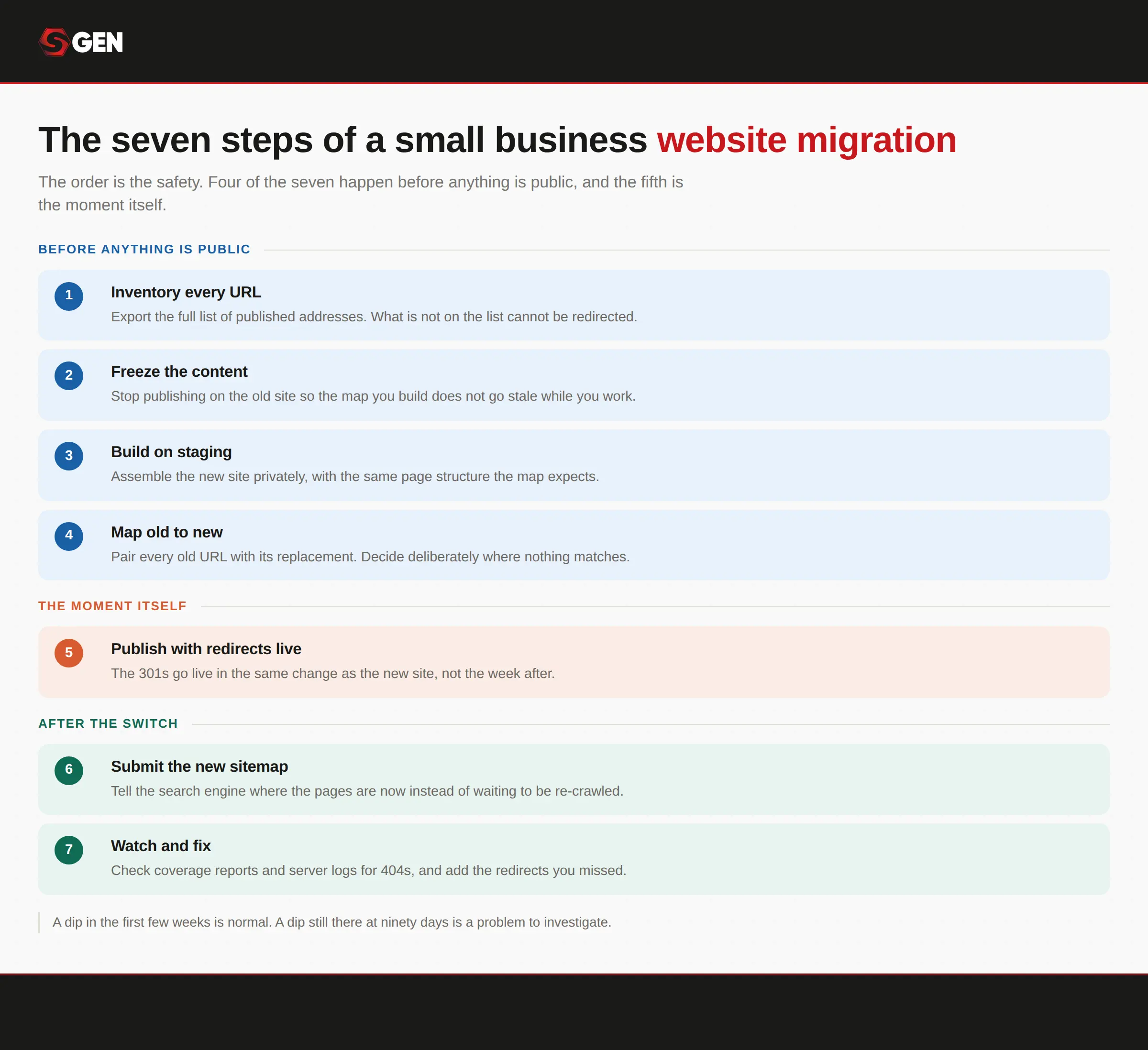
Seven steps, not twenty-nine. Enough to scope the job and brief whoever does it.
Step 1. Inventory everything you have
This project should start with an SEO migration checklist. Every page, every post, every image, every form. Export your page and post lists, download the media library, and write down where form submissions currently go.
Pull your URL list from more than one source, because no single source is complete. Your sitemap, Google Search Console, your analytics, and whatever your current system can export will each show you something the others miss.
Do not skip pages that look unimportant. A three-year-old blog post can be carrying a dozen links from authoritative sites, and you will not know until you look.
Step 2. Record what "normal" looks like before anything changes
Take two to four weeks of baseline before you touch anything: your current rankings for the terms you care about, your organic traffic, and which pages bring it in. Without this you cannot tell afterwards whether something broke or whether it is simply a quiet month.
Take a full backup of the existing site at the same time. This is your rollback point and it should exist before anyone starts work.
Four things should stay in your name regardless of who does the migration: Search Console ownership, that pre-migration backup, the URL map you build in Step 5, and your analytics baseline. This is the most practical protection a small business has, and it costs nothing to insist on.
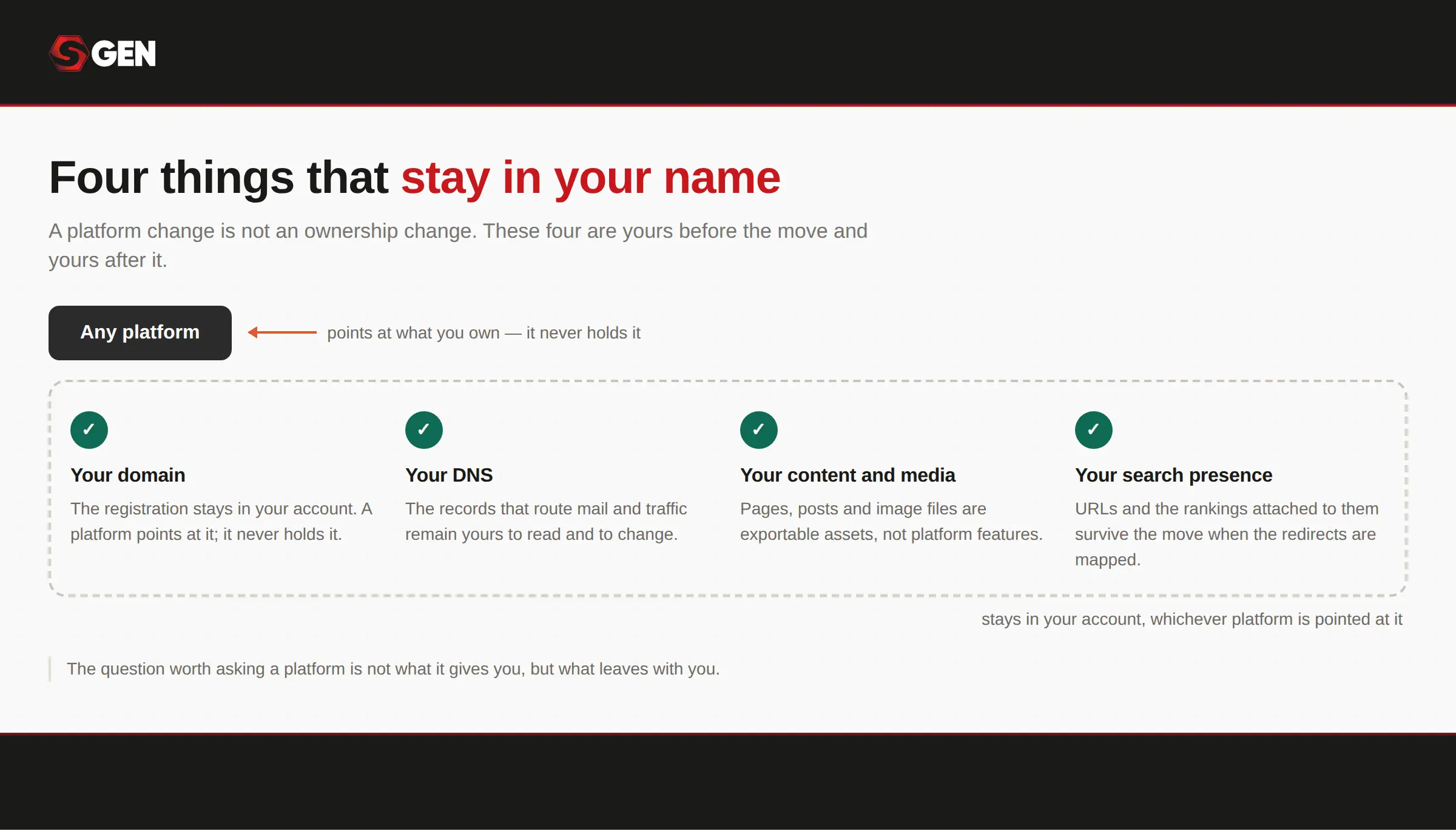
Whoever performs the migration, these four belong to you.
Step 3. Decide what to keep, improve, or let go
Most guides skip this step but it is the one that pays for itself. A move is the natural moment to drop pages nobody reads and fix the ones that matter, rather than carrying every decision you have ever made across to a new system. Which is why a rebuild is a solid alternative to an import event or wizard as this is your opportunity to clean up rather than carry legacy debt forward.
Anything you drop still needs a decision. Redirect it somewhere genuinely relevant, or retire it deliberately with a 410.
Step 4. Move the content, rebuild the design
Correct the assumption most people arrive with: moving platforms does not mean retyping your website. On most modern platforms, pages and posts export to CSV or JSON and import with a field-mapping step that preserves whether each item was a draft or published.
What gets rebuilt is the design. Themes do not transfer as themes, and the equivalent on a modern platform is a set of brand tokens plus page templates. On a site carrying years of theme and plugin decisions, that rebuild is usually the part worth doing. An audit of the current plugin stack is advisable.
Build on a private staging version that search engines cannot see, never on the live site. Re-upload your media rather than linking back to the old server, and reset the alt text as you go. Resist the urge to recreate your current website’s visual design, no matter how much you like it. Remember to match the brand, not the layout.
Step 5. Map every URL that is changing
A two-column document. Old address on the left, new address on the right. That is the entire artefact, and it is the single thing most responsible for protecting your rankings. Where a whole pattern changes, such as dated blog URLs collapsing to simple slugs, one rule can cover the whole set rather than one rule per post.
Set the redirects up before the switchover, not after. Once search engines crawl the new site and find dead addresses, the damage is already done, and it is the most common way a competent migration goes wrong.
Step 6. Verify on staging before you touch DNS
This is a short checklist you can actually run. Verify that every page is present, every post is correctly dated and categorized, and no broken images. Ensure that every form is tested with a real submission, navigation is working and metadata is set on every page.
You should also test a sample of old URLs against your redirect map. Five is usually enough to catch a systemic error, and a good platform will let you dry-run a single URL to see which rule catches it before anything is live. Confirm the staging site is still invisible to search engines, and that the live site will not be.
Step 7. Cut over, then watch for ninety days
Point the domain at the new site ONLY once everything above is done. Propagation usually takes minutes to an hour. Afterwards, submit the new sitemap in Search Console. If your domain changed as well as your platform, file the change of address.
Your last and crucial step of the migration is to check at 30, 60 and 90 days. As mentioned, a dip in the first few weeks is normal and expected. A dip that is still there at 90 days is a problem to investigate rather than wait out. Keep the old site and its backup until the new one is fully indexed.
Should You Do This Yourself, or Hire Someone?
Not every website migration needs outside help. Managing a migration yourself is reasonable when the scope stays fairly limited. This tends to be the case for a small site where URLs remain largely unchanged, with little or no blog archive and only modest organic traffic to consider.
It also works well when there's nothing beyond content that needs rebuilding, minimal CMS content overall, and no changes happening to forms or analytics setups. You will need a website migration checklist and a 301 redirect map to start.
Hiring outside help becomes the better call as complexity and stakes increase. This is especially true when hundreds of URLs are changing at once, or when a domain change is happening alongside a platform change. Custom functionality that has to be replicated also raises the bar for what a DIY approach can realistically handle.
Perhaps most importantly, any site where organic search is genuinely how customers find the business warrants the added protection that comes with professional support.
So the decision whether to hire or DIY depends on your chosen website migration strategy .
| If your move involves | What changes | SEO risk | Typical timeline | Can you self-manage? |
|---|---|---|---|---|
| A redesign on the same platforms, same URLs | Look and layout | Low | Days to 2 weeks | Usually, yes |
| A new platform, URLs kept identical | Platform, not addresses | Low to moderate | 2 to 4 days for 5 to 10 pages | yes, for small sites |
| A new platform, some URLs changing | Platform and addresses | Moderate | 1 to 2 weeks for 10 to 25 pages | Yes, with a redirect map |
| A new platform and redesign, 100+ pages | Nearly everything | High | 3 to 6 weeks build or longer | Get help |
| A domain change, any size | The address itself | Highest | Add 2 o 4 weeks of monitoring | Get help |
Cost of website migration
Website migration costs vary from completely free to over $75,000, depending largely on project complexity and who performs the work. At the lowest end, many hosting companies offer free or low-cost migration tools to win new customers, making simple moves between hosts essentially painless.
As complexity increases, so does the price tag, with freelancers and small agencies typically charging a few thousand dollars for standard business sites that need basic URL mapping and SEO safety checks. Large-scale e-commerce and enterprise migrations sit at the far end of the spectrum, often requiring tens of thousands of dollars to properly handle the job.
Here’s a rough estimate of what to expect:
| Project Type | Cost Range | What's Included |
|---|---|---|
| Basic Hosting Transfer | $0 to $200 | Standard WordPress/CMS move between hosts; often free via hosting provider tools |
| Small Business | $2,000 to $9,000 | Content transfer, basic URL mapping, fundamental SEO safety checks |
| Mid-Size to Large E commerce | $10,000 to $80,000+ | Product catalog and account migration, comprehensive 301 redirects, risk mitigation, traffic protection |
The WordPress Costs That Brought You Here
If you’re here because your business is growing and looking for a more efficient way to scale your website, then you’re not alone. While plugins support flexibility, there are certain tradeoffs that should be taken into consideration.
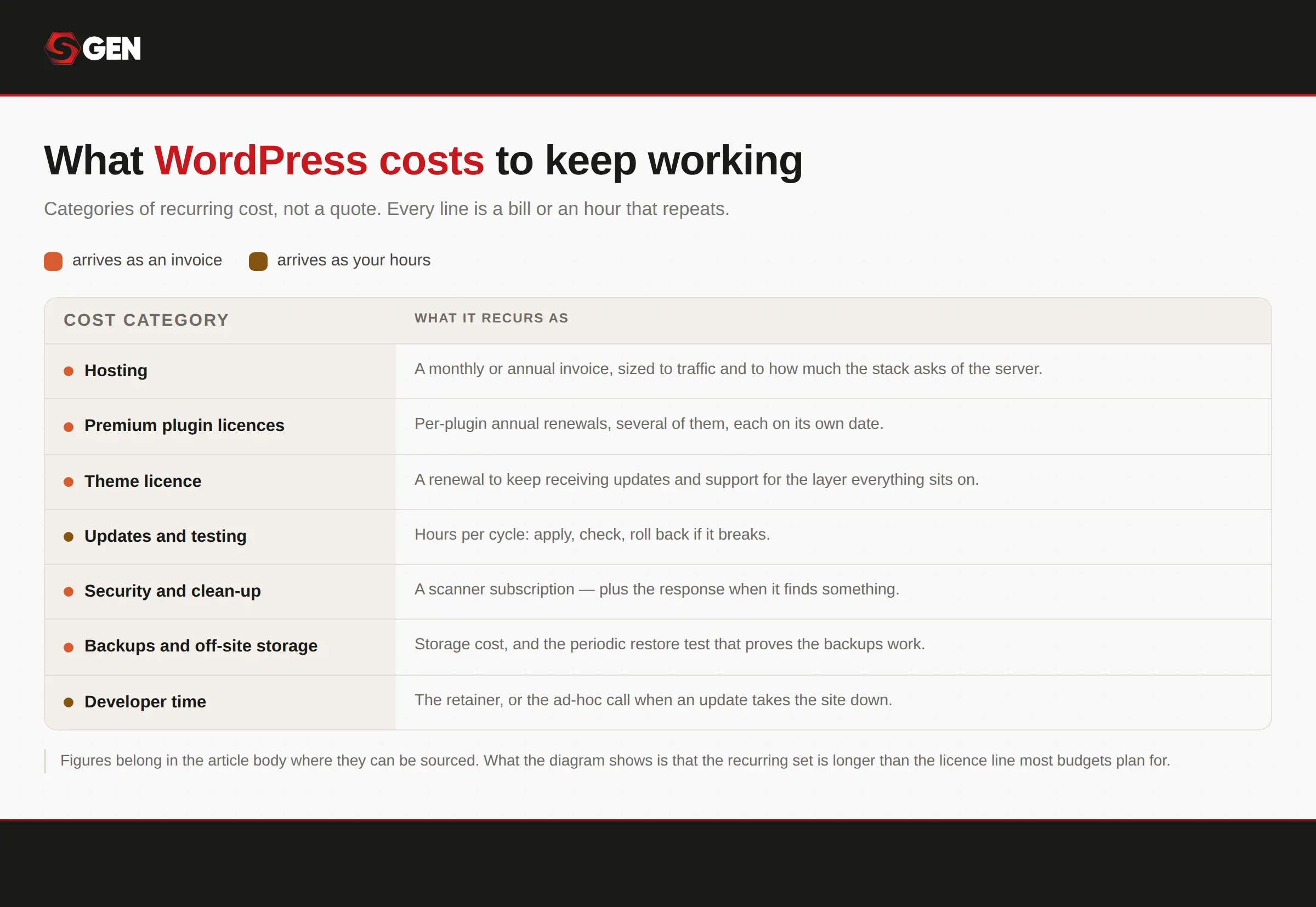
The cost to manage multiple vendors never reaches an invoice.
So how would you know if your small business has outgrown WordPress?
You experience plugin fatigue
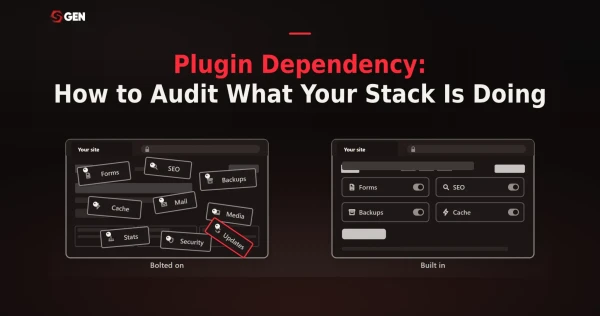
Every capability on a WordPress site is a separate product with its own update schedule and its own vendor. The average install runs 20 to 30 of them. Each one solved a real problem on the day it was installed, and together they become the thing you maintain.
You notice the rising maintenance cost
The recurring bill is rarely the license alone. Managed hosting, an SEO plugin, a security plugin and a forms plugin together come to roughly 60 dollars a month, or about 727 dollars a year, for a single site at renewal pricing and the hours spent on updates sit on top of it.
You have a growing concern over security exposure
Each plugin is an additional surface. Patchstack found that plugins accounted for 91% of the 11,334 WordPress vulnerabilities disclosed in 2025, while core accounted for six. Keeping them patched is ongoing work rather than a task you complete
You're struggling to manage multiple vendors
When something breaks, working out which of five suppliers owns the problem is itself the problem. That is the cost that never appears on an invoice. None of this makes WordPress a bad choice. The point is that the cost is cumulative, and most small businesses have never added it up.
Why Waiting Often Costs More Than Moving
"If it is ranking, do not touch it" is the most common reason small businesses stay put, and it is frequently correct. For a stable site with meaningful organic traffic and no operational pain, not moving is a legitimate answer.
That said, what waiting costs is less visible than what moving risks, which is exactly why it gets discounted. Maintenance hours compound. Security exposure grows with every plugin added. Performance degrades as the stack accumulates. And the rebuild you are deferring gets larger and more expensive every month the site grows.
The clearest way to think about this comes from outside the world of platform sales pitches, since anyone selling a solution has an obvious stake in how you weigh the tradeoffs. If a migration genuinely serves the business's long-term interests, that same logic extends to its SEO outcomes, even with the near-certainty of some temporary turbulence along the way.
The real question is how well the move gets executed once the decision has already been made.
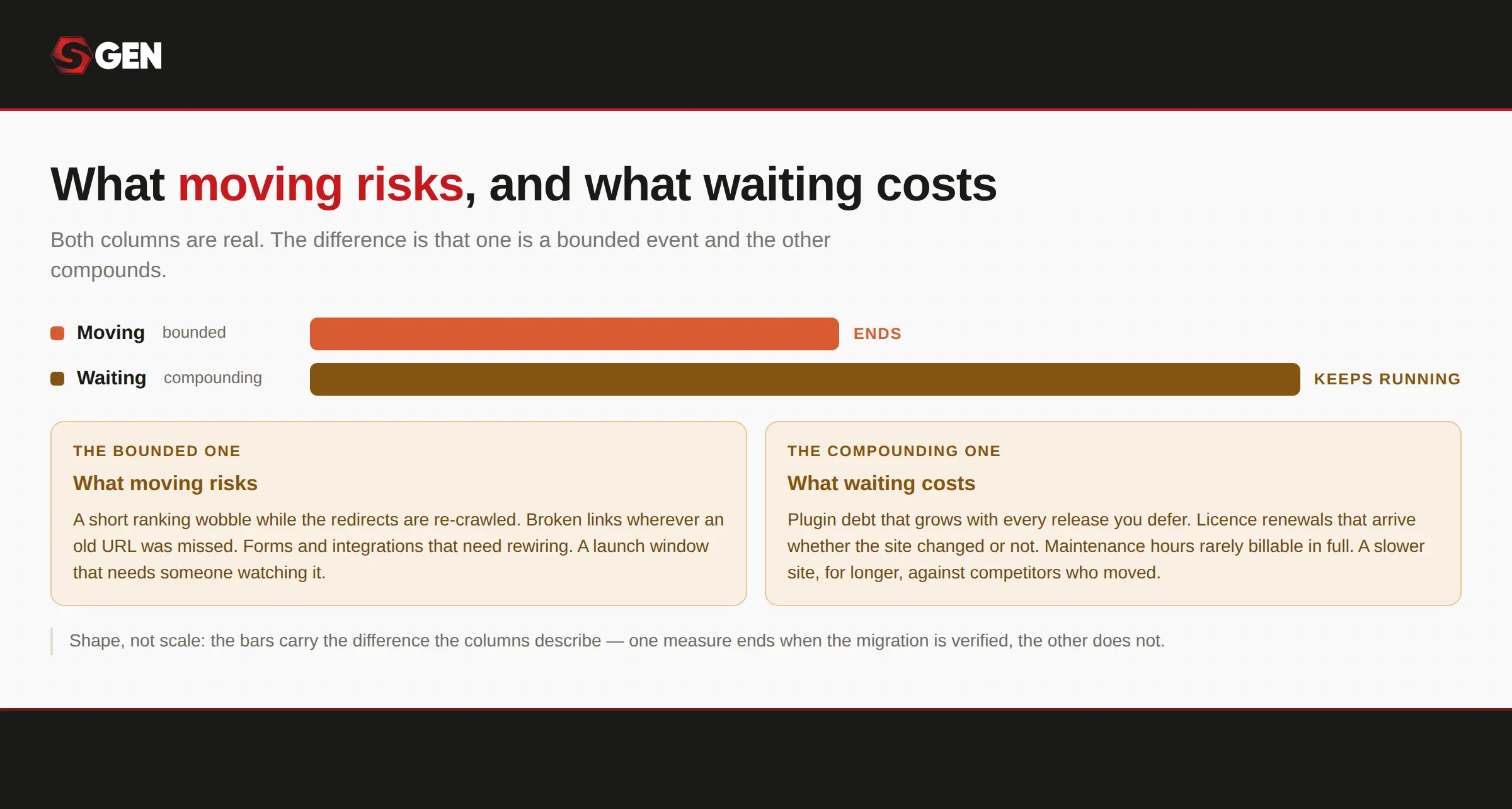
The price of a migration should be weighed against what stands to be lost if rankings and traffic aren't properly preserved
Why Should Small Businesses Choose Integrated Platforms?
The argument is not that integrated platforms are better in the abstract. It is that they remove specific costs a small business is currently absorbing without measuring.
Maintenance drops because there is no plugin stack to keep in sync. Functionality that used to be assembled ships with the platform: forms, SEO fields, redirects, analytics, backups. Performance is handled at the platform layer rather than configured per site. And management simplifies because one login replaces four vendor relationships.
The field here is genuinely competitive. Wix, Squarespace, Duda and SGEN all serve small business sites, and each is stronger than the others at something. Read our evaluation of 7 best website builders for small business to find the right one before you commit.
How SGEN Approaches Migration
SGEN applies the same seven steps. What differs is how much of the risky work the platform handles rather than you.
Two paths, and neither needs you to hire a developer.
The white-glove route runs five published steps. You send the site URL and what a finished result looks like. They scope the work and quote a fixed price, which you approve before anything starts. They rebuild, with your content imported. You review the result on staging and sign it off. Then they launch with 301 redirects wired from every old URL. It is quoted separately from the plan price.
The do-it-yourself route is free on the sandbox tier. Content imports via CSV or JSON with field mapping, pages start from templates rather than a blank canvas, and brand settings are defined once as global tokens.
What that means for your rankings
Redirects are native 301 and 302 rules, loadable in bulk, with a dry-run that shows which rule would catch a given URL before anything goes live. They also fire automatically when a slug changes and do not expire, which makes the most common cause of lost rankings difficult to cause by accident.
Staging is private and unindexed by default, and the sitemap regenerates on every publish. Metadata, canonical tags and schema live with the page, so there is no separate SEO plugin to install, configure or renew.
What it does not do
There is no one-click importer from any external platform. The design is rebuilt rather than carried across. Backups are taken manually before significant changes rather than on a published automatic schedule.
Find out how SGEN stacks up against popular business website builders:
Conclusion: How To Migrate Website Without Losing SEO
For small, but growing businesses migrating a website without losing SEO can be tedious, but the right strategy has safeguards in place to protect rankings during the move. Which is why there’s no reason to hesitate once you’ve realized that your current website platform can no longer efficiently support the demands of your growing online presence
The platform you choose plays an outsized role in how much of that work falls on you long after launch. Look for one that handles redirects automatically, keeps staging sites out of search results, rebuilds sitemaps on its own, and stores metadata with the content itself rather than in a plugin you have to maintain. Start your search with our complete WordPress alternatives guide.
The fewer things you have to remember and manage manually, the more the effort you invest during migration keeps paying off long after the project wraps up.
Frequently Asked Questions
Does changing website platforms hurt SEO?
Temporarily, usually yes. A short dip after a move is normal and recovery follows if the redirect work was done properly. Permanent losses come from missing redirects and uninventoried pages, not from the move itself.
Will I have to retype all my content?
No. On most modern platforms, pages and posts export to CSV or JSON and import with a field-mapping step. What gets rebuilt is the design, because themes do not transfer between platforms.
How long does a small business website migration take?
A five to ten page site takes two to four days of build time. Ten to twenty-five pages takes one to two weeks. Calendar time usually runs two to three times longer once content review and approvals are counted.
What does a website migration cost?
Doing it yourself costs your platform subscription and your time. Specialist agencies quote roughly 5,000 to 15,000 dollars without a redesign and considerably more with one. Some platforms quote a rebuild directly as a service.
What happens if my rankings drop after the move?
Check your redirect map first, since missing or broken redirects cause most drops. Then confirm the new site is not blocking search engines. A dip in the first weeks is expected. A dip still present at 90 days needs investigating.