


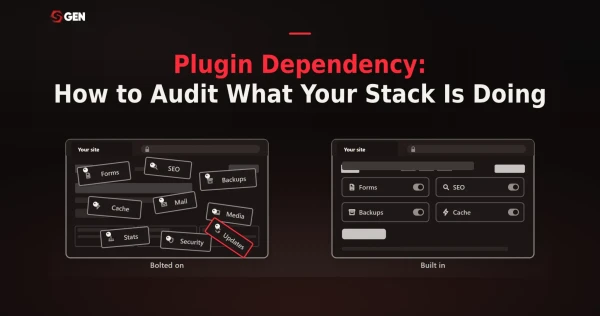
Plugin dependency is what happens when a website's capabilities live in software the platform did not ship. Forms, SEO, caching, security, backups, page building, each from a different vendor on a different release schedule. Each one solved a real problem on the day it was installed. Left unchecked they cause plugin bloat that puts your site at risk.
So how many WordPress plugins is too many? This SGEN guide helps you evaluate how heavily your website depends on plugins and what it means for your business growth. Start with a five-step audit you can run this afternoon.
Key takeaways
- Accumulation without curation is the core of plugin bloat issues. Every plugin added to a site means depending on a third-party developer's continued maintenance.
- Roughly nine out of ten WordPress vulnerabilities trace back to plugins rather than the core software itself.
- Auditing what your stack depends on reveals why platforms with capability built into their core architecture tend to hold up better as sites and client rosters grow.
Do You Still Need A Plugin For Everything?
Start with the assumptions, because most plugin stacks are inherited rather than chosen. Each of the big ones was a correct decision at the time, and most of them have never been revisited.
That inheritance usually has a shape. A developer set the site up three years ago and picked what they knew. An agency took over and added their standard set without removing the previous one. Someone needed a popup for a campaign that ended in 2023. Nobody audited any of it, because nothing broke and auditing is not billable.
"I have always used Yoast"
Yoast solved something WordPress genuinely did not do. Editing a title tag and a meta description used to require touching theme files, and Yoast made it a form field. That was a real contribution. The question is whether it still needs to be a separate product now that titles, meta descriptions, canonical tags, sitemaps and schema ship natively on most modern platforms.
"Everyone needs Elementor"
Page builders exist because themes were rigid and the alternative was writing code. Crediting that properly matters: they put design control in the hands of people who could not write CSS, and that opened website building to an enormous number of businesses.
What they also added is a rendering layer between your content and the page a visitor loads. That layer is why a page builder site behaves differently from a theme site, and it is the thing you are choosing when you pick one.
The third answer, and it deserves credit
Spark Interact, a Sydney agency, published a version of this argument in April 2026 describing how they stayed on WordPress, dropped page builders entirely, then built their own internal site management tooling.
Their framing is the sharpest anyone has put on it: the agencies doing the best work over the next decade are the ones investing in their own research and development now, rather than waiting for the next page builder to solve problems that page builders created in the first place. They also say something most vendors will not, which is that they built the standard stack, got good at it, and then started asking whether the standard approach itself was the issue.
That is worth taking seriously as a route. It is also worth noting where it ends up: an agency with a development capability most small businesses do not have. Building your own tooling is a real answer if you have engineers. It is not an answer available to a business that has a website rather than a development team.
None of this makes plugins a mistake. Plugins are what a platform without native capability requires. The question is whether the platform needs to be like that.
What A Plugin Stack Actually Costs You
The sticker price of a plugin is rarely the real cost. The actual expense shows up later, in the update cycles, compatibility checks, and troubleshooting hours that accumulate quietly across every site running it.
The security cost
Patchstack found that plugins accounted for 91% of the 11,334 WordPress vulnerabilities disclosed across the ecosystem in 2025, while core accounted for six. Separately, 78 per cent of sites compromised in 2025 were running at least one outdated plugin. Every competitor page in this space says plugins carry security risk. None of them quantifies it, and the mechanism behind those numbers is covered in how plugin dependency hurts Core Web Vitals as well.
The maintenance cost
The average WordPress install runs 20 to 30 plugins, each with its own release cycle and its own vendor. Managing that means tracking dozens of independent schedules for as long as the site exists, rather than configuring something once.
Hostinger counts more than 58,000 free plugins in the directory. That number is usually presented as a strength, and it is one. That said, it is also the reason nobody can tell you which twenty-five you ended up with or why.
The cost is not the updating itself, which takes minutes. It is the checking, the staging, and the occasional plugin conflicts where an update to one thing breaks a different thing entirely and you find out from the client. That work does not scale down when the site is small. A five-page brochure site with twenty-two plugins carries almost the same update burden as a fifty-page one.
The license cost
Managed hosting, an SEO plugin, a security plugin and a forms plugin at renewal pricing come to roughly 60 dollars a month, or about 727 dollars a year, for a single site. This is the smallest of the three costs and the only one anyone sees on an invoice. That is precisely why it gets attention and the other two do not.For one site that is a rounding error against what the site earns. It stops being one when you multiply. An agency or a business running ten sites is carrying north of seven thousand a year in licenses alone, and the figure grows every time someone solves a problem by installing something.
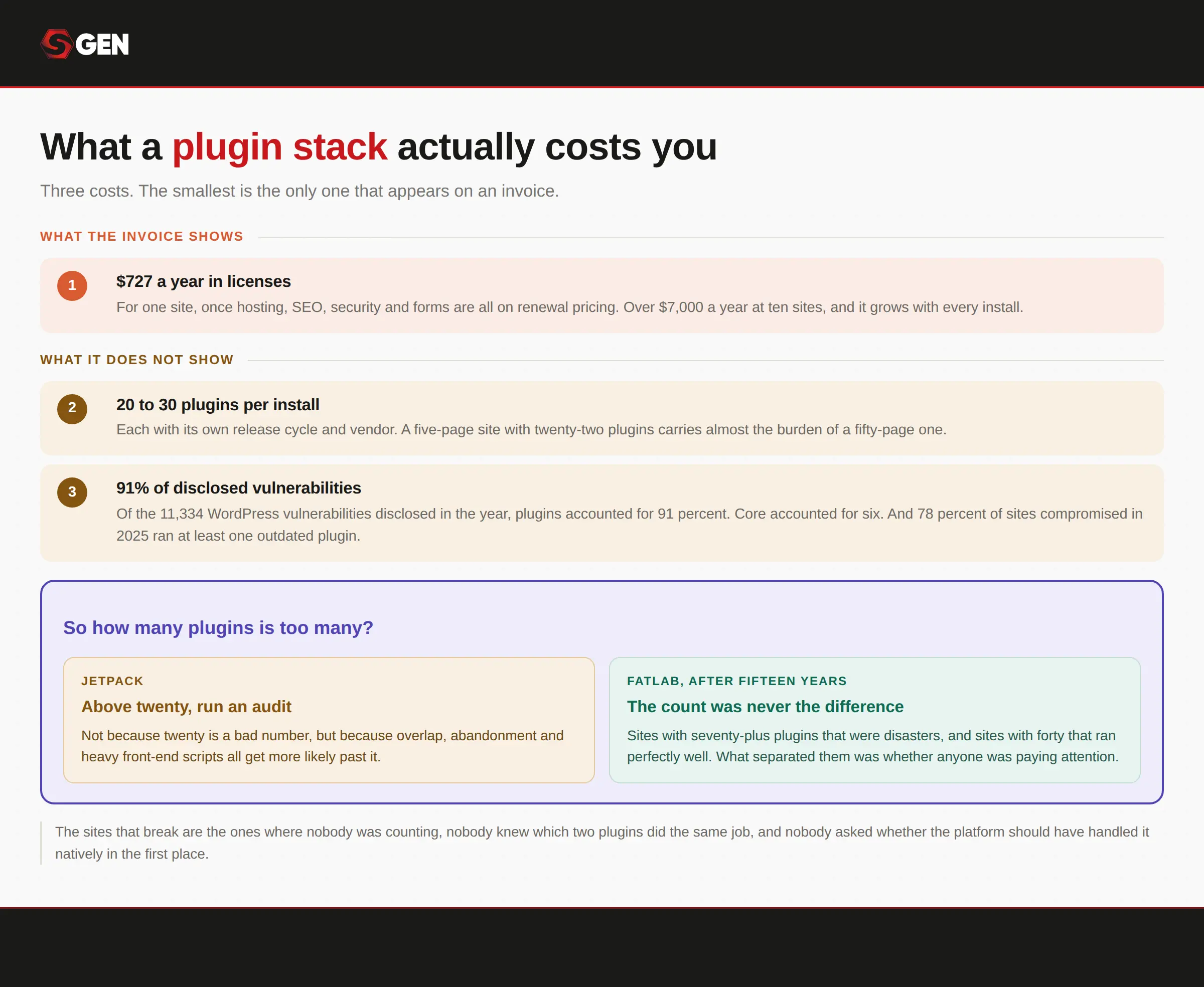
The one you can see on an invoice is the smallest of the three.
How many WordPress plugins is too many?
There is no universal number but a site can run twenty well-built plugins and stay fast, and one badly coded plugin can undo that on its own. A handful of poorly built plugins can drag down even a lean site more than a much larger stack of well-maintained, efficiently coded ones ever would.
Automatic, creator of the Jetpack plugin, suggest running an audit if you have above twenty active plugins. Not because twenty is a bad number, but because overlap, abandonment and heavy front-end scripts all become more likely past it.
The most honest answer comes from an agency rather than a vendor. FatLab, after fifteen years managing WordPress sites, reports inheriting sites with seventy-plus plugins that were disasters and sites with forty that ran perfectly well, and concludes the difference was never the count. It was whether anyone was paying attention.
So everyone selling you a plugin says the number does not matter, and they are right. However, they are also answering a smaller question than the one you have. The sites that break are the ones where nobody was counting, nobody knew which two plugins did the same job, and nobody asked whether the platform should have handled it natively in the first place.
What Modern Websites Do Differently
A plugin adds capability by attaching code to a system that did not anticipate it. A native module is a capability the platform shipped with. The difference shows up on update day, in who owns a conflict when two things disagree, and in whether two features can assume the other exists.
For example: on a plugin stack, your form plugin and your SEO plugin do not know about each other. If a form submission should create a page, something has to be built to make that happen, and that something breaks when either plugin updates. Where both are native, they were designed against the same data model and the connection already exists. This architecture difference is why the same capability behaves differently depending on where it came from.
What ships natively on a modern platform is most of what people install plugins for: forms and submissions, SEO fields and schema, redirects, analytics, media handling, backups, consent tracking. Wix, Squarespace, Webflow, Duda, Ghost, Shopify and SGEN all take a version of this approach, and the differences between them are real, which is why the full comparison of WordPress alternatives is worth reading before choosing one.
The operational consequence is the part agencies notice first. One update surface instead of thirty. One vendor relationship instead of four per site. That shift is covered properly in how integrated platforms simplify website management.
A note on headless
A technical reader will raise headless here, and it deserves a straight answer rather than being ignored. Decoupling content from presentation is a genuine solution to the same problem, and for organizations with development capacity it is often the right one.
The cost is that there is no theme. Every screen is custom development, which means the thing you removed, plugin dependency, gets replaced by developer dependency. For a business without an engineering team, that is a trade rather than a fix. It is worth knowing the option exists and worth being honest about who it suits.
Can You Replace Plugin Stacks Without Losing Functionality?
Mostly, yes. The answer genuinely differs depending on which job you are asking about.
- SEO is the cleanest swap. Titles, meta descriptions, canonical tags, sitemaps and schema are table stakes on modern platforms, and what you lose is the plugin's own analysis tooling, the traffic-light scoring that tells you a sentence is too long.
- Forms transfer well for the common cases: contact, enquiry, booking, newsletter. Very complex conditional logic and payment-integrated forms are where native modules run out and a dedicated product still wins.
- Ecommerce is the biggest variable. Modern platforms handle catalogue, checkout and payment competently. Custom product types, unusual tax handling and bespoke checkout flows are where a specialist system is genuinely better.
- Analytics, security and redirects are usually improvements rather than compromises, because they move from something you installed to something the platform operates. A redirect rule that lives in the platform cannot silently stop firing after an update, which is a failure mode most people have experienced without diagnosing.
- Backups follow the same pattern. A backup plugin is a piece of software you have to trust, configure, and periodically test. Platform-level backups are infrastructure. Neither is infallible, but only one of them can be deactivated by a compatibility problem.
What you actually give up
- No marketplace. The long tail of niche functionality, the plugin that does one strange thing your industry needs, is not there. If your business depends on one of those, that is a genuine reason to stay.
- Fewer edge cases. A native module covers the common 90% well and the unusual 10% not at all. Most sites are entirely inside the ninety. Some are not.
- A rebuild rather than an import. Content moves between platforms, usually via CSV or JSON export. The design does not. Themes do not transfer as themes, and the equivalent on a modern platform is brand tokens plus page templates.
Native vs plugin functionality
| Capability | Typical plugin | What native means | What you give up | What you stop maintaining |
|---|---|---|---|---|
| SEO fields and schema | Yoast, Rank Math | Meta lives with the page, schema by content type | Plugin-specific analysis tools | A license and a release cycle |
| Forms | Gravity Forms, WPForms | Submissions and routing in the admin | Very complex conditional logic | A license and a spam-filter dependency |
| Redirects | Redirection | Rules in the platform, often automatic on slug change | Little | A plugin that silently stops firing |
| Caching and CDN | WP Rocket, caching plugins | Handled at the platform layer | Manual tuning control | Config that breaks after updates |
| Page building | Elementor, Divi | The builder is the platform, not a layer on it | A large template marketplace | A rendering layer between content and page |
How To Audit Your Website's Plugin Dependency
Here are five steps you can use to audit plugins on any platform
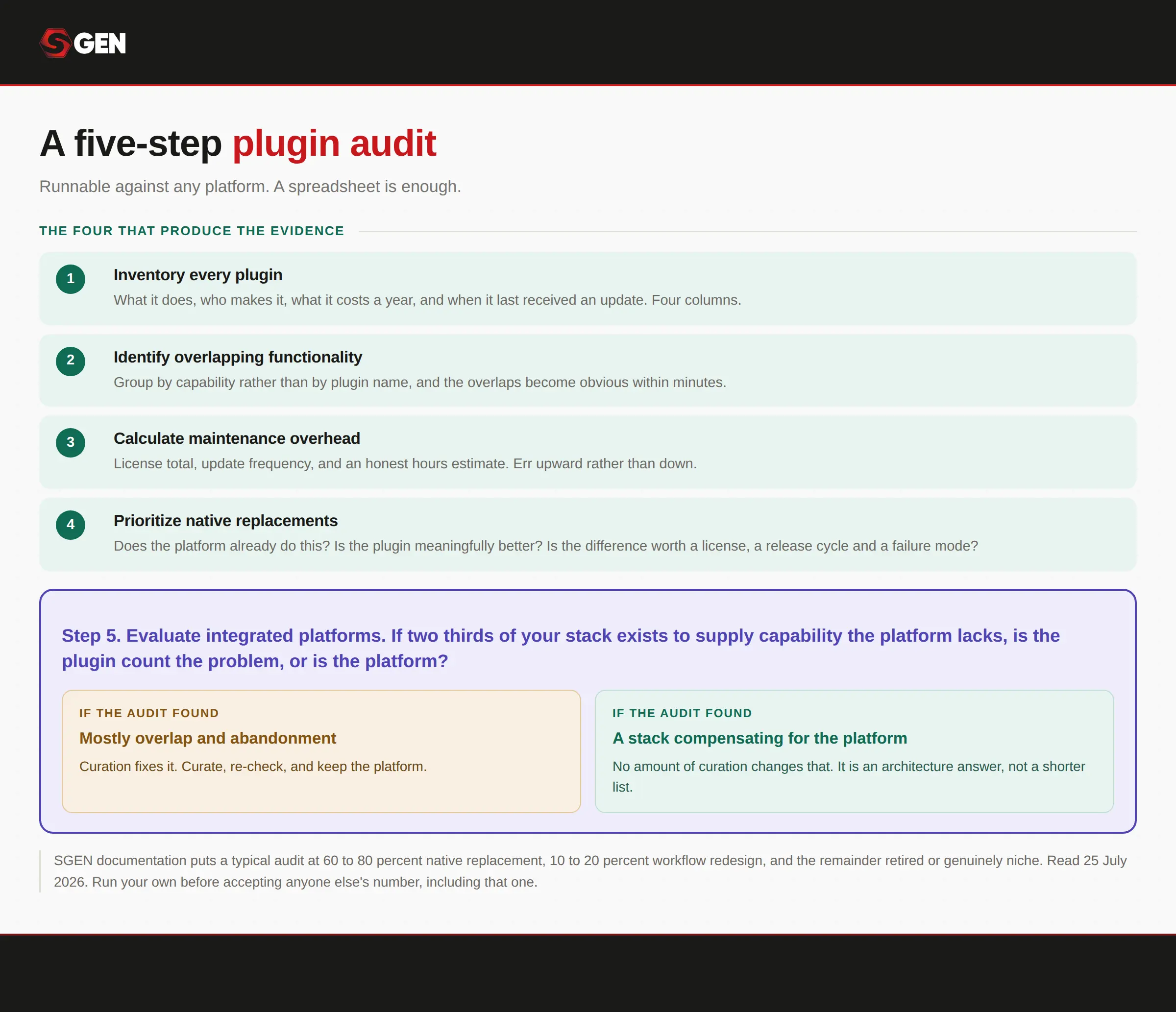
Find out how plugin-dependent your website actually is.
1. Inventory every plugin
List every active plugin with what it does, who makes it, what it costs a year, and when it last received an update. Four columns.
Include the ones nobody remembers installing. Abandoned plugins are the ones that become vulnerabilities, because nobody is watching them and nobody will notice when the vendor stops shipping fixes.
What you will typically find at this stage: two or three plugins nobody can account for, at least one that has not been updated in over a year, and a license renewing to a card belonging to someone who left.
2. Identify overlapping functionality
Two plugins doing one job is the most common finding and the easiest win. Security plugins that also cache. SEO plugins that also handle redirects. Page builders that ship a form module nobody uses because a form plugin was installed first.
Group your list by capability rather than by plugin name and the overlaps become obvious within minutes. The pattern to look for is not two plugins with the same name on the tin. It is two plugins that both happen to do one thing you actually use, where you are carrying the whole of each for the sake of a fraction of one.
3. Calculate maintenance overhead
Add the annual license total. Then add update frequency, which you can read off the last-updated column. Then add an honest estimate of hours a year spent on conflicts, breakage and the update that took down a client site on a Tuesday.
Most people have never added this up, which is exactly why the stack feels free. The license total is easy and usually smaller than expected. The hours are harder to estimate and almost always larger, so err upward rather than down: the estimate that feels slightly unfair to the stack is usually the accurate one.
4. Prioritize native replacements
For each capability, ask three questions. Does the platform already do this? Is the plugin doing it meaningfully better? And is that difference worth a license, a release cycle and a failure mode?
Start where the answer is obviously yes. Redirects and basic SEO fields are usually the first to go, because native versions are equivalent and the plugins are pure overhead.
Then sort what is left into three piles. Things a workflow change removes, meaning you stop needing the capability rather than replacing it. Things that are genuinely niche, where nothing else does the job and the plugin earns its place. And things you can simply retire, which is usually more of the list than anyone expects.
5. Evaluate integrated platforms
If two thirds of your stack exists to supply capability the platform lacks, is the plugin count the problem or is the platform?
The decision criteria run both ways, and the audit tells you which one you are in. If it surfaced mostly overlap and abandonment, curation fixes it and you should curate. If it surfaced a stack that exists almost entirely to compensate for missing native capability, no amount of curation changes that, and you are looking at an architecture answer instead.
For reference on scale, SGEN documentation puts a typical plugin replacement audit at 60 to 80 per cent native replacement, 10 to 20 per cent workflow redesign, with the remainder retired or genuinely niche. Run your own before accepting anyone else's number, including that one.
Learn how SGEN's native modules stacks up against WordPress:
Conclusion: How To Audit For WordPress Plugin Dependency
Ask a hundred agency owners "how many plugins is too many" and you'll get a hundred different numbers. Plugin count was never the real signal. Trouble tends to concentrate on sites where the stack grew one "quick fix" at a time until no one left on the team could account for what half of it was doing. An audit should tell you whether a plugin exists because the platform genuinely couldn't do that job natively.
The real shift happens when core capability lives inside the platform instead of being assembled from outside pieces. And this is possible only once business owners are able to recognize when they reach a point where plugins no longer serve their best interest. Many modern website platforms are now built to absorb that capability directly, which means the choice isn't really about picking better plugins anymore. It's about picking a foundation that needs far fewer of them to begin with.
Frequently Asked Questions
What is plugin dependency?
It is when a website's capabilities live in software the platform did not ship: forms, SEO, caching, security, backups. Each one solved a real problem when it was installed. Together they become a stack you maintain rather than a site you run.
Are WordPress plugins a security risk?
Collectively, yes. Patchstack found plugins accounted for 91 per cent of the 11,334 WordPress vulnerabilities disclosed in the year, while core accounted for six. The risk is rarely any single plugin. It is the number of surfaces nobody is watching.
Do plugins slow down a website?
Some do, and what each one loads matters more than how many you have. A plugin adding scripts to every page costs more than five that load only where they are needed.
How do I know which plugins to remove?
Group your list by capability rather than by name. Overlaps surface within minutes, and abandoned installs stand out. Start with anything the platform already does natively, because those are pure overhead.
Can a website work without plugins?
On WordPress, barely. On platforms where forms, SEO, redirects and backups ship natively, there is nothing to install. What you give up is the marketplace, so genuinely niche requirements have no long tail to draw on.