

An agency lives or dies on repeatable delivery, and the platform decides how repeatable it is. Two problems cost the most: client sites that need constant unbillable maintenance, and platform bills that grow faster than the client roster. The right agency website builder fixes both. These platforms are not one category. Some are hosting, some are design tools, some are full platforms, and some are a CMS you assemble yourself.
What matters for an agency is how a platform manages multiple projects, what a client sees at handoff, what renews and at what rate, and what the tenth site costs rather than the first. Choosing from a long list of options can become challenging, which is why we tested dozens of popular software and shared our recommendations in this guide.
The seven best agency website builder options we evaluated are:
- Duda: Best agency website builder for white label reselling
- Wix Studio: Best for mid-to-large scale agencies that need all-in-one enterprise workspace
- Hostinger Pro: Best for hosting large client portfolios in a single plan
- SGEN: Best for growing web design agencies that prefer a native, out-of-the-box solution
- Squarespace: Best for new design agencies and creative studios
- Webflow: Best agency website builder for high-end visual design
- Wordpress.org: Best for high-ticket agencies with maintenance retainers
Best Agency Website Builder Quick Comparison
| Product Name | Our score out of 5 | Agency Pricing Starts at | Multisite dashboard | Client Management |
|---|---|---|---|---|
| Duda | 4.68 | $29/mo annual, plus $17–19 per extra site | Native, all plans; white-label at $149 | Native from Team $29 Plan |
| Wix Studio | 4.37 | $12/mo per site, yearly prepaid | Workspace only; full version Enterprise | Native from Basic; Client Kits paid |
| Hostinger Pro | 4.32 | $29/mo on 24 months, renews $49 | Native in hPanel; 100 sites on Startup | Access sharing, unbranded dashboard; no transfer |
| SGEN | 4.26 | $0 Sandbox, then $39/mo annual | Native on all plans, including free | Native and free; roles, login-as-client |
| Squarespace | 4.19 | $16/mo annual, per site | Native Circle dashboard, 3+ sites | Native: permissions, invoicing, proposals |
| Webflow | 4.19 | From $15/mo site plan plus workspace | Workspace only, no dashboard product | Native on Freelancer $16, Agency $35 |
| WordPress.org | 4.13 | Free software; hosting and plugins extra | Plugin only: ManageWP or WP Umbrella | Native roles; billing needs plugins |
Methodology: How we evaluated the best agency website builders
To provide a fair, unbiased recommendation, we tested over a dozen website builders in the market. The rubric scored every platform against four criteria: pricing and ease of use at 20% each, features and project management at 30% each.
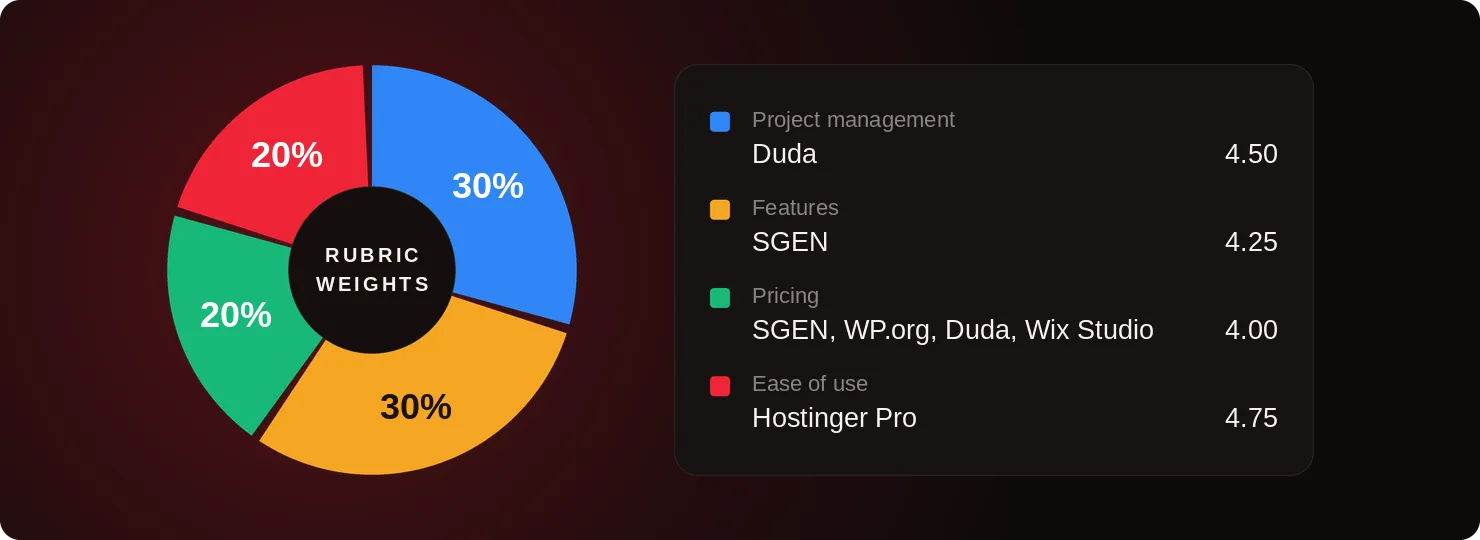
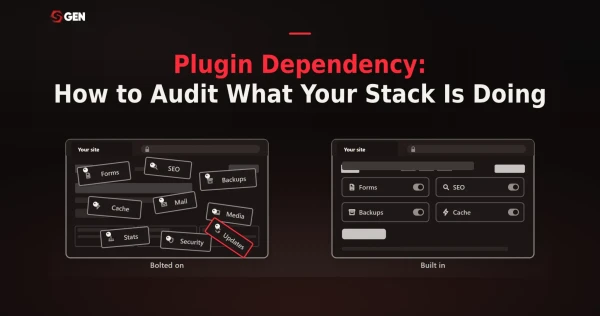
Web design agencies need a platform that offers the best value, which comes down to having native features instead of plugin-based architecture.
Duda scores full marks on five of the six project management factors, including client handoff and billing, while Hostinger Pro leads ease of use on free migration and full site portability. Four platforms tie on pricing at 4.00, and SGEN leads features on white-label-free unlimited bandwidth, storage, and native SEO, dropping points only on integrations.
Eventually, Duda takes the overall win at 4.68 because its strengths sit in project management and features, the two categories that carry 60 percent of the agency score, while its pricing ties rather than leads.
Duda: Best Agency Website Builder for White Label Reselling
- Our evaluation
- 4.68 / 5
- Pricing scheme
- Per account, not per site. The plan buys the platform plus a few included sites; extra sites are billed separately.
- Multi-Site Agency Dashboard
- Native on every plan. Unpublished projects are free and unlimited, but the white-labeled dashboard is White Label $149 only.
- Content Safety Handoff Controls
- Native. Client accounts see only their assigned sites, and a Simple Editor keeps non-technical clients out of the layout.
- Native Client Billing / Invoicing
- Yes, native. Duda Client Billing handles client payments in-platform, no client billing fees on the Agency plan.
Founded in Palo Alto in 2009, Duda sells to web professionals rather than to the people who own the websites: agencies, SaaS platforms, hosts and point-of-sale providers. Its commercial model is built on that assumption, separating platform access from the sites themselves, which nothing else in this guide does.
Why we chose Duda
White label reselling is the position because Duda alone can disappear entirely. The White Label tier brands the editor, dashboard, preview pages and platform emails, and Duda claims a client will not know it is involved unless told. Unpublished projects stay free until a site goes live.
Three other platforms advertise white labeling and mean different things by it. Hostinger Pro skins the hosting panel; WordPress.org re-skins the admin dashboard through plugins. Wix Studio removes site branding, but the client still logs into Wix. Squarespace and Webflow offer nothing at any price.
The cost is the tier ladder. White-label client access and analytics are absent from Basic, Team and Agency, so an agency whose clients must never see Duda pays $149 a month, not $52. Platform, per-site and add-on charges also stack.
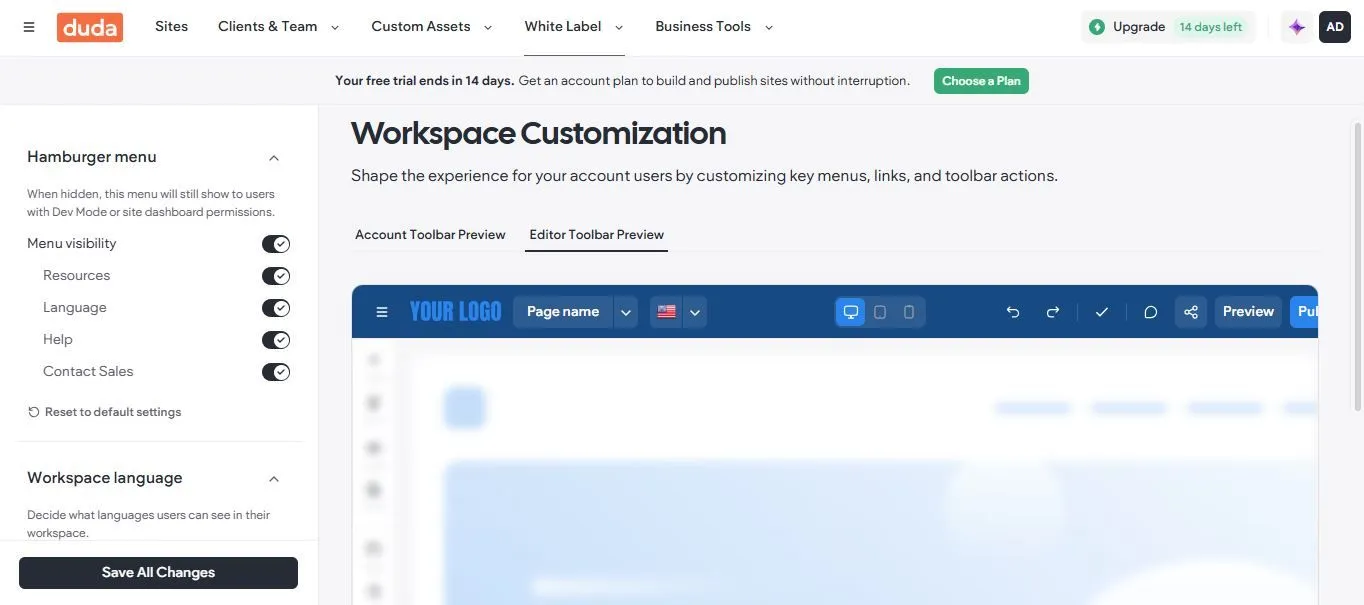
Duda lets agencies strip its branding and control which menus clients see, the white labeling depth behind its top project management score. (Source image: Duda)
Pricing
- Basic: $19 per month billed annually, or $25 monthly. 1 site included
- Team: $29 per month billed annually, or $39 monthly. 3 team seats, unlimited client accounts
- Agency: $52 per month billed annually, or $69 monthly. 4 sites, 6 team seats, priority support
- White Label: $149 per month billed annually, or $199 monthly. Full platform white labeling
- Additional sites: $19 per month or $171 per year on Basic, $17 per month or $168 per year on higher tiers
Read the ladder as team and client infrastructure rather than site capability, because the site is a separate purchase. Basic at $19 has no team seats, no client accounts, no custom templates and no dynamic pages, which makes it a solo plan despite the agency framing. Agency at $52 is where most agencies land. There is a 14-day trial with no card that includes every White Label feature, plus a 30-day money-back guarantee, and no promotional rate anywhere in the list, so nothing lapses in year two.
Two costs sit outside the table. Ecommerce and bookings are priced separately on top of platform plus sites, and AI Visibility runs its own ladder from $19 to $195 per month.
Top features
- Full white label: the $149 tier brands the editor, dashboard, preview pages and platform emails, adds a custom platform and email domain, white-label client access and white-label analytics, and pairs with an unbranded support portal.
- Dynamic pages from connected data: one template plus a connected Google Sheet or Airtable base generates every location, staff or product page, and editing a row republishes the page it feeds.
- Client Billing and scoped client accounts: manage client payments inside the platform, with unlimited client accounts from Team that reach only their assigned sites and cannot touch platform-level settings.
- Code export and REST API: pull a finished site down as HTML and CSS, or drive the platform through one of the industry's more robust website-building REST APIs. Blog data is excluded from the export and the API is White Label or Custom only.
- Uncapped storage and bandwidth: nothing is metered on any tier, entry plan included. The one published limit is 1,000 pages per site, and Duda argues traffic caps make no sense for an agency.
How to manage client projects on Duda
Onboarding starts before the build. An AI-powered content collection form gathers copy and assets from the client, and unlimited unpublished projects mean the site is built and revised without a bill. Site comments then capture change requests on the page itself, for up to 100 clients from Team.
Handoff works both ways. A client account takes the site with permissions scoped to it alone and the Simple Editor to work in, or code export hands over HTML and CSS. Migration in scales too, from an import tool for one or two sites to bulk migration beyond a hundred.
Duda Pros and Cons
- Pros
-
- ✓Only genuine full white label in this guide
- ✓Unlimited scoped client accounts plus native client billing
- ✓Highest rated platform here, with support as the top strength
- ✓Code export and REST API for exit planning
- Cons
-
- ✕Full white label costs $149 per month billed annually
- ✕Sites billed separately from the platform plan
- ✕Limited customization is the dominant complaint
- ✕Basic plan omits the collaboration features entirely
User reviews
Outstanding customer support appears in 93 reviews and strong agency support in 66, which is unusual because support is the most common complaint almost everywhere else. Reviewers name reusable sections and client permissions as the features that cut their support load.
The complaints are one consistent theme. Limited customization appears in 45 reviews, limited features in 41, and lack of advanced features in 31. Agencies doing highly custom design work describe hitting structural constraints, and 24 reviewers cite a steep learning curve coming from other builders.
Related: Learn how to cut WordPress maintenance time and protect your agency's margin.
Wix Studio: Best for Mid-to-Large Agencies Needing All-in-One Enterprise Workspace
- Our evaluation
- 4.37 / 5
- Pricing scheme
- Per client site, yearly prepaid. Basic $12, Standard $20, Plus $32, Elite $149, plus custom Enterprise. No seat charges.
- Multi-Site Agency Dashboard
- Partial. One workspace holds every client site, but true multi-site management and centralized billing are Enterprise only.
- Content Safety Handoff Controls
- Native, and the strongest here. Content Mode locks layout and CSS; Client Kits ship tutorials into the client dashboard.
- Native Client Billing / Invoicing
- Enterprise only. Below that you front the subscription, or transfer ownership so the client buys their own plan.
Wix Studio is a separate platform from Wix Classic rather than a tier of it, built for freelancers, agencies and in-house web teams. Where Classic sells an all-in-one to a business owner, Studio sells production capacity to whoever builds sites for a living: a responsive editor with custom breakpoints, a VS Code based IDE with GitHub integration, real backend compute containers with published vCPU and RAM specifications, and a Client Kit for handover.
Why we chose Wix Studio
The all-in-one position rests on the workspace, not on one feature. Clients comment directly on staging elements, Content Mode locks layout and CSS so they can only edit text and images, and Client Kits push your tutorials into their dashboard. Nothing costs anything until a site publishes.
Against Duda, the other all-in-one, the trade is design ceiling for agency infrastructure. Against Webflow it is seats: Webflow charges $39 per full seat on top of everything else, Studio charges nothing. Against Squarespace, which caps Basic at two contributors, Studio starts at three.
What Studio holds back is roster scale. Multi-site management, centralized billing, SSO and audit logs are Enterprise-only, and no tier below it carries a contractual uptime guarantee. There is no export either, so handoff means handing over a Wix account rather than a website.
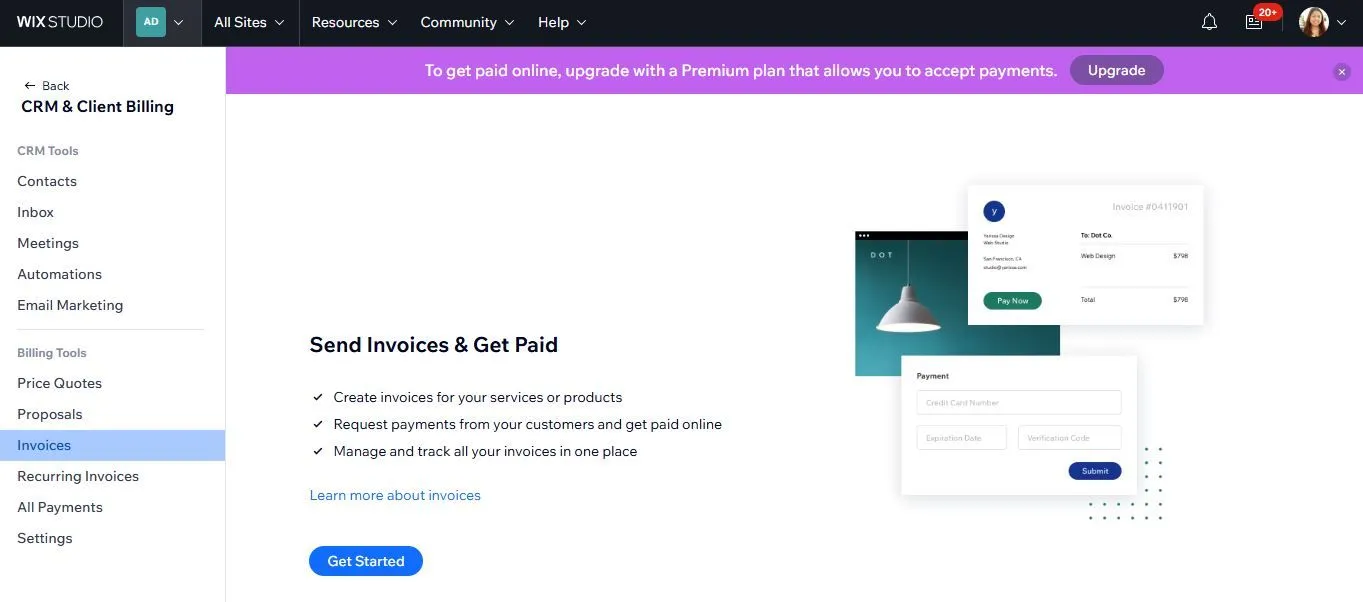
Wix Studio bundles proposals, invoices, and recurring billing into the same workspace as the sites, though accepting payments requires a Premium plan. (Source image: Wix Studio)
Pricing
- Basic: $12 per month, yearly prepaid. 10 GB media storage, 3 site collaborators, 1,500 CMS items, 1 micro backend container, no ecommerce product catalog
- Standard: $20 per month, yearly prepaid. Payment acceptance, 50 GB storage, 5 collaborators, 4,000 CMS items, a 50,000 product catalog
- Plus: $32 per month, yearly prepaid. Marked Recommended and the first tier with priority support. 120 GB storage, 10 collaborators, 20,000 CMS items, 2 standard containers
- Elite: $149 per month, yearly prepaid. Unlimited media storage, 100 collaborators, 10,000,000 CMS items, dedicated data infrastructure
- Enterprise: custom. Adds multi-site management, centralized billing, SSO, IP allowlisting, audit log, data locality, custom SSL and a dedicated success manager
There is no free plan on the Studio pricing page and no free trial, only a 14-day money-back guarantee. The value inflection is not where the recommendation badge sits: Plus at $32 is the last tier priced like a per-client-site cost, and Elite at $149 is a different order of spend aimed at one large site rather than a roster. Note also that no paid tier below Enterprise carries a contractual uptime guarantee, only a service level objective.
Top features
- Content Mode: lock grid structures, custom layouts, custom CSS and responsive layers so a client can update text and images without breaking the design. The single most cited reason agencies moved from WordPress.
- Client Kits: a custom onboarding widget in the client's live dashboard holding your video tutorials, style sheets, brand guidelines, PDFs and contact details, so the handover package ships with the site.
- Responsive editor with real breakpoints: custom breakpoints and layout grids rather than Classic's absolute positioning, reusable design libraries, an AI Visual Sitemap and Wireframe Generator, and Figma to Studio conversion.
- Compute platform: real backend containers with published specifications, from 1 micro container at 1 vCPU on Basic to 5 standard containers on Elite, alongside a VS Code based IDE, GitHub integration and the Wix CLI.
- Ownership handover: an emailed ownership request the client accepts by adding their own payment method, after which they carry the site plan while you optionally remain Co-Owner or Admin for future work.
How to manage client projects on Wix Studio
The workflow is free until launch. The canvas, CMS, team collaboration and unlimited staging sites cost nothing, because free is a site's un-upgraded state rather than a plan. Clients comment directly on staging elements, and those comments sync into the editor as a resolvable checklist.
Below Enterprise the billing answer is ownership transfer: the client accepts by email, adds their card and carries the plan, keeping your platform cost near zero. What is missing is the exit, since no export exists, and every site brought to Studio is rebuilt.
Wix Studio Pros and Cons
- Pros
-
- ✓Best-in-guide handoff through Content Mode and Client Kits
- ✓Lowest per-site price here at $12, with no per-seat charge
- ✓Unlimited bandwidth and free unlimited staging sites on every tier
- ✓No plugin dependency, which reviewers name as the deciding factor
- Cons
-
- ✕Multi-site management and centralized billing are Enterprise only
- ✕No export path, so a client site cannot leave Wix without a rebuild
- ✕Support is gatekept by a chatbot, with long waits to reach a human
- ✕Undocumented limits surface mid-build, and Classic sites cannot be converted
User reviews
- G2: 4.6 out of 5 across 83 reviews
- Capterra: 4.7 out of 5 across 34 reviews
Praise is specific and repeats: real breakpoint control after Classic's absolute positioning, reusable components speeding up professional workflows, and handoff as the stated reason several agencies switched.
The consistent failure is triage. Multiple reviewers describe extended back-and-forth with a chatbot before reaching a person, one of them mid-launch on a client site, which sits oddly against the highest Customer Service score in the guide once a human is reached.
Learn about our Wix for agencies alternative
Hostinger Pro: Best for Agencies Hosting Large Client Portfolios In a Single Plan
- Our evaluation
- 4.32 / 5
- Pricing scheme
- Tiers based on CPU, RAM, storage, websites and mailboxes. Startup is $29/mo paid upfront for 24 months. Renews at $49/mo
- Multi-Site Agency Dashboard
- Native in hPanel. Startup holds 100 websites from one login, with per-site access sharing and an unbranded client dashboard.
- Content Safety Handoff Controls
- Partial. Single-site access is shared under permissions you set, but ownership transfer is unavailable on Agency hosting.
- Native Client Billing / Invoicing
- None. Reviewers additionally report unresolved invoice disputes, including a refusal to reissue an invoice.
Hostinger is a hosting company with a website builder attached, and for an agency that distinction governs everything. The agency capability people actually mean when they say Hostinger Pro lives in the hosting product and the hPanel, not in the builder, and Hostinger publishes a dedicated hosting-for-agencies product at hostinger.com/pro alongside a public agency directory.
Why we chose Hostinger Pro
Volume hosting is the whole position, and it is a margin argument rather than a capability one. Ten client sites cost roughly $160 a month on Squarespace Basic and $120 on Wix Studio Basic. One Hostinger Pro Plan holds those 10 times over so infrastructure stops being a line item.
WordPress.org runs on the same logic, buying bulk infrastructure and selling maintenance, but it hands you the patching. Pro absorbs the hosting layer, shipping managed WordPress, daily backups, malwarre scanning and monitoring lerts on every tier. The plugin stack is still yours, so the retainer narrows to work only you can do.
Two things count against it. The $29 rate takes 24 months upfront and renews at $49 so budget the renewal. And there is no native client billing and no published ownership transfer so every client invoice runs through you.
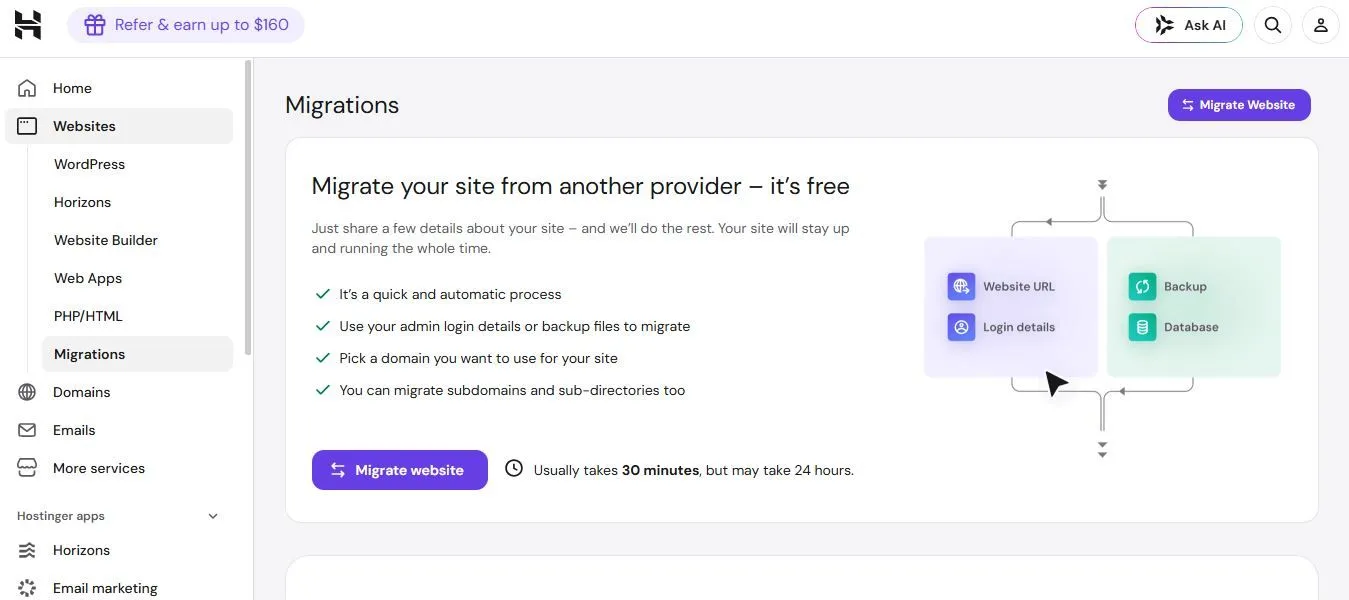
Hostinger runs migrations free and states that they usually take 30 minutes but may take 24 hours, according to Hostinger. (Source image: Hostinger)
Pricing
- Agency Startup: list $69 per month, sold at $29 per month as 24 months for $696, renewing at $49 per month. 100 websites, 6 CPU cores, 12 GB RAM, 300 GB NVMe storage, 4,000,000 inodes, 10 mailboxes per website free for one year
- Agency Professional: list $89 per month, sold at $44 per month as 24 months for $1,056, renewing at $69 per month. 200 websites, 8 CPU cores, 20 GB RAM, 500 GB NVMe storage, 6,000,000 inodes, 20 mailboxes per website free for one year
- Agency Growth: list $109 per month, sold at $64 per month as 24 months for $1,536, renewing at $89 per month. 300 websites, 10 CPU cores, 30 GB RAM, 700 GB NVMe storage, 8,000,000 inodes, 30 mailboxes per website free for one year
- A free domain for one year, unlimited CDN and SSL, a dedicated IP and daily backups ship on all three tiers
- All plans are paid upfront, and the advertised monthly rate is the total plan price divided by the number of months, according to Hostinger
Read the term before the rate. Plans require a two-year prepayment and describes the first term only; renewal is the number to budget against. Pro renews at 1.69 times the advertised rate on Startup, 1.57 on Professional and 1.39 on Growth, milder than Hostinger's consumer tiers but still a 69 percent increase on the plan most agencies will buy.
Top features
- One hundred sites on a single plan: Agency Startup holds 100 websites at $29 per month, and Professional and Growth raise the ceiling to 200 and 300. Ten client sites on Squarespace Basic cost roughly $160 a month by comparison.
- Per-site access sharing with an unbranded dashboard: a client logs in to the one site you scoped for them without touching your master credentials, and the panel carries your branding rather than Hostinger's. Both are new to the Agency tier.
- Full website isolation and a dedicated IP: every site runs in its own container on all three tiers, so one client's traffic spike or compromised plugin cannot reach the rest of the roster.
- Proactive monitoring alerts: Hostinger flags downtime and malware before the client emails you about it, backed by daily backups and free malware scanning on every plan.
- Developer tooling included rather than sold: SSH and WP-CLI, SFTP account management, PHP version management, free staging environments, one-click cloning, a redirects manager, cron jobs and unlimited collaborators, none of them tier-gated.
How to manage client projects on Hostinger Pro
Client management happens at the hosting layer. The Pro panel shows performance, malware scans and uptime across every client site from one login, single-site access can be shared under permissions you set, and the client dashboard carries your branding. Each site is isolated, so a compromise does not travel.
The gap is ownership. Hostinger's support page documents a Transfer website ownership feature that moves a WordPress site onto a client's own plan, but lists it as currently unavailable on Agency hosting. The site stays portable through SSH and WP-CLI, though moving it is a migration you run.
Hostinger Pro Pros and Cons
- Pros
-
- ✓100 sites on one plan at Startup, 300 on Growth
- ✓Per-site client logins under an unbranded dashboard
- ✓Full site isolation and a dedicated IP on every tier
- ✓Highest ease-of-use score here at 4.6 on Capterra
- Cons
-
- ✕Renewal runs 1.39x to 1.69x after 24 months upfront
- ✕Ownership transfer is unavailable on Agency hosting
- ✕Fixed CPU and RAM put the real roster below the cap
- ✕AI-first support with no reliable route to a human
User reviews
What the hosting reviews tell you is consistent. Value is described as better than the price suggests, and ease of use is the highest in this guide at 4.6. The negatives cluster on billing conduct: refused invoice corrections, a charge applied after cancellation, and a disputed domain transfer invoice, all with support declining to resolve.
Read the profile before the score. These ratings cover Hostinger hosting broadly, and the agency features are marked new by Hostinger, so little of the sample describes the Pro tier specifically.
SGEN: Best for Growing Web Design Agencies That Prefer a Native, Out-of-the-Box Solution
- Our evaluation
- 4.26 / 5
- Pricing scheme
- By live site count, with the platform identical at every tier. Sandbox $0, Indie $39, Studio $97, Scale $297, Enterprise $497.
- Multi-Site Agency Dashboard
- Native on every plan including the free Sandbox. Site Manager lists each site with environment, vitals and lead count.
- Content Safety Handoff Controls
- Native. Three roles with an audit log, plus login-as-client that never shares a password and records every switch.
- Native Client Billing / Invoicing
- Not published. SGEN documents no client billing or invoicing product at any tier, including Enterprise.
SGEN builds the whole stack into one system rather than expecting you to assemble one. Its plans buy live sites instead of feature tiers, so the builder, all 23 modules and the Foundation Pack are present everywhere, free Sandbox included. It is the newest entry here, and argues its case in published comparisons against six rivals including WordPress, Elementor and WP Engine.
Why we chose SGEN
The native position is maintenance arithmetic, and SGEN publishes the sum. An assembled stack runs hosting, a page builder, SEO, forms, security, backups, call tracking and image optimization at $145 to $200 a month per client. SGEN ships the same capability native from $39, with nothing tier-gated.
WordPress.org is what this is aimed at: the same requirements met by a plugin stack you patch, against a system with nothing to patch. Against Duda and Wix Studio, SGEN gives up white label, client billing and Client Kits, but its free tier is the whole platform.
That said, SGEN carries no third-party review scores at all, white label is a sales conversation rather than a plan feature, no client billing is published, and there is no WordPress importer, so the design is rebuilt.
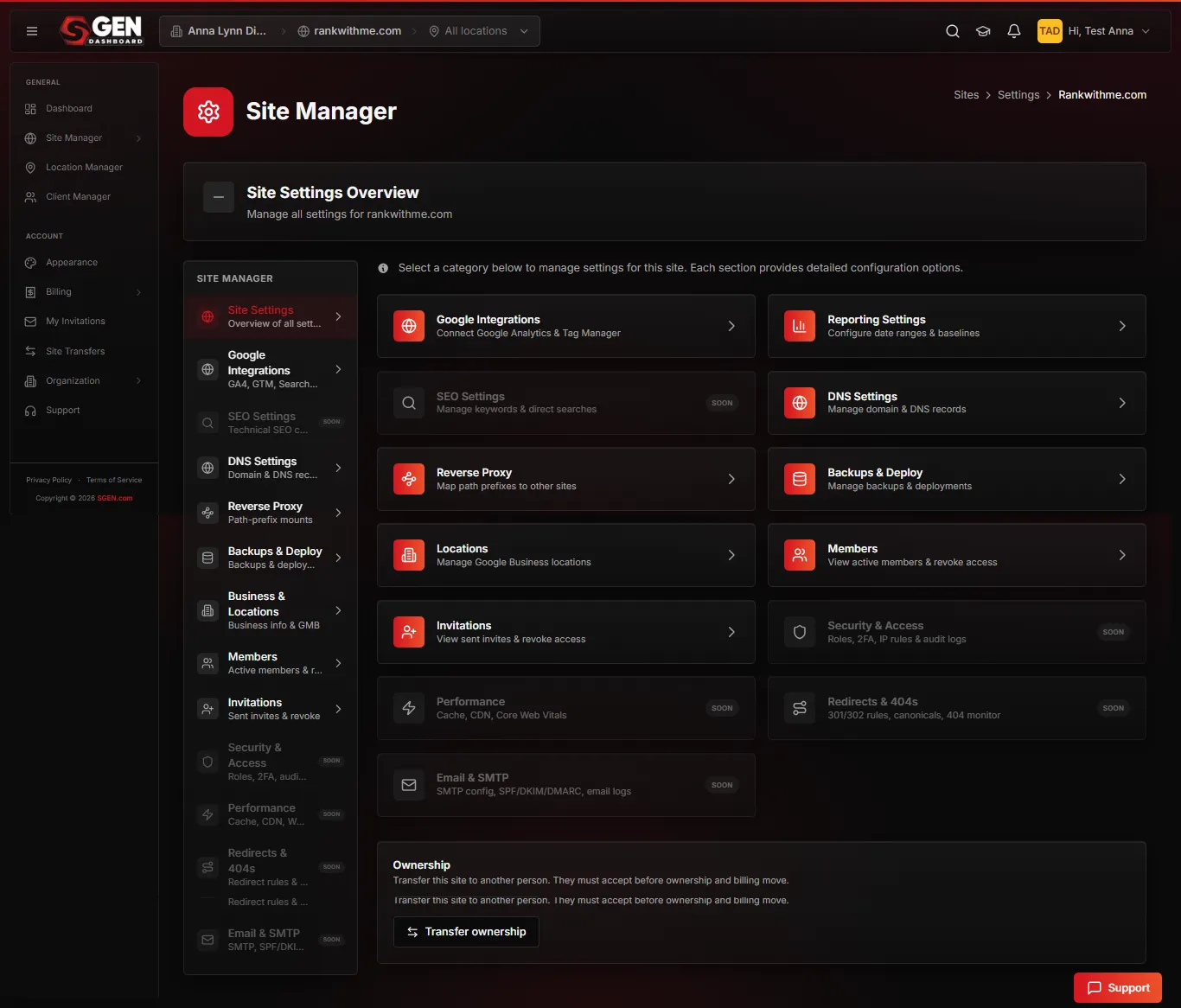
SGEN centralizes DNS, deploys, and member access per site under one Site Manager, with several settings marked as coming soon. (Source image: SGEN)
Pricing
- Sandbox: $0, no card and no time limit. Unlimited sandbox sites on a staging URL, with the whole platform unlocked
- Indie: $39 per month billed annually, or $47 monthly. 1 live site
- Studio: $97 per month billed annually, or $117 monthly. 3 live sites. Marked Most popular
- Scale: $297 per month billed annually, or $333 monthly. 10 live sites. Marked Most agencies on the agencies page
- Enterprise: $497 per month billed annually, or $577 monthly. Unlimited live sites, published as a self-serve price rather than a sales call
Nothing on the ladder is discounted for a first term, so year two costs what year one did, and the top rung shows a public price rather than a sales call. Paid plans carry a two-week trial, which is separate from the Sandbox and should not be conflated with it.
For an agency the number that matters is the tenth site rather than the first: Scale at $297 for 10 live sites is $29.70 per site with the full platform, hosting and security included, against ten separate Squarespace or Wix subscriptions plus whatever each one needs bolted on. A white-glove migration is quoted per site and is not included in any plan. Read more about SGEN's pricing.
Top features
- Twenty-three modules, none tier-gated: the seven groups span building and design, publishing, growth, SEO, analytics and attribution, security and compliance, and daily operations, and every plan carries all of them.
- Foundation Pack: hosting, SSL, CDN, WAF, security patching and the multi-site dashboard, shipped on every plan including the $0 Sandbox, so the security stack never becomes a separate line on a client invoice.
- Login-as-client: switch into a client account to see exactly what they see, make the change and switch back in one click, without sharing or storing their password, with every switch recorded in the audit log.
- Stage and Live with clone-forward: point-in-time snapshots move server-side between environments or onto a different site entirely, so a proven client build becomes the starting point for the next one.
- Redirects and SEO: 301 and 302 rules load in bulk, and a Test URL dry-run reveals which rule catches a given address before launch. A separate module audits titles, meta, schema, robots and Core Web Vitals together.
How to manage client projects on SGEN
The published route runs the whole build on the free Sandbox. Staging sites are unlimited, every module is unlocked, and clone-forward starts the next client site from a proven build rather than a blank canvas. Site Manager lists every site with environment, vitals and lead count.
Handoff is a defined path: build on the Sandbox, then transfer the site to the client account at launch. Login-as-client covers support afterwards without password sharing. Migration is deliberately not one-click, so content imports by CSV or JSON and the design is rebuilt.
SGEN Pros and Cons
- Pros
-
- ✓Every tier carries the complete platform, free Sandbox included
- ✓The security stack ships with the product, leaving nothing to patch
- ✓Staging sites are unlimited and free, with no card and no expiry
- ✓Seats cost nothing per head, and the roster dashboard is universal
- Cons
-
- ✕No independent rating on any review platform yet
- ✕White label needs a sales conversation, not a plan upgrade
- ✕Client billing and invoicing are absent from published docs
- ✕WordPress sites are rebuilt rather than imported
User reviews
- G2: no listing
- Capterra: no listing
SGEN has no Capterra or G2 reviews yet and no BBB listing, unlike every other platform in this guide, several of which carry samples in the thousands. If review volume is how you de-risk a platform decision for a client roster, this is the weakest entry here and we would not argue otherwise.
What exists instead is first-party proof and a way to test it yourself. A public showcase runs to 29 live sites spanning 5 categories and 17 industries, alongside a status page for hosting, the builder and the dashboard. In place of reviews, the Sandbox lets you audit the platform on a real client build before any money or commitment changes hands.
Find out how SGEN stacks up against WordPress
Squarespace: Best For New Design Agencies and Creative Studios
- Our evaluation
- 4.19 / 5
- Pricing scheme
- Per site, billed annually, each client site its own subscription. Basic $16, Core $23, Plus $39, Advanced $99 per month.
- Multi-Site Agency Dashboard
- Native Circle dashboard at three or more sites. It tracks the portfolio and referrals rather than managing sites centrally.
- Content Safety Handoff Controls
- Native on all plans. Editor and Store Manager roles block global styling and code injection, and sites transfer to clients.
- Native Client Billing / Invoicing
- Native on all plans. Proposals, contracts and invoices ship in the admin panel. No centralized subscription billing.
Squarespace occupies a middle ground for agencies. It is not a pure DIY builder and not a custom engineering platform, and it manages client relationships primarily through Squarespace Circle, its partner program for freelancers and agencies. Everything runs on its own managed cloud with hosting, SSL and updates bundled into every subscription, and there is no self-hosting path.
Why we chose Squarespace
New studios are the position because Squarespace is the fastest route to work that looks designed. Templates hold their proportions whatever goes in, and Circle adds the commercial layer at three sites: a portfolio dashboard, priority support, six-month trials and launch commissions. Proposals and invoicing are native.
Wix Studio and Duda are what a studio graduates to. Duda prices per account with wholesale rates and hides itself completely; Wix Studio charges $12 a site with no seat charge. Squarespace does neither, and there is no white label at any price. Against Webflow, it trades control for speed.
Two limits shape the fit. Basic allows only two contributors in total, which binds as soon as a client and a second designer both need access, and scheduling and email marketing are separate subscriptions easy to mistake for included features.
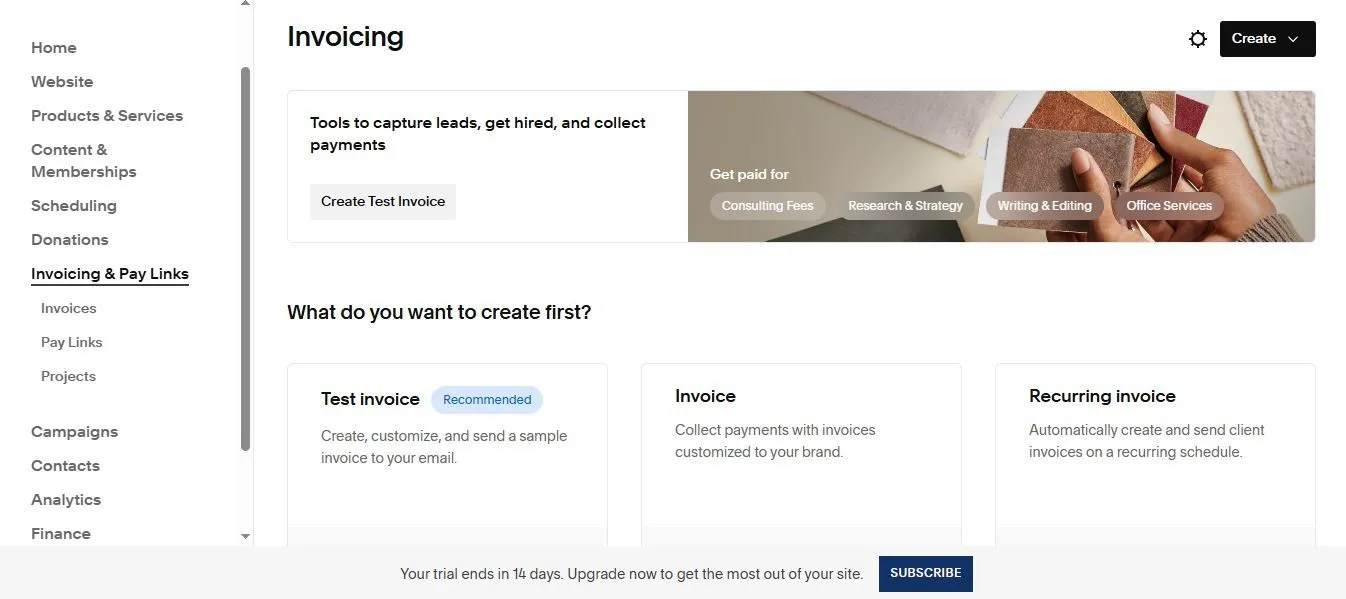
Squarespace covers client invoicing and pay links natively, which supports its 4.25 ease of use score for agencies running lean. (Source image: Squarespace)
Pricing
- Basic: $16 per month billed annually. 2 contributors, 2% online store transaction fee, 7% on digital content and memberships
- Core: $23 per month billed annually. No online store transaction fee, 5% on memberships, unlimited contributors
- Plus: $39 per month billed annually. 1% on memberships. Offered only where Squarespace Payments operates
- Advanced: $99 per month billed annually. 0% on memberships, unlimited video
- No free plan. A 14-day trial runs on every new site with no credit card, extended to six months through Circle
Upgrades past Basic buy cheaper fees and bigger allowances rather than capability you could not otherwise reach, which makes the decision a sum about sales volume. For agency work the number that matters is contributors: Basic allows only two in total, which is restrictive the moment a client and a second designer both need access.
Read the renewal terms before committing a client, because promotional discounts apply to the first payment of a new subscription only and the free custom domain is first year only. Scheduling and email campaigns bill separately, and both read like plan inclusions until the invoice arrives.
Top features
- Circle Pro Dashboard: track your active client portfolio, filter builds by client tag, get priority support routing, and extend free site trials to six months so you can build before a client pays.
- Designer templates that hold their shape: the curated layouts govern type and spacing regardless of who is editing, which is why a handed-over site still looks composed a year later.
- Native proposals, contracts and invoicing: draft client proposals, send contracts and issue professional invoices directly from the admin panel using Squarespace Payments, without buying a separate CRM.
- Scoped contributor permissions: add clients as Editor or Store Manager so they can fulfill orders, blog and read analytics while global design styling and custom code injections stay locked.
- Zero maintenance overhead: a closed, secure platform with hosting, SSL, updates and security included on every plan, so there is nothing to patch and no plugin conflict to break a live client site.
How to manage client projects on Squarespace
The workflow is built around handoff rather than long-term management. Squarespace argues it openly: transfer the finished site and the client manages updates independently, so you do not inherit every change. Contributor permissions make that safe, and Saved Sections speed up the next build.
Where it thins is the roster. Circle lists sites and tracks referrals but does not manage them, there is no white-labeled reporting, and no way to bill multiple subscriptions centrally. Migration in is self-serve unless you are on the quote-based Premium tier.
Squarespace Pros and Cons
- Pros
-
- ✓Native proposals, contracts and invoicing, with Circle cash commissions
- ✓Clean documented handoff, with clients running their own updates after
- ✓Templates hold their proportions whoever is editing them
- ✓Zero maintenance overhead, with hosting, SSL and updates on every plan
- Cons
-
- ✕No white label at any price; clients see Squarespace throughout
- ✕No bulk agency rates; every client site is a separate linear subscription
- ✕Basic allows only two contributors in total
- ✕Customization ceiling, and a recognizable look that is hard to escape
User reviews
Squarespace rates higher than Wix on both platforms, on roughly a third and two thirds of the sample size respectively, so the gap is real but Wix's figures rest on more evidence.
Design and template quality draws the most praise, and reviewers arriving from Wix point to exactly that as what moved them. For agency work the useful signals are speed to a professional result and clients confidently running their own updates after handoff, which matches Squarespace's own positioning.
Cost is the dominant complaint, with reviewers objecting to paying in perpetuity and to adjacent services each carrying a separate charge, followed by the customization ceiling and by useful features sitting behind higher tiers, custom code named most often.
Learn about our Squarespace alternative
Webflow: Best Agency Website Builder for High-End Visual Design
- Our evaluation
- 4.19 / 5
- Pricing scheme
- Site plans from $15, workspaces from $16, seats at $39 full or $15 limited, plus metered add-ons.
- Multi-Site Agency Dashboard
- Workspace on all paid plans. No dashboard product below Team.
- Content Safety Handoff Controls
- A content editing role, scoped client seats and branch staging keep clients off the design.
- Native Client Billing / Invoicing
- Native on Freelancer $16 and Agency $35, absent from Starter. .
Webflow is a visual development platform aimed at professional designers, developers and marketing teams rather than at business owners. The distinguishing architectural choice is that the canvas maps to real CSS rather than to a proprietary layout abstraction, which is simultaneously why it has the highest ceiling here and why it has the steepest learning curve.
Why we chose Webflow
High-end design is the position because the canvas maps to real CSS rather than a proprietary abstraction, which is why reviewers name unmatched customization and never having to tell a client no. Branch staging, page branching and comment-only review links make it work for teams.
Wix Studio is the only other design-led platform here, and its editor is cheaper per site with no seat charge. What Webflow has that nothing else matches is the exit: any paid workspace exports clean HTML and CSS with no attribution, and site transfer moves ownership.
Price it carefully, because reviewers consistently say cost is hard to predict. Four parallel price lists run at once, seats cost $39 each on top, and several of the most useful capabilities are metered add-ons, so a client site's true cost is not knowable from the plan price.
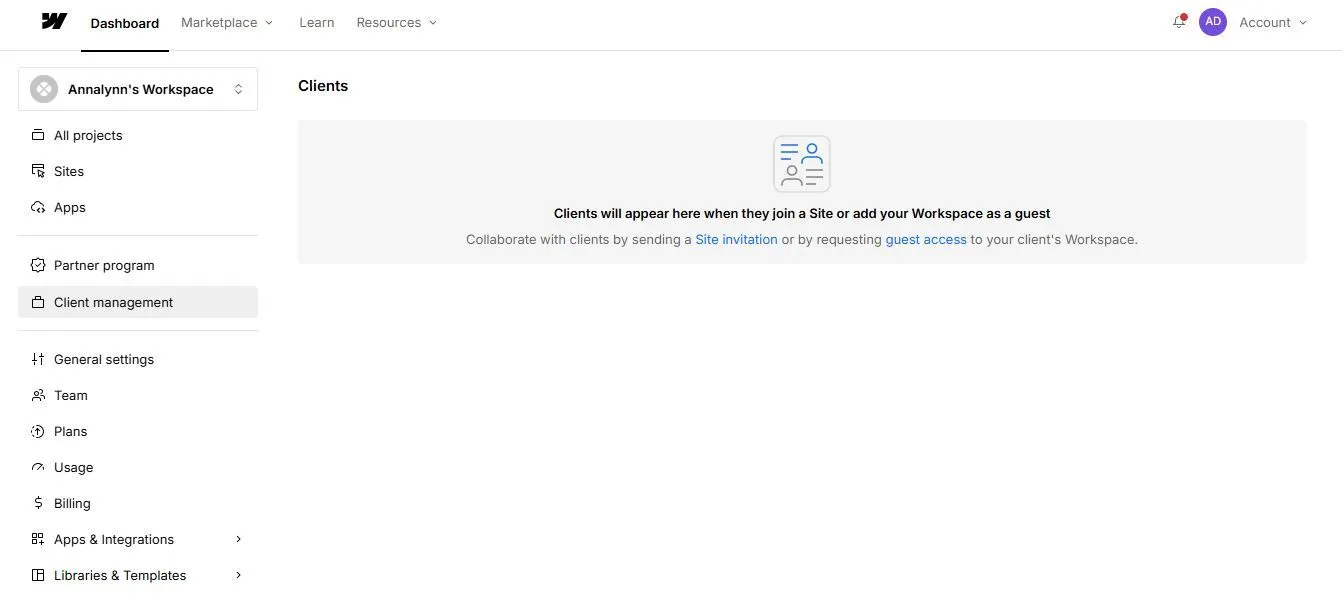
Webflow handles clients through workspace invitations rather than a client portal (Source image: Webflow)
Pricing
- Site plans: Starter free on a webflow.io subdomain, Basic $15 per month billed yearly with no CMS, Premium $25 per month billed yearly with 20,000 CMS items and 40 Collections
- Workspace plans for freelancers and agencies: Starter free, Freelancer $16 per month, Agency $35 per month, both billed yearly
- Seats: $39 per month per full seat and $15 per limited seat, billed yearly, with free reviewer seats
- Ecommerce site plans, bought instead of a standard site plan: Standard $29, Plus $74, Advanced $212 per month billed yearly
- Add-ons, several usage-metered: Optimize from $299 per month, Analyze from $9, Localize $9 or $29, AI credits $20 per month, and bandwidth above the Premium allowance from $20 per month
Basic at $15 has no CMS at all, so it is brochure sites only and Premium at $25 is where the platform actually starts for client work. Above that the shape changes completely: the Team platform plan is $2,500 per month on an annual contract with nothing in between, which tells you who Webflow is now built for. Cancelling does not stop billing, since you pay the remainder of the term you signed up for.
Top features
- Code export with no attribution: any paid workspace plan exports clean, semantic HTML and CSS to host anywhere, which alongside site transfer means a client site can genuinely leave.
- Client payments: invite the client to put their own card on file to cover the site plan and site add-ons, so the agency never fronts subscription costs or marks them up. Freelancer and Agency only.
- Branch staging and publishing workflows: branch staging, page branching for parallel work, private staging restricted to workspace members, a publish summary and single-page publishing. The best staging setup in this guide.
- Shared Libraries: push components, variables and assets across every site in a workspace, which is the closest thing here to a repeatable onboarding kit for a client roster.
- SEO and AEO tooling: metadata, canonicals, sitemaps, 301 redirects and schema, plus robots.txt and LLMs.txt control, AI bot access controls and sitewide AEO audits, with AEO agents on Team and Enterprise.
How to manage client projects on Webflow
The workspace is where the agency model lives. Guest roles let you join a client's own workspace without consuming seats, client seats give scoped access to specific sites, and a content editing role means a client publishing a post cannot touch the layout.
Handoff has two routes: site transfer moves ownership on any tier including free, or code export hands over HTML and CSS. Client payments settles who pays Webflow. The gap is inbound migration, which Webflow's own FAQ answers with a flat no, so every site is rebuilt.
Webflow Pros and Cons
- Pros
-
- ✓Highest design ceiling here, with no template lock-in
- ✓Real portability through code export with no attribution and site transfer
- ✓Client payments so the agency never fronts subscription costs
- ✓Best staging and governance in this guide, built for teams
- Cons
-
- ✕Steep learning curve; foundational HTML and CSS effectively required
- ✕Four parallel price lists and $39 per full seat make cost hard to predict
- ✕No inbound migration at all, so every client site is a rebuild
- ✕Email-first support with a 48-hour target and no phone or chat below Team
User reviews
The Capterra sample of 266 is a fraction of Squarespace's 3,413, so read it as directional. The headline score also conceals the real signal: Ease of Use at 4.1 is the lowest of the hosted platforms here, and a high overall score built on a low ease-of-use score is exactly what a professional tool looks like.
Praise clusters on the design ceiling, on portability, and on Webflow University, which several reviewers credit with turning them into working Webflow professionals. The complaints are consistent and agency-relevant: pricing that is hard to determine up front, one reviewer charged for two seats after removing a team member because seats must be downgraded separately, ecommerce that reviewers say plainly is not a platform for ecommerce, and support that scores 4.1 with no phone or chat below the Team tier.
WordPress.org: Best for High-Ticket Agencies with Monthly Technical Maintenance Retainers
- Our evaluation
- 4.13/ 5
- Pricing scheme
- Software free and GPL; hosting, theme and plugins are separate renewing costs. WordPress.com runs $4 to $45/mo billed annually.
- Multi-Site Agency Dashboard
- Plugin only. WordPress.com adds native site management on Business and Commerce.
- Content Safety Handoff Controls
- Native roles on every plan, the most granular here, but no role stops a client breaking a layout unless you lock it down.
- Native Client Billing / Invoicing
- Plugin only. Automattic for Agencies offers revenue share, which is a margin mechanism rather than a billing layer.
WordPress launched in 2003 and became the reference CMS the rest of this guide is measured against. Two versions get confused constantly and the distinction matters for an agency. WordPress.org is the open-source release you download, host yourself and maintain, and it is the subject of this entry. WordPress.com is Automattic's managed service built on the same software, where hosting, security, backups and updates are handled for you.
Why we chose WordPress.org
Maintenance retainers are the position because WordPress has no boundary. Booking, a members area, a storefront, a second language, a custom content type: something in the library already does it. The retainer follows from the same architecture, because updates, patches and post-release conflicts are ongoing paid work.
SGEN and the hosted builders are all arguments against that model, either removing the plugin stack or taking hosting and security off your plate. What none of them match is the exit, because a WordPress client owns a site that moves anywhere, where Wix Studio and Squarespace have no export at all.
The cost sits in the maintenance layer and agencies underprice it. Reviewers name abandoned plugins, vulnerabilities and update conflicts as the dominant complaint, with sixty-seven describing slowed sites and thirty-six reporting collisions after an update. Unstaffed, that work becomes an unpriced retainer.
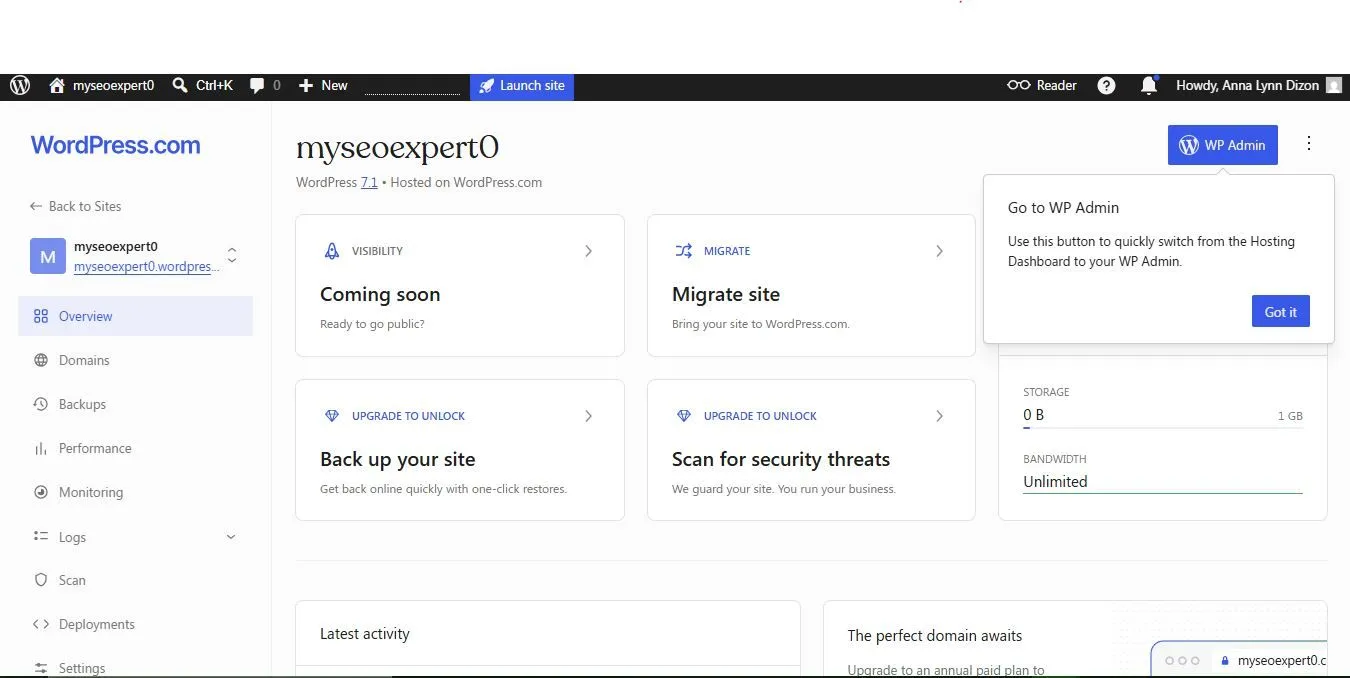
WordPress puts backups and security behind a plan upgrade, so the base plan covers less agency work than the dashboard first suggests. (Source image: WordPress)
Pricing
- WordPress.org software: free and GPL licensed. Hosting, a premium theme and the plugin stack are separate costs, renewed annually
- WordPress.com Free: $0. 1 GB storage, a wordpress.com subdomain, no plugins, and a 10% transaction fee on payments
- Personal: $4 per month billed annually. Custom domain free for a year, 6 GB, plugin access, 8% transaction fee
- Premium: $8 per month billed annually. All premium themes, full analytics, payment buttons, 4% fee
- Business: $25 per month billed annually. 50 GB, staging site, real-time backups, SFTP, SSH, WP-CLI, centralized site management, 2% fee
- Commerce: $45 per month billed annually. WooCommerce bundled, unlimited products, inventory management, 0% fee
A free licence does not produce a free website. Two-year and three-year terms cut the WordPress.com rates further, with stated savings reaching 69% on Personal and Premium, and Business at $25 is the first tier that behaves like a development platform. On the self-hosted route, budget hosting plus the plugin stack per site and then the hours: Automattic for Agencies offers up to 50% revenue share and volume hosting discounts if you are migrating client sites, which is the closest thing to agency economics WordPress has.
Top features
- The plugin ecosystem: nothing else comes close for breadth, covering SEO, forms, caching, bookings, memberships, commerce and security, which turns most client requirements into a purchase rather than a project.
- Full data ownership: the GPL license, an open export format and a published database schema mean a client site changes hosts whenever you decide, with nobody to ask and nothing proprietary left behind.
- Unlimited users and granular roles: headcount is never billed and never capped, on the free tier as much as the paid ones, which no other platform here matches.
- Third-party agency dashboards: ManageWP, WP Umbrella and MainWP monitor uptime, automate backups, push core updates and send white-labeled monthly performance reports across hundreds of sites at once.
- Migration in both directions: a built-in importer covers Wix, Squarespace, GoDaddy, Medium and Blogger, and WordPress.com's Website Design Services team offers hands-on migration help.
How to manage client projects on WordPress.org
There is no native dashboard, so the first decision is which one to buy. ManageWP, WP Umbrella or MainWP become the layer where uptime, backups, updates and white-labeled client reports live. Client portals for invoices and tickets are built into the site with plugins.
Handoff is where WordPress wins outright. Roles are granular enough to scope access exactly, and the site is portable enough to go anywhere afterwards. What roles do not do is protect a layout, so lock the builder down deliberately or expect the change requests.
WordPress.org Pros and Cons
- Pros
-
- ✓Plugin and theme choice without equal anywhere in this guide
- ✓Cleanest client handoff, with full ownership and no vendor lock-in
- ✓Unlimited users with role-based permissions on every plan
- ✓Cost efficiency at scale, with free software and unlimited sites
- Cons
-
- ✕Self-hosting makes updates, patching and security your problem
- ✕No native multi-site dashboard, so an agency layer must be bought separately
- ✕Ease of use at 4.2, the lowest score in this guide
- ✕No vendor support at all on WordPress.org
User reviews
The Capterra sample is by a wide margin the largest in this guide, roughly 40% larger than Wix's, and can be treated as settled rather than directional. Note that the two listings describe different products, which matters for how each figure is read.
Praise concentrates on ownership and ecosystem, stated plainly and often: control of the data, freedom to change hosts, and a community reviewers rate above any vendor support desk. The negatives sit almost entirely on the plugin layer and the work of running it, with accounts of plugins abandoned by their authors, paid replacements bought to fill the gap, and a standing unease about securing the site alone. Ease of use at 4.2 and Customer Service at 4.1 are both the lowest here.
See our complete list of WordPress alternatives.
What to Look For in an Agency Website Builder
These seven criteria separate a platform built for agencies from a builder an agency happens to use. Every platform in this guide answers them differently, and the differences surface in year two rather than at launch.
Value for money
Price the tenth client site, not the first. The models differ structurally: per site on Wix Studio and Squarespace, per account on Duda, per live site on SGEN, and four parallel lists on Webflow. Then check what renews, because Hostinger's rate rises 3.67 times and Wix publishes no renewal price at all.
Client management
Ask who can log in and what they can reach. WordPress gives unlimited users with granular roles on every plan, Duda scopes client accounts to assigned sites from Team, and Webflow charges $39 per full seat on top. Squarespace caps Basic at two contributors, which binds sooner than most agencies expect.
Client request tracker
No platform here ships a client-facing ticketing queue, but each has a workaround. Duda's site comments capture requests on the page and Wix Studio syncs canvas comments into a checklist. Customer profiles cover the rest: Wix Studio's native CRM, Squarespace's contacts panel, or a form routed into your own CRM. WordPress plugins do it properly.
Client Onboarding and safe handoff
Handoff has two halves: what a client can break, and whether they can leave. Wix Studio's Content Mode and Duda's Simple Editor lock the layout while permitting content edits, where WordPress roles do not. On the exit, only Webflow, Duda and WordPress let a finished site move off the platform. Learn how to streamline your web design workflow.
Client billing and invoicing
This is who bills the client, not who takes their money. Duda Client Billing and Squarespace's native proposals and invoices are the only complete answers, and Webflow's Client payments puts the client's own card on file from $16. Wix Studio reserves centralized billing for Enterprise, and WordPress leaves it to plugins.
Client payment collections
A different question: how the client's own customers pay. Check the transaction fee, because it outlasts the plan price. WordPress.com runs 10% down to 0% by tier and Webflow 2% falling to zero, while SGEN publishes no transaction fee and Hostinger's Business tier charges none across 100-plus payment methods.
After sales support quality
Read the Customer Service sub-score rather than the headline rating. Wix Studio leads at 4.7 on Capterra, then Hostinger at 4.5, Duda and Squarespace at 4.4, and Webflow and WordPress at 4.1. Then check the route in, because Wix and Hostinger both gate support behind a bot.
How to Solve Web Design Agency Unbillable Hours
Unbillable hours are the hours your team actually works but never invoices: pitching, scoping RFPs, discovery calls, internal admin, training, and the “quick fix” you absorb to keep a client happy. Every web design agency has them. The real question is whether yours are planned or invisible.
Some agencies are fine with a share of them, and rightly so. Sales, R&D, and internal tooling are investments, and mature agencies price them into their rates. What is not fine is unplanned unbillable time such as scope creep, rework, and bench time that nobody budgeted for or recovered.
When should web design agencies stop accepting unbillable hours
Treat these as hard stop signals rather than judgment calls:
- ✓Utilization slips below target. If senior designers and developers fall under roughly 75-80% billable for consecutive weeks, the overhead is no longer being absorbed by your rate.
- ✓The work is client-driven, not agency-driven. Training and internal process improvements are your cost. New pages, extra revision rounds, and features outside the Statement of Work are not.
- ✓Courtesy work becomes a pattern. One free favor builds goodwill. A recurring monthly favor has become an unpriced service line.
- ✓The client caused the rework. Late assets, missing copy, reversed decisions, and unapproved content changes all trigger a change order, not a write-off.
- ✓A flat-fee or retainer account fails its internal audit. If logged hours on a fixed-fee account exceed what you priced, raise the fee at renewal instead of quietly eating the difference.
- ✓Bench time is being filled with busywork. Idle capacity is a forecasting problem to fix, not an expense to accept.
- ✓Unbillable work is creating overtime. Once people are working late to hit billable targets on top of admin, you are paying for it in burnout and turnover.
-
Pricing or contract strategy that mitigates unbillable hours
Start with the rate itself. Price against billable hours, not total hours. A designer costing $120,000 who bills 1,500 of 2,000 hours breaks even at $80 an hour, and a 25% margin sets the rate near $107. Overhead is then recovered by design, not by accident.
Then choose a model that stops selling time. Fixed-fee or value-based pricing charges for the outcome, so efficiency becomes margin instead of unbilled hours. Retainers convert bench time into paid availability. Make them use-it-or-lose-it: rollover lets a client stockpile hours and demand a month’s work in a week.
The contract does the rest. A change-order clause stops out-of-scope work until it is signed, so name what is included and what is not. Fix revision rounds at two, bill the rest, and add a client-delay clause that adjusts timelines and fees when feedback or assets arrive late.
Website builder software tools to manage unbillable hours
Judge your stack by what it removes from your week, not by its feature list. The capabilities that actually move unbillable hours are these:
4 Work arounds when your website builder lacks client request tracking tools
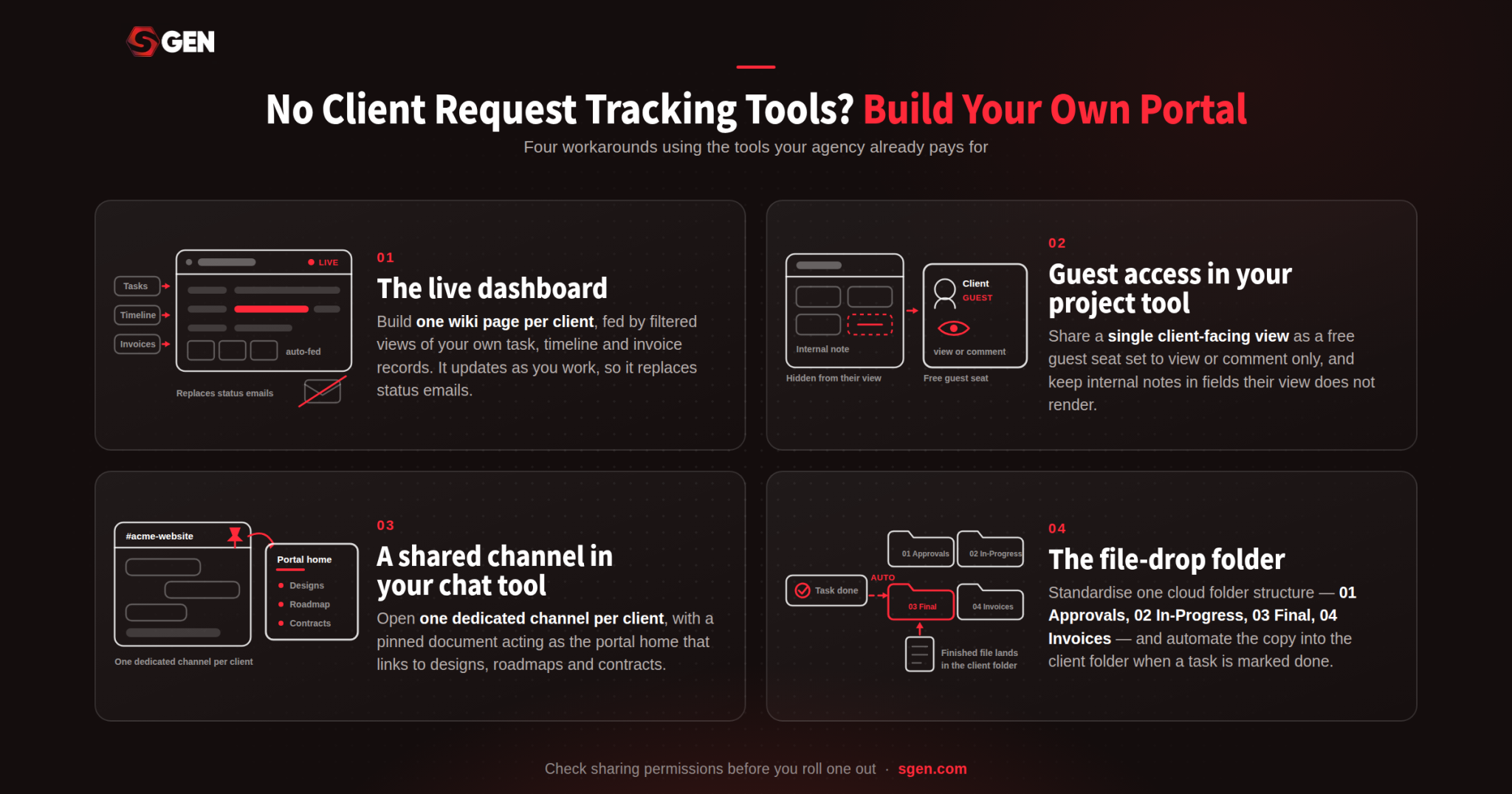
Four workaround to give clients a portal experience using the wiki, project, chat and storage tools your agency already pays for.
Two cautions before you roll one out. Permissions are fragile, and one wrong setting can expose your margins, your rates, or another client’s project. And a workaround portal always looks like the tool it is built on, which can feel budget to a client paying premium rates.
Conclusion: What is the Best Agency Website Builder?
The best website builder for agencies is the one that matches your business model. And based on our evaluations, Duda is the best agency website builder if you need full client management control. Squarespace is best for smaller web design agencies, while Wix Studio and SGEN are best for those actively scaling. Choose Hostinger Pro when hosting large client portfolios or WordPress.org if your agency earns significantly from a maintenance retainer. For high-end visual design, go with Webflow.
For those still undecided, start your shortlist with native platforms like SGEN because plugin maintenance is the cost agencies most consistently underprice. See how a native website builder for agencies handles a client roster, and build free on the Sandbox before deciding.
Frequently Asked Questions
What is the best website builder for a digital marketing agency?
It depends on whether you need client reporting and campaign tooling alongside the site. Duda and Wix Studio both include client dashboards and analytics natively, while WordPress connects to any marketing stack through integrations but requires you to assemble and maintain it.
Which CMS is best for agencies building client websites?
WordPress remains the best CMS for agencies building client websites that need custom content structures and unlimited integrations. Also, Wix Studio and Webflow both offer capable no-code CMS layers with dynamic pages, and unified platforms remove the plugin maintenance entirely at the cost of ecosystem breadth.
Do agencies need a white label website builder?
Only if your contracts require your brand on the client-facing dashboard. Duda is the only platform in this guide with genuine full white labeling, covering the builder, dashboard, preview pages and platform emails, and it costs $149 per month billed annually rather than the cheaper Agency tier most roundups quote.
What is the best website builder for designers working in agencies?
For design control, Webflow and Wix Studio lead. The best website builder for designers who already know CSS is Webflow, because the canvas exposes the real box model and exports clean semantic code. Designers who want speed over control will move faster in Wix Studio or Squarespace.
How much should an agency budget per client website?
Between roughly $12 and $40 per site per month on hosted platforms, before renewal increases and add-ons. On WordPress, budget hosting plus roughly $727 per year per site in plugin licenses, plus maintenance hours. Compare best website builder for web agencies options at ten sites rather than one, because per-site pricing changes the ranking completely.