

Every agency running WordPress sites for clients knows the quiet math problem hiding inside retainer contracts: the hours logged rarely match the hours actually spent. Part of the problem is that maintenance rarely happens in a clean, dedicated block of time. Over enough clients and enough months, this reactive pattern turns what should be routine upkeep into a steady drain on capacity that never quite shows up as a line item.
Left unaddressed, the accumulation of a hundred, small invisible tasks can hurt an agency's bottom line. In this SGEN guide, we take a closer look at where profitability disappears somewhere between contract and actual work, and how to reduce WordPress maintenance costs.
Key takeaways
- Retainers fail to protect your margin when a client's "quick fix" turns into an afternoon of troubleshooting where none of it shows up as billable work
- Developers get pulled out of focused project work to handle client urgent requests with the switching cost rarely getting tracked anywhere
- Cutting the plugin count reduces maintenance permanently and automating updates make the same work faster
How WordPress Maintenance Eats Into Agency Profit
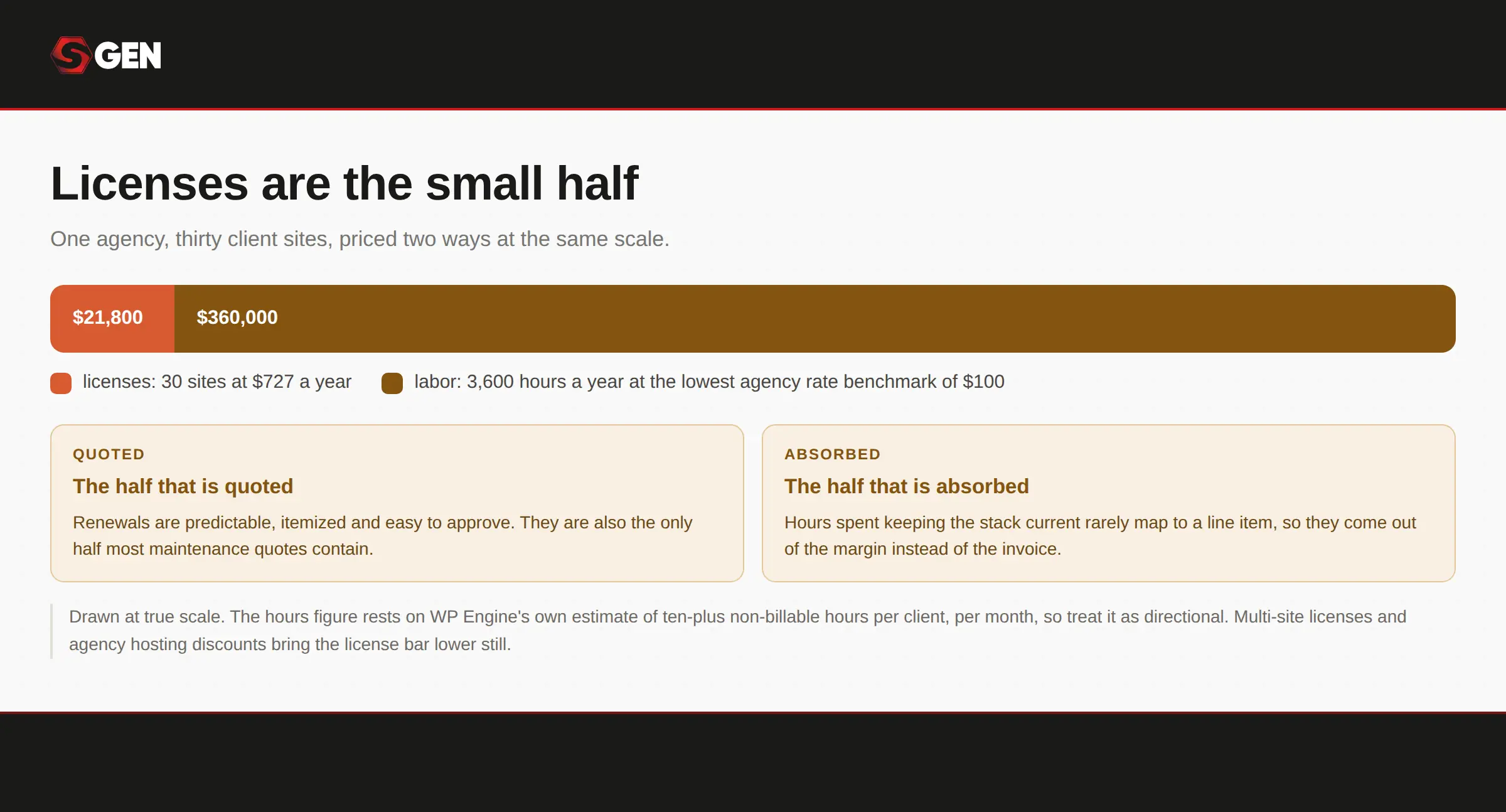
The bill you can see is a fraction of the one you cannot.
What looks like a stable, predictable revenue stream on paper often functions more like an open-ended commitment once maintenance work actually begins.
What you are actually maintaining
The average WordPress install runs 20 to 30 plugins, each from a different vendor on a different release schedule. That is not a setup cost you pay once but a standing obligation that arrives every week for as long as the site exists.
A plugin conflict here, a core update breaks a theme's styling, a client requests a minor text change that requires digging through custom code, or a security scare turns into an hours-long investigation that ends with nothing actually wrong. None of it shows up as billable work, yet all of it eats into the margin the retainer was supposed to protect.
Each of these feels too small to invoice separately, so they get absorbed into "maintenance" without ever being counted against the actual time they consumed. Multiply that across a full roster of client sites, and what was meant to be a stable, low-effort revenue stream starts quietly eating into the margins on every other project the agency takes on.
The license bill, multiplied
A working stack for a single client site comes to roughly $60 a month, or about $727 a year, once managed hosting, an SEO plugin, a security plugin and a forms plugin are all on renewal pricing. That is the same stack priced out in our complete guide to WordPress alternatives. An agency running thirty client sites is carrying roughly $21,800 a year in licenses before anyone opens a laptop, and the figure climbs with every project you win.
Two things to say about that number, because an agency owner will think both. It is generous to the stack in one direction: Yoast, Wordfence and WPForms all sell multi-site and developer licenses, and hosts discount agency plans well below single-site rates, so a well-negotiated stack comes in under this.
It is far too kind in the other.
The hours, which are the large half
WP Engine puts the labor at more than ten non-billable hours per client, per month, recovered by automating plugin management and standardizing environments. At thirty sites, ten hours each is 3,600 hours a year. Codeable benchmarks agency rates at $100 to $250 an hour. You do not need the top of that range for the labor to dwarf the $21,800 by an order of magnitude.
Which is the actual problem. The license bill is annoying and predictable. The hours are neither, and they come out of the same pool as billable work. That is also why maintenance cost is invisible on a profit and loss statement and obvious in a utilization report.
Why Agencies Still Build On WordPress Even When It Costs More
WordPress carries a reputation for hidden costs, from constant plugin updates to the ongoing security maintenance that never quite ends, yet agencies keep choosing it project after project. There is simply that flexibility, client familiarity, and an ecosystem few competitors can match.
"Our team already knows it"
Usually true, and it is a real asset rather than an excuse. Retraining has a cost, disruption has a cost, and an agency that can solve any WordPress problem quickly has something worth protecting.
The question is what that knowledge is being spent on. Knowing WordPress deeply is valuable. Spending it on plugin conflicts and update regressions is not, and those are different activities that happen to require the same expertise.
"Our clients expect it"
Less often true than it feels, and rarely tested. Most clients expect two things: to be able to edit their own site, and to own it if they leave you.
WordPress satisfies both. It is not the only thing that does, and the assumption usually gets inherited from the last agency the client worked with rather than examined.
On the next project where the platform is genuinely open, ask the client what they need to be able to do themselves, and what happens to the site if they stop working with you. Neither answer usually contains the word WordPress.
When WordPress is still the right call
There are conditions where it genuinely is:
- Bespoke field structures that will not survive an export intact.
- A plugin with no equivalent anywhere else, where the client's workflow depends on it.
- An in-house or retained WordPress developer already staffed and budgeted. The economics change completely when the labor is already paid for.
- A mature URL set with rankings at genuine risk, where the migration cost outweighs the maintenance saving.
- A client who wants full content portability above everything else.
How Integrated Platforms Help Agencies Scale More Profitably
The argument is not that integrated platforms are better in the abstract. It is that manual maintenance scales linearly with headcount and platform-level maintenance does not.
Consider what happens as a client roster grows without any automation in place. If it takes three developers to manually handle 60 sites, growing that roster to 120 sites means either doubling the team or doubling everyone's workload, since manual effort scales directly with the number of sites.
Automate the routine parts of that maintenance, though, and the equation changes entirely. A single automated workflow costs roughly the same to run across 60 sites as it does across 600, because the expense now tracks the process itself rather than the client count. That difference is what eventually separates agencies that scale profitably from those that scale their headaches instead.
Hosts and managed services make the stack cheaper to maintain. Integrated platforms make less of it exist. Those are different offers and they solve the problem at different depths.
Comparing WordPress maintenance strategies
| Approach | What it removes | What it leaves you | Cost shape | Best for |
|---|---|---|---|---|
| Manual, in house | Nothing | Everything, growing with roster | Your team's hours, uncounted | Under 10 sites |
| Managed host with update automation | The updating labor | The stack, its licenses and conflicts | Per site, monthly, scales linearly | Any size, if you stay on WordPress |
| White-label outsourcing | The labor and the staffing risk | The stack, plus a share of the margin | Per site to a partner | 10 to 50 sites |
| Integrated platform | The stack itself | A rebuild, no plugin marketplace | By plan or site count | New builds first, portfolio over time |
| Doing nothing deliberate | Nothing | Everything, plus the security exposure | Unbilled hours | Nobody |
The field is competitive and worth comparing properly, so the best CMS options for an agency portfolio is the comparison to read before committing to anything.
How To Transition Your Agency To A Lower-Maintenance Workflow
This is more of an operational change than a migration project. Nobody has to move anything on day one, and the agencies that do this well treat it as a hiring decision rather than a technology one.
Start with the next new client, not the existing book
The first site on a new platform should be one you were going to build anyway. It costs nothing to lose, the client has no expectations about how it was built, and you find out whether the thing works on a project where being wrong is survivable.
Build it alongside your normal process rather than instead of it. If the new platform is slower on the first project, which it usually is, that is information rather than failure. The comparison that matters is the third build against your current third build, not the first against your hundredth.
Pick one person to learn it properly
Train one employee first on how to efficiently use the new integrated platform, not the whole team at once. One person building two or three sites produces something a training session cannot: a real internal opinion, held by someone whose judgement the rest of the team already trusts.
You get one of two outcomes and both are useful. Either an advocate who can teach the others, or a documented reason not to proceed that cost you three projects instead of thirty.
Standardize before you scale
Whatever platform you land on, the second build should reuse the first. Components, structure, settings, the intake questions. That is the difference between a pilot and a habit, and skipping it means arriving at the new platform with the old problem.
Decide what happens to the existing roster
Existing WordPress sites stay on WordPress until there is a reason to rebuild them, and that reason is usually a redesign the client is already paying for. A split estate is normal. It is also considerably cheaper than a migration project nobody asked for.
This is the part that makes the whole transition affordable, and it is the part agencies talk themselves out of because a split estate feels untidy.
Tell clients what changes for them, which is usually very little
They log in somewhere different and their site loads faster. That is the whole client-facing change on most projects.
Frame it as an upgrade to how you work rather than as a platform decision, and you avoid a conversation that helps nobody. Clients who are asked to approve a technology choice will research it, and the research will be written by whoever is selling the alternative.
Five Ways To Reduce WordPress Maintenance Time
Every item here is doable on WordPress without changing anything else.
1. Cut the plugin count before you automate updating it
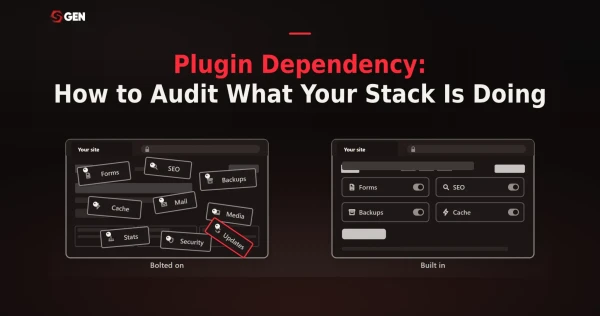
Audit what each plugin actually does across the whole portfolio, not site by site. Most agencies find duplicates, abandoned installs, and two plugins doing one job on different clients because two different people set them up.
Automation makes the same work faster, removal makes the work stop. Twenty-five plugins updated automatically are still twenty-five vendors, twenty-five release schedules and twenty-five things that can break a client site on a Tuesday.
While you are there, write down an update policy. Apply security and patch releases within seven days, hold major version updates for two to four weeks to let the ecosystem catch up, then apply on staging first and promote to production once tested.
2. Consolidate vendors so one contract covers hosting, security and backups
The stack priced earlier is four vendors for one site. At thirty sites that is four renewal dates, four support relationships and four things that can lapse without anyone noticing until they matter.
Managed hosts fold security and backups into the hosting line, which is genuine consolidation and worth doing even if nothing else changes. However, note that consolidating vendors does not consolidate the stack. You still have the plugins. They are just billed together.
3. Standardize what you build so every site maintains the same way
One approved plugin set, one theme or builder, one hosting configuration. Variety across a portfolio is the specific thing that makes maintenance unpredictable, because every site fails differently.
A starter site duplicated per client does most of this automatically, and it is the same practice that speeds up delivery. For an agency in the ten to fifty site range this is the highest-leverage item on the list, because it compounds with every new build rather than paying back once.
4. Make client edits safe so routine requests stop reaching you
A meaningful share of what agencies count as maintenance is not maintenance. It is a client who cannot find where to change a phone number and emails you instead.
Lock down what should not be edited, expose what should, and hand over a one-page guide at launch. Support requests fall without anyone doing anything technical.
Frame it as protecting your own time rather than as client service. That is the honest version and it is also the one that gets it done.
5. Put maintenance scope in writing so ad-hoc requests stop being unbilled
Scope creep in maintenance is invisible because every individual request is small. Nobody bills fifteen minutes, and nobody notices the fortieth fifteen minutes.
One strategy is to price maintenance at hours times rate, plus 20 to 40 per cent for the risk of quoting a fixed price, and never below your project rate on an effective-hourly basis. If you price maintenance below your project rate, you teach clients that bundled time is worth less than scheduled time.
Write down what is included, what is billed separately, and what is out of scope. Most agencies have never done this, which is why the plan they sell at $150 a month costs them $400 to deliver in a bad month.
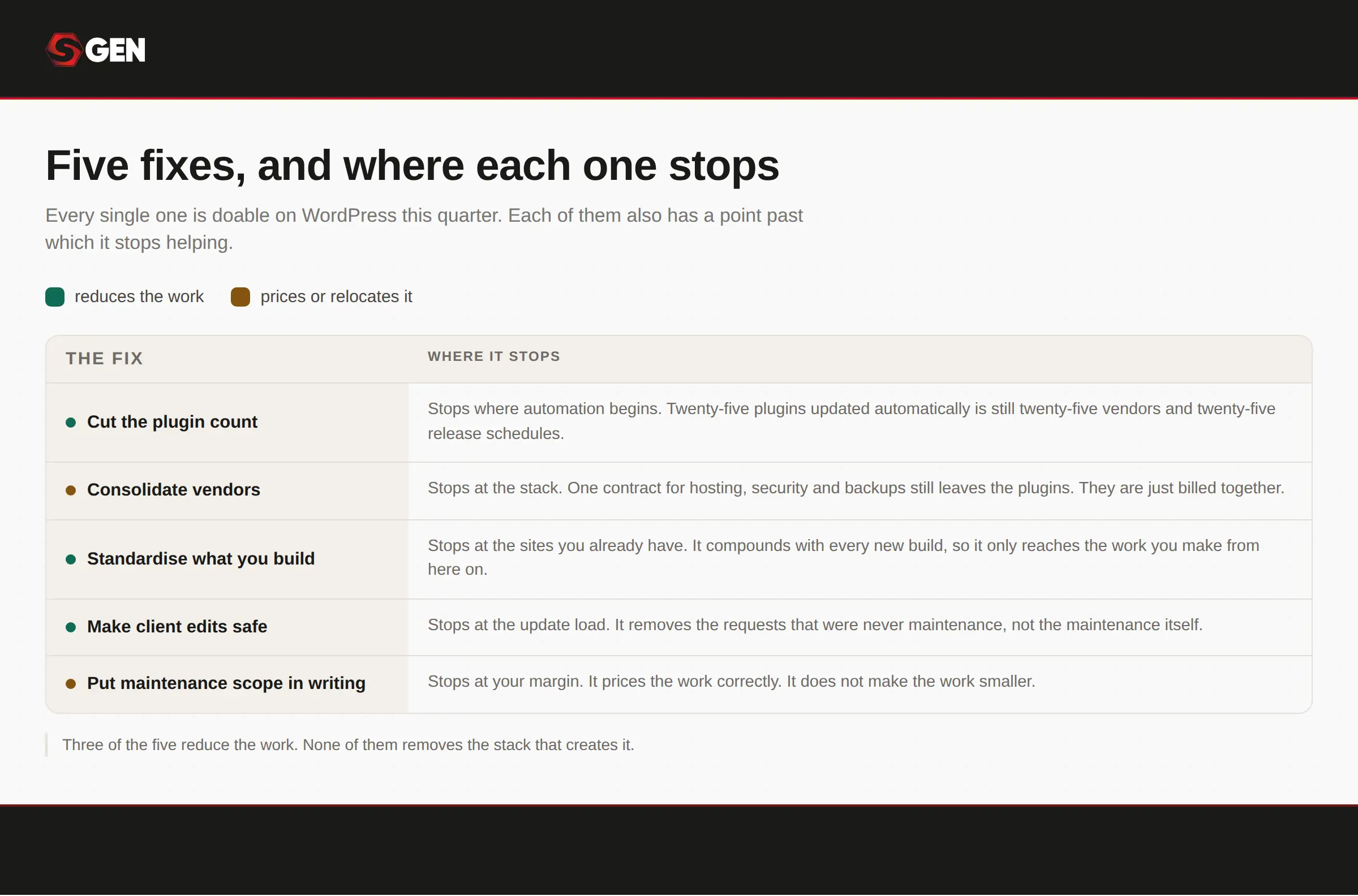
All five are worth doing. None of them removes the stack itself.
What this looks like when the platform does it
Each of the five above has a ceiling, and the ceilings share a cause: you are managing a stack rather than removing one. Here is what changes when the capability ships with the platform instead.
Item one gets an endpoint rather than a floor. SGEN ships 23 native modules on every plan, so forms, SEO, backups and redirects are not licenses to track. Item two is completed rather than consolidated, because the Foundation Pack covers hosting, SSL, CDN, WAF and security patching as standard.
Item three applies across the portfolio rather than per site, because design tokens and saved components live at account level. Item four needs no lockdown exercise, since staging and live run as parallel environments with client roles built in. And item five becomes predictable to quote, because pricing goes by live-site count rather than per feature.
Here's how SGEN stacks up against popular agency website builders:
Conclusion: How To Cut WordPress Maintenance Cost
WordPress maintenance costs are mostly a function of hours, and hours respond to standardization far more reliably than they respond to effort alone. Cutting the plugin count removes work permanently rather than simply making it faster to do. What decides how far any of that goes is whether you are managing a stack or removing one.
Where capability ships with the platform rather than as licenses to track, there is no renewal calendar and no update cadence to reconcile. Where a shared design vocabulary lives above the individual project, the thirtieth site maintains like the first. And where hosting, security and patching sit at the platform layer, the hours that used to disappear into upkeep go back into the work clients actually pay for.
Frequently Asked Questions
How much does WordPress maintenance cost per site?
Licenses run roughly $727 a year for a typical stack of managed hosting, SEO, security and forms. Labor is the larger cost and is rarely counted, at upwards of ten hours per client per month by WP Engine's estimate.
How many hours a month does maintaining a client site take?
WP Engine puts recoverable non-billable time at more than ten hours per client per month. Actual load varies with plugin count and traffic, and the figure is a vendor estimate rather than an independent study.
Should a small agency do maintenance in-house or outsource it?
FatLab, which sells the service, describes the breaking point as arriving at five to fifteen client sites, when someone on the team becomes a de facto WordPress admin. They put freelancer capacity at ten to twenty sites, and note that volume pricing from maintenance partners typically starts around ten to fifteen.
What should a WordPress maintenance plan include?
Core, theme and plugin updates on a written schedule, backups with tested restores, uptime and security monitoring, and a defined scope for what counts as included support. The last one is what protects your margin.
Does reducing plugins actually reduce maintenance?
Yes, permanently, in a way automation does not. Each plugin removed is one fewer vendor, release schedule and failure mode. Automating updates makes the same work faster without making it smaller.