

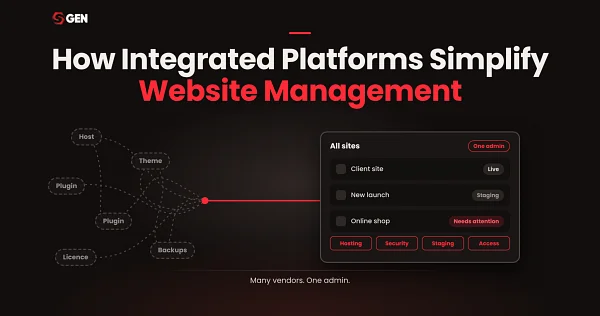
Integrated platforms simplify website management by turning a stack of separate tools into one product. On an assembled stack, the work of running a site is spread across a host, a theme and a set of plugins, and each has its own updates and its own vendor. An integrated platform moves hosting and security patching to one vendor and puts everything else in one admin, so there's less to update and one place to do the work.
This SGEN guide explains what website management includes, why the work multiplies on an assembled stack, what an integrated platform changes and what it leaves alone.
Key Takeaways:
- On an assembled stack, website management grows with every plugin and every site, and that time comes out of your margins, your launches and your budget.
- An integrated platform cuts that work by removing jobs, not just reassigning them, because hosting, patching, staging and access come built in.
- Content, search and accessibility stay with you on any platform, so judge a move by how many recurring jobs leave your list.
What Is Website Management?
Website management is the ongoing work of keeping a live site secure, current, fast and easy to use. It starts the day the site launches and continues for as long as the site is live.
The work covers more than most people expect. Shopify’s guide groups it into six areas: security, accessibility, technical performance, on-page SEO, content updates and design. Some of those are technical jobs. Others are editorial decisions about what the site says.
That's the difference between management and maintenance. Maintenance is the routine upkeep, such as software updates, backups, and fixing broken links. Management includes all of that, plus deciding what the site should say and checking whether it is doing its job for the business.
Website Management vs Maintenance
| Website maintenance | Website management | |
|---|---|---|
| Scope | Keeping the site running | Keeping the site running and useful to the business |
| Typical tasks | Software updates, security patches, backups, fixing broken links | All maintenance tasks, plus content, design, on-page SEO, accessibility and reviewing results |
| Main question | Is the site working? | Is the site doing its job? |
| How often | On a routine schedule, or when something breaks | Ongoing, alongside the business's plans |
| Who usually does it | A developer, host or maintenance service | A site owner or team, with technical help as needed |
| What a platform can take over | Much of it, depending on the platform | Little beyond the maintenance part |
The difference matters when you compare platforms, because a platform can take over a lot of the maintenance and very little of the rest. Even Shopify divides the work for its own customers. Which side each task lands on depends on how the site is built, and that's where an assembled stack and an integrated platform start to differ.
Why The Work Multiplies On An Assembled Stack
An assembled stack is a site built from parts made by different vendors: a content management system, a host, a theme and a set of plugins. Each part can be a good choice on its own. The work comes from the joins between them, and it grows with every part you add.
Start with updates. Every part has its own release schedule, and none of them is planned around the others. A plugin update can change something another plugin relies on, so each update needs checking on its own and then alongside everything else. With twenty plugins, there are twenty schedules to follow, and the exact combination on your site is one no vendor has tested.
Security follows the same pattern. Each plugin is code written by a different team, with its own standards and its own pace for fixing problems. Your site is only as current as the slowest vendor in the stack, and a patch only protects you once someone applies it.
Then there is accountability. When something breaks, the cause can sit in the host, the theme or any plugin, and each vendor can reasonably point to the others. Someone on your side has to find the fault before anyone will fix it.
Administration adds up more quietly. Separate vendors mean separate logins, invoices, renewal dates and support queues. None of it is hard, but all of it takes time, and it's easy to lose track of.
Agencies feel this first, because they repeat the same work for every client. Ten client sites mean ten sets of updates, checks and renewals every month. The work grows with the number of parts and the number of sites, not with how much the sites actually change.
All of that work affects agencies in more ways than one:
- Lower return on the site. Hours spent on updates, checks and renewals produce nothing new. The site costs more to run without bringing in more.
- Thinner agency margins. Upkeep is hard to bill for, so every extra plugin or client site eats into profit on work you've already sold.
- Slower launches. When a change has to be tested against every part of the stack, campaigns, new pages and offers wait for the site to catch up.
- More risk to revenue and reputation. A broken checkout, a hacked page or a site that's down costs sales and trust, and the more parts there are, the more places that can start.
- Less predictable costs. Separate licenses, renewals and emergency fixes make the true cost of the site hard to budget and easy to underestimate.
- Harder to scale. Each new site or feature adds to the workload at the same rate, so growth means hiring for upkeep rather than for growth.
Advantages of Integrated Website Management
Integrated website management means running your site on one platform that ships hosting, security and core site features as a single product from one vendor. Because the parts are built and tested together, the work that multiplies on an assembled stack starts to shrink.
These are the main advantages:
- Fewer updates to manage. When forms, SEO fields and redirects are part of the platform, they stop being separate items on an update list. The vendor ships changes together and tests them against each other first, so an update doesn't leave you checking what else it broke.
- One place to run the site. Editing, publishing, user access and settings sit in one admin. New staff learn one system, and when someone leaves, you remove their access in one place.
- One vendor responsible when something breaks. A conflict between two native features belongs to the platform vendor. You still report it and wait for a fix, but you no longer have to work out which of four vendors should look at it.
- New features without new vendors. A site that needs a form or a redirect uses what is already there. There's no extra license, release cycle or account to add.
- More predictable costs. One subscription can cover what used to be separate hosting, licenses and renewals, which makes the site easier to budget and harder to underestimate.
Assembled Stack vs Integrated Platform Compared
The choice should always come down to what works best for you. Here's how each recurring job usually sits and what moves when you change platforms.
| Job | Assembled stack | Integrated platform |
|---|---|---|
| Hosting and SSL | You choose and pay a host | Included by the vendor |
| Security patching | Plugin and theme patches are yours to apply, unless a service does it | Vendor patches what it runs |
| Feature updates | You apply and test each one | Vendor ships them with the platform |
| Backups | Host or plugin | Varies, so check whether they run automatically |
| Staging | Host feature or plugin | Often built in, so check the plan |
| Content, design, SEO and accessibility | You | You |
Most of the technical jobs go to the vendor, and the rest stay with you. Here, the cost arrives up front, as a rebuild and a period of learning a new system. That's one way to reduce the workload, but it isn't always the right first step.
Your other alternatives are to:
- Hire it out. You can hire a freelancer or contract an agency to take on the work. The stack stays as it is. Shopify's example of 10 hours of monthly work at an assumed $60 per hour comes to $600 a month in labor, plus software.
- Add a management tool. ManageWP offers to monitor and maintain WordPress sites "from a single, user-friendly dashboard." This makes the stack easier to run, and the components are still there. The guide to cutting WordPress maintenance time covers ways to reduce that upkeep.
A healthy site with a small stack may be better served by the two. Moving to an integrated platform starts to make sense when the plugin audit shows that most of your stack exists to supply what the platform lacks.
How Modern Website Builders Handle Website Management
A modern website builder treats management as part of the product. Hosting, patching, staging and access are the jobs that sit with you on an assembled stack, and a builder has them built in and run from one admin.
Hosting And Security Come With The Plan
On a modern builder, you don't choose a host or patch the software yourself. Hosting, SSL, a content delivery network, a firewall and security patching are usually part of the subscription, and the vendor keeps that layer current. There's no patch queue on your side, and no gap between a fix being released and someone applying it.
Changes Are Tested Before They Go Live
On an assembled stack, staging means a host feature or another plugin. A modern builder can include it natively, with a staging copy of the site, a way to push changes live and a way to roll them back. You try a change on a copy before visitors see it.
Backups are where builders differ most. Some take them automatically on a schedule, and others take them on demand, when you choose to save a recovery point. Know which one you have, how long backups are kept and what a restore replaces, and build that into your routine before any big change.
Access Is Managed In One Place
Built-in roles let you decide who can do what without a separate plugin. Writers can edit content without reaching settings or billing, and when someone leaves, you remove their access once. For agencies, the better builders let you enter a client’s account without shared passwords and keep a record of who did what.
Several Sites Run From One Dashboard
If you run more than one site, the dashboard is where the time savings add up. One view shows which sites are live, which are in staging and which need attention, so you can see every site at once instead of checking them one by one.
What To Know Before Moving To An Integrated Platform
An integrated platform takes a lot of work off your list, but not all of it, and it comes with trade-offs of its own. Before you move, be clear about which jobs will still be yours and what you give up in exchange. That way, the decision is based on the work that actually changes.
Work That Stays On Your List
An integrated platform changes who keeps the site running. It doesn't decide what the site should say or whether it's working.
- Content: pages still need writing, checking and retiring, and offers and prices need keeping current.
- Search work: native SEO fields can replace a separate plugin, but someone still has to choose keywords and fill those fields well.
- Accessibility: Shopify calls it "the ongoing work of making your website usable by people with disabilities," and that includes regular testing.
- Specialist tools: Shopify's own guide suggests adding "specialist tools for accessibility testing and store-level backups according to your needs," so one platform may not cover everything.
- Ownership: name one person responsible for the site, because a shorter list still needs someone to run it.
Trade-Offs
In an integrated platform, there's no plugin marketplace to draw on, so a niche requirement may have no answer. You also rely on one vendor for features, fixes and pricing.
Moving is the largest cost from both a monetary and marketing equity perspective. Changing platforms is a rebuild, not a one-click import, so plan for the time it takes to recreate pages, settings and redirects on the new system. If you do move, protect your rankings during the migration.
How To Evaluate A Platform For Your Team
Once you know what changes and what you give up, test a platform against your own site rather than its feature list. Work through these steps before you commit:
- List every recurring job. Note who does each one today, including the jobs nobody tracks. That list is what you're trying to shrink.
- Mark what the platform would take over. Get the vendor’s documentation for each job, so you're relying on what it actually does rather than what it implies.
- Ask who applies security patches. Find out what the vendor handles and what, if anything, is still left for you.
- Ask how backups work. Check whether they run automatically or on demand, how long they are kept and who performs a restore.
- Check how it handles several sites. If you run more than one, look at how billing, access and roles work across all of them.
- Check how you would leave. Make sure you can export your content if the platform stops being the right fit.
- Start with one low-risk site. Rebuild it first and run it for a full update cycle before you move the rest.
Conclusion: Count The Jobs, Not The Features
Feature lists make most platforms look alike, so judge them by the work they take away. On an assembled stack, the jobs multiply with every part and every site. An integrated platform simplifies website management by removing those jobs, not by adding more features to manage.
If most of your list is plugin updates, conflicts and renewals, a change of platform will make it much shorter. If most of it is content and strategy, those jobs stay with you wherever the site runs. SGEN is built this way. Hosting, SSL, CDN, firewall and security patching come in every plan, including the free Sandbox. Stage and Live gives you staging, push, clone and restore natively.
To see how this compares with your current setup, read SGEN vs WordPress or try the free Sandbox.
Frequently Asked Questions
What does website management include?
It usually covers security, updates, backups, performance, content, design, on-page SEO and accessibility. Shopify's guide groups the work into six elements, and Wix's guide also covers monitoring and backups.
How much does website management cost?
It depends on who does the work. Shopify advises budgeting for your platform subscription, domain renewal and paid apps separately from the time spent. Its worked example is $600 a month in labor, based on an assumed rate.
What is the difference between website management and website maintenance?
Maintenance is routine upkeep, such as updates, backups and fixes. Management goes further and adds content, design and decisions about how the site performs for the business. People use the terms loosely, so check the scope of any service you buy.
Can you manage multiple websites from one platform?
Often, yes, but the billing model differs. Squarespace lets you manage several sites from one account, and each one has its own billing subscription. SGEN prices by live sites: Studio covers 3, Scale covers 10 and Enterprise covers an unlimited portfolio.
Do you still need a website manager on an integrated platform?
You still need someone who owns the site, though it may not be a full technical role. With hosting and patching handled by the vendor, that person spends more time on content, search and checking results.