


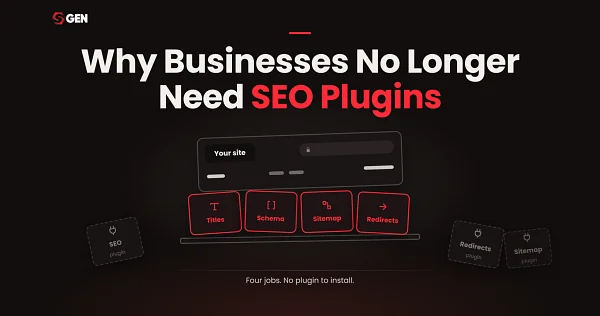

Most businesses no longer need an SEO plugin because their website platform now does the job one used to do. Google never asked for these tools. They were a fix for content management systems that left out titles, meta descriptions, schema and redirects, and many platforms now include those controls as part of the product. Self-hosted WordPress is the main exception, where a plugin or custom code still fills the gap.
This SGEN guide explains what the tools do, why they became standard, what they cost beyond the license and when keeping one is the right call.
Key Takeaways:
- SEO plugins filled a gap in WordPress, not a requirement from Google. Hosted builders such as Wix, Squarespace, Duda and SGEN now ship titles, sitemaps, schema and redirects as part of the platform.
- A plugin helps you manage search settings, but it doesn't rank pages. Rankings, clicks and customers come from what the page says and who links to it.
- On self-hosted WordPress, one well-kept plugin is still a sensible choice. Just count its real cost, which is the updates and security patches it needs for as long as it stays installed.
What Does An SEO Plugin Do?
An SEO plugin is an add-on that gives a content management system search settings it lacks or only partly offers. On WordPress, two widely installed examples are Yoast SEO, with 10+ million active installations, and Rank Math, with 4+ million.
Most of what these products do falls into three jobs:
Controls
Controls are the fields for the title tag, meta description, canonical URL and robots settings on each page. They let you tell search engines what a page is and how to treat it.
The title element is one of the sources Google uses for the title link in its results, and the meta description gives Google a summary it may use for the snippet. The canonical URL tells Google which version of a page you prefer when several URLs show the same content, so signals such as links are combined on one URL instead of split across copies. Robots settings decide whether a page appears at all, because a noindex rule tells search engines to leave the page out of results.
Generated code
Generated code is the output a plugin writes for you, mainly schema markup and XML sitemaps. Few small teams would write this by hand for every page, so producing it automatically made it realistic.
Schema markup helps Google understand what's on a page, and valid markup can make a page eligible for rich results such as review stars. It changes how a result looks rather than where it ranks. A sitemap lists the pages you want found, and Google reads it to crawl your site more efficiently. That matters most on large or new sites, where some pages might otherwise go undiscovered, and a page Google hasn't found can't rank.
Guidance
Guidance is the scores and prompts that comment on keyword use and readability while you write. It changes nothing in the page’s code. It works as a checklist that reminds writers to use the term people search for in the title and headings, and to keep sentences easy to read. That's the part of ranking that comes from the page itself, which is also why a passing score isn't the same as a page that ranks.
Why WordPress Sites Came To Rely On Add-On SEO Tools
WordPress was where this category grew up, and the reason was practical. Editing a title tag or meta description once meant changing theme files, and Yoast turned that job into a form field. That was a real contribution, and it put basic search settings within reach of people who don't write code.
So the need came from the platform. WordPress left page-level search settings to themes, and add-ons stepped in to supply them. When a platform leaves those settings out, someone has to fill the gap. When it includes them, the add-on has less left to do.
Later releases closed more of the gap. Version 5.5, in 2020, added an XML sitemap index at /wp-sitemap.xml without any plugin. Version 5.7, in 2021, added a Robots API that manages the robots meta tag in one place, and it allows large image previews in search by default on sites open to indexing.
Taken one release at a time, none of these changes looked like much. Put together, they show WordPress slowly taking on work that used to belong to the add-on: first the title tag plumbing, then the sitemap, then the robots meta tag. Each release left the plugin with a little less to do, and that raised a question nobody asked in 2010.
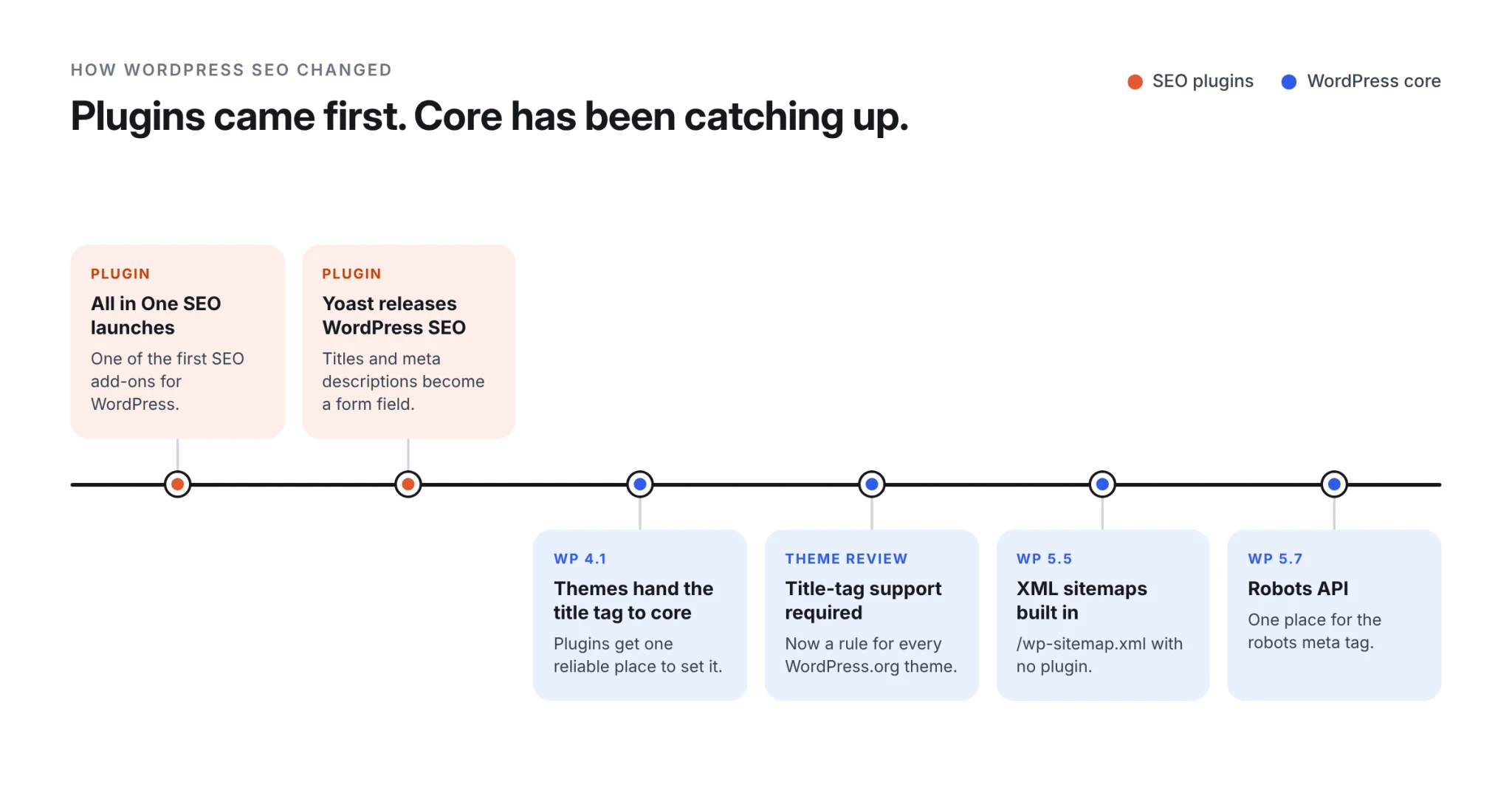 Each core release took over a job the plugin used to do.
Nearly two decades after the first SEO plugin, the WordPress community is now asking it openly. The WordCamp Europe 2026 programme includes a workshop by Fernando Tellado titled “Do you really need an SEO/GEO plugin for WordPress?”, on getting more from WordPress without installing plugins.
That the question now gets asked on WordPress’s own stage shows how much core has caught up. How you answer it depends on whether you'd rather maintain a plugin or the code that replaces it.
How SEO Controls Moved Into The Platform
Today’s hosted website builders went further than WordPress core. They treat search settings as part of the product, not something left to an add-on, and their own descriptions show how far that has gone.
Wix says it “creates and maintains your XML sitemap,” and it lets you set up permanent 301 redirects when you retire an old URL. Squarespace says every site comes with default SEO page titles and descriptions, which you can change page by page. Duda says “A sitemap is automatically generated for each site.” None of the three asks you to install anything to get these basics.
Similarly, SGEN's own SEO module takes on the jobs a plugin usually does.
| Job | Usual plugin approach | Native in SGEN |
|---|---|---|
| Titles and meta descriptions | A form under each post | SEO Title and Meta Description columns, editable in place in the SEO Manager |
| Schema | Generated by content type | Schema Editor with a Schema Type and Custom JSON-LD for each page |
| Robots | Settings screen | Live robots.txt editor and an Index toggle for each page |
| Redirects | A Premium feature or a second plugin | Native 301 and 302 manager |
| XML sitemap | Plugin, or WordPress core | XML sitemap generation |
| Canonical URLs | A field under each post | Each page has its own canonical field |
| Writing guidance | Scores and traffic lights | Issue flags with Focus Keyword, H1 and Word Count columns |
The last row is the honest trade. The plugin audit names a plugin's own analysis tooling, such as traffic-light scoring, as what you lose on this swap. For a wider view of the options, see the complete guide to WordPress alternatives.
Rankings Depend On The Page, Not The Add-On
The truth is, a plugin doesn't rank pages. It writes a handful of tags into the page head: a title, a description, a canonical, a robots rule and some schema. Those tags help a search engine read the page. They don't make the page worth ranking. That's decided by what the page says, the question it answers and the sites that link to it.
You can see this in the numbers. Yoast SEO runs on more than 10 million WordPress sites, and those sites don't all rank. The same plugin with the same settings sits on pages at the top of the results and on pages nobody finds. The tool stays the same, so what makes the difference is the page. Google's core updates make the same point. When Google changes how it weighs content, as it did with the November 2026 core update, sites running the same plugin with the same settings still move in different directions, because the update is judging the content, not the tags.
For SEOs: Rankings and clicks come from the Page
Your scorecard is rankings, impressions and click-through rate. A plugin score isn't on it, and for good reason. Sarah Moon Consulting calls those scores convenient but only a “surface-level assessment” of a page. A green light means the page passed one plugin’s checklist, not that it beats the results already ranking.
Google’s documentation points to what does move those numbers. It says “Snippets are primarily created from the page content itself,” and it builds title links automatically from sources that include the title element, headings and the text of links pointing to the page. Clicks follow from a page that answers the search clearly, with headings that say what it covers and other pages that link to it. A meta field can help describe that page but not stand in for it.
What you need from your tools is visibility across the whole site, not a prompt on one post at a time. A modern website builder can give you that natively. In SGEN’s SEO Manager, every page’s SEO title and meta description sits in one table that you edit in place. Focus keyword, H1 and word count each have their own column, and issue flags mark the pages that need attention. You audit the site in one view, then spend your time on the pages themselves.
For tech leaders: fewer dependencies, less to patch
Your goals are a site that stays up, stays secure and doesn't eat engineering time. Every plugin works against that because it's one more vendor, one more release schedule and one more place for a vulnerability to appear.
The way to improve those goals is to give search output a single owner. Titles, canonicals, robots rules, schema and redirects should be produced by one layer that your team already maintains. That holds for AI search too. Google says: “You don’t need to create new machine readable files, AI text files, or markup to appear in these features.” There's nothing new for an add-on to bolt on. A page only has to be indexed and eligible.
Modern website builders ship that layer as part of the platform. SGEN has a live robots.txt editor, an Index toggle on every page, a Schema Editor with custom JSON-LD for each page and a native 301 and 302 redirect manager. These are features of the platform, so they update with it, and there's no separate plugin to vet, patch or remove when it goes out of support.
For business owners: customers come from pages, not plugins
Your goal is enquiries, bookings and sales from people who found you on Google. A plugin doesn't produce those, and the vendors say so. SEOPress states in its own guide: “Installing a SEO plugin will not improve your ranking in Google.” FatLab, a WordPress hosting, support and maintenance provider, installs one on every client site and still says: “We also tell every client that the plugin won’t improve their rankings.”
What brings customers in is having the right pages. Every service you sell and every question customers ask before they buy needs a clear, accurate page that answers it. That's where your search budget does the most good.
A modern website builder takes care of the technical basics so the budget can go there. Hosted platforms such as Wix and Duda say they generate your XML sitemap automatically, and Squarespace gives every page a default SEO title and description that you can change. SGEN includes SEO as a native module on every plan, with no separate SEO license to buy. When the basics come with the platform, the money you'd have spent on tools can go into pages your customers will actually find.
When You Should Keep Your Plugin
That said, moving these settings into the platform doesn't, by itself, move a single page up the results. Moving platforms to remove a single plugin rarely makes sense. A move is a rebuild, and protecting your rankings during a migration takes planned work. It starts to add up when the audit shows that most of your stack exists to supply what the platform lacks.
The case for dropping one depends on where your site runs. Keep it in these situations:
- You're on self-hosted WordPress and staying there. Without a plugin, page-level fields mean custom code, and that code then needs an owner.
- Your writers depend on the prompts. If a live checklist is what keeps a small team consistent, it's doing useful work.
- You need something a native module doesn't cover. Check the specific schema type or workflow before you assume it exists.
- Cost considerations
The license is the smallest cost of a plugin, and keeping it updated and secure is the bigger one. According to Patchstack, 91% of new WordPress vulnerabilities in 2025 were in plugins, and SEO plugins are no exception: Rapid7 lists a cross-site scripting flaw in Yoast SEO up to version 26.8. Our plugin audit adds that the most common problem is two plugins doing one job.
Conclusion: The Platform Decides Whether You Need One
SEO plugins earned their place by giving people controls their platform left out. Where those controls now ship natively, the add-on is one more thing to pay for and update, and your rankings still depend on the same work as before. Where they don't, on self-hosted WordPress in particular, a single well-kept plugin remains a reasonable choice.
Either way, the plugin was never what ranked your pages. The work that does is the same on any platform: choosing pages worth writing, matching them to what people search for, linking them sensibly and keeping them accurate. If you do drop your plugin, export your titles, meta descriptions and redirects first, then check the page source afterwards to make sure they still appear.
SGEN's published comparison says its plans need no separate SEO license, because SEO ships as a native module on every tier. You can compare that directly in SGEN vs WordPress, or test it on the free Sandbox.
Frequently Asked Questions
Do I need an SEO plugin on WordPress?
Usually, yes, unless someone maintains custom code for you. WordPress core provides an XML sitemap, but page-level meta tags take a plugin or code. One lightweight option covers most sites.
Does WordPress have built-in SEO?
Partly. Core has generated an XML sitemap index since version 5.5, and the WordCamp Europe 2026 programme lists a workshop on what else it can do without plugins. Editing meta tags for each page is where most site owners still reach for an add-on.
Is Yoast SEO worth it?
FatLab says "The free version is absolutely worth installing." Premium costs $118.80 a year before VAT, so judge it by whether you'll use its redirect prompts and AI tools on that site.
Do Squarespace or Wix sites need an SEO plugin?
Generally not for the basics. Launch Happy says Squarespace websites "really don't need Yoast or any other SEO plugins," and Wix describes title tags, meta descriptions, sitemaps and redirects as part of its own SEO tools.
Do SEO plugins improve rankings?
Not by themselves. SEOPress, a vendor in this category, says so directly. They make settings easier to manage and catch omissions, and the ranking still comes from the page and the site.